Giacom Integrations API (2.0.4.3)
Download OpenAPI specification:
Welcome to the Giacom Integrations API! The list below describes the most relevant capabilities of the Giacom Integrations API and provides quick links to use cases and operations for each one
Enables provisioning and in-life service management of:
- Giacom Mobile
- Gamma Mobile
Enables provisioning and in-life service management of:
- BTW Broadband
- FTTP
- SOGEA
- SOADSL
Clients interacting with the Mobile Provisioning Capability will mainly create Service Orders on the API. This entity is used to order, change and cease services The Giacom API incudes the following service provisioning capabilities:
- Provision a new Service
- Manage a live Service
- Cease a live service
See Service Order for more details on how to manage Service Orders:
The Giacom API incudes the following support capabilities:
- Service Inventory
- See ## Service Inventory / Instance
- Provides an Inventory of live services, as well as ab historic repository of ceased services, constantly maintained in sync with the Vendor's state of the services
- Allows Tenants to search and retrieve service instance details
- Supports a refresh on demand feature enabling Tenants to retrieve freshly updated service details from the Vendor
- Service Catalogue
- See Service Catalogue
- Provides a repository of Service Specifications used to define the data model and business rules for services, with the ability to manage service specifications differentiated by:
- Service category
- Vendor
- Tenant
- Deployment environment
- Address management
- See Geographic Address
- Address search, AKA lookup AKA matching
- See Address validation/matching
- Provides address lookup functionalities allowing to search addresses by partial address and/or Openreach ALK (Address Key Locators)
- Produces a single match or a list of alternative matches, depending on the information provided to the search endpoint
- Utilises BTW as the main provider for address searching
- Address creation
- See Create a silver/bronze address
- Enables creating Silver / Bronze Openreach addresses when needed
- Enables creating specific Vendor ALK from a valid Address with an Openreach ALK
- Appointment management
- See Appointment
- Appointment slot search
- See Search appointment slots
- Enables Tenants to search for available appointment slots for a particular service order context
- Appointment slot booking
- See Book an appointment
- Enables Tenants to book an available appointment slots for a particular service order context
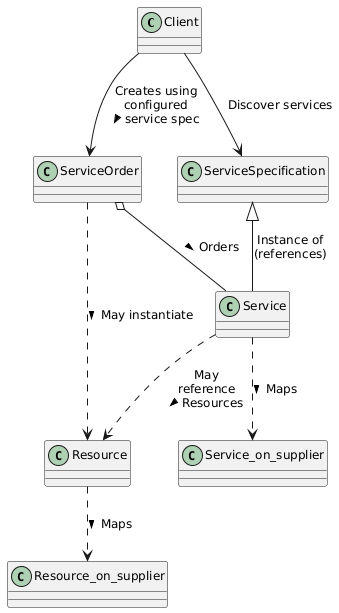
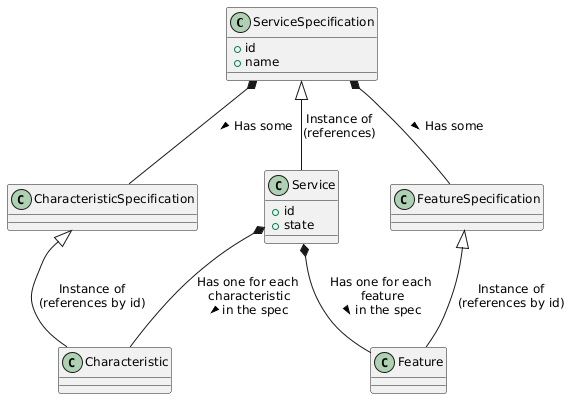
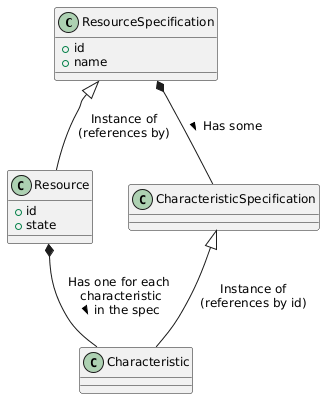
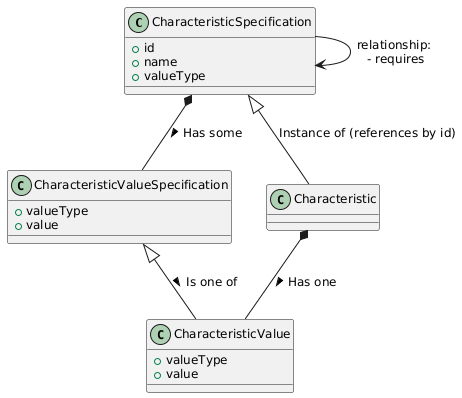
This section introduces the data model of the Mobile Provisioning API.
The data model is presented in two sections:
API Data Model: Overview of the data model of the API. Used to get an overall perspective of the different entities and how the correlate and collaborate with each otherService Meta-Catalogue: Presentation of the structure of the components of the Service Specifications which define the services available for ordering in the platform
| Overview | |
|
|
 |
| Services | |
|
|
 |
| Resources | |
|
|
 |
| Characteristics | |
|
|
 |
| Features | |
|
|
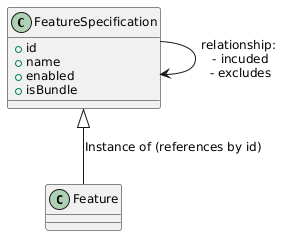 |
Services are defined through Service Specifications which define their characteristics, features and also their category.
Mobile Services define the following categories:
- Mobile
Mobile Voice Service: Defines a standalone Voice and Data mobile serviceMobile Data only Service: Defines a standalone Data only mobile serviceMobile Bolt On: Defines a Bolt-On for a mobile service
- Broadband
Broadband FTTP: Defines an FTTP broadband serviceBroadband SOGEA: Defines a SOGEA broadband serviceBroadband SOADSL: Defines an SOADSL broadband service
Each Service Specification in each category presents a list of offerings (service tariffs) which may be chosen to instantiate a service. The available tariffs for each Service Specification are defined in the specCharacteristic with the ID = VENDOR_OFFERING.
Vendor Offerings define:
- For Mobile Services: The tariff
- For Broadband Services: The distinctive service level, typically the speed
Click to expand the sample json
            {
                "id": "VENDOR_OFFERING",
                "name": "Vendor offering",
                "description": "The product or service that will be ordered with the vendor",
                "valueType": "string",
                "minCardinality": 1,
                "maxCardinality": 1,
                "isUnique": false,
                "configurable": true,
                "characteristicValueSpecification": [
                    {
                        "name": "AIO25GB - All In One 25GB V24Q2",
                        "description": "AIO25GB - All In One 25GB V24Q2",
                        "valueType": "string",
                        "isDefault": true,
                        "value": "62212"
                    },
                    {
                        "name": "AIO2GBP - All In One Pooled Data 2GB V24Q2",
                        "description": "AIO2GBP - All In One Pooled Data 2GB V24Q2",
                        "valueType": "string",
                        "isDefault": false,
                        "value": "62230"
                    },
                    {
                        "name": "AIO2GBPIC - All In One Pooled Data 2GB inc. International Caller V24Q2",
                        "description": "AIO2GBPIC - All In One Pooled Data 2GB inc. International Caller V24Q2",
                        "valueType": "string",
                        "isDefault": false,
                        "value": "62231"
                    }
                ]
            },
Bolt-ons are services which can be added to core services to enhance them. Currently only available for Mobile services
Bolt-ons are identified by the Bolt On suffix in their category = "xxx Bolt On". Bolt-ons include a serviceSpecRelationshiplist which defines the specific Services with which they are compatible. It is possible to have Bolt-Ons compatible with multiple Service specifications. Bolt-Ons also have anallowance type`, defined in an informational characteristic "ALLOWANCE_TYPE". The system may define multiple allowance types for Bolt-Ons. E.g. for the mobile case:
Minute Bolt-onText Bolt-OnData Bolt-OnRoaming Data Bolt-On
The snippet below shows the relevant fields of a Bolt-On's Service Specifications which, in this case, define the Bolt-On to be compatible with the Mobile Services defined by the Service Specification with the ID = MOBILE_VOICE_SRV_GIACOM.
The relevant specification's characteristics are:
category: "Mobile Bolt On"serviceSpecRelationship: defines a relationship between Service Specifications. Possible values for this relationship field are:addon_for: The defining Service Specification is a Bolt-on for the target Service Specification
ALLOWANCE_TYPE: This particular example definesData Bolt-OnsVENDOR_OFFERING: This characteristic defines all the available Data Bolt-On
Click to expand the sample json
        "category": "Mobile Bolt On",
        "serviceSpecRelationship": [
            {
                "relationshipType": "addon_for",
                "id": "MOBILE_VOICE_SRV_GIACOM_O2"
            }
        ],
        "specCharacteristic": [
            {
                "id": "ALLOWANCE_TYPE",
                "name": "Bolt-on allowance type",
                "description": "Bolt-on allowance type",
                "valueType": "string",
                "minCardinality": 0,
                "maxCardinality": 0,
                "isUnique": false,
                "configurable": false,
                "characteristicValueSpecification": [
                    {
                        "isDefault": false,
                        "name": "Bolt-on allowance type",
                        "description": "Bolt-on allowance type",
                        "valueType": "string",
                        "value": "Data Bolt-On"
                    }
                ]
            },
            {
                "id": "VENDOR_OFFERING",
                "name": "Bolt-on tariff",
                "description": "Bolt-on tariff",
                "valueType": "string",
                "minCardinality": 1,
                "maxCardinality": 1,
                "isUnique": false,
                "configurable": true,
                "characteristicValueSpecification": [
                    {
                        "name": "WODDTU1 - 1GB Data Top-Up (WS)",
                        "description": "WODDTU1 - 1GB Data Top-Up (WS)",
                        "isDefault": true,
                        "valueType": "string",
                        "value": "WODDTU1 "
                    },
                    {
                        "name": "WODDTU5 - 5GB Data Top-Up (WS)",
                        "description": "WODDTU5 - 5GB Data Top-Up (WS)",
                        "isDefault": false,
                        "valueType": "string",
                        "value": "WODDTU5 "
                    },
The Meta-Catalogue defines a consistent, structured, and vendor-agnostic way to represent service specifications.
It enables ordering, activation, configuration, and lifecycle management of different access services (e.g., mobile and broadband) through a unified model.
The meta-catalogue decouples channel and vendor variability from core business logic by defining intent, service properties, feature enablement, and commercial / operational dependencies in a machine-processable format.
Its purpose is to:
- Provide a common, consistent and modular modelling approach for multiple access technologies
- Support different order journeys, vendor integrations, and service features
- Maximise reusability and interoperability across vendors and products
[Char] VENDOR_OFFERING string
The product or service that will be ordered with the vendor
- Mandatoriness: Mandatory
- Cardinality: Single value
- Uniqueness: Allows duplicates
- Configurability: Client defined
[Char] VENDOR_SUB_ACCOUNT string
A logical sub-division of the Vendor Account. May represent a sub-account of an account, an account of a tenant, or other vendor specific terminology
- Mandatoriness: Mandatory
- Cardinality: Single value
- Uniqueness: Allows duplicates
- Configurability: Client defined
- Supported values:
Vendor sub account ID: A logical sub-division of the Vendor Account. May represent a sub-account of an account, an account of a tenant, or other vendor specific terminology
[Char] JOURNEY_TYPE string
The type of order that is to be placed with the vendor. Changing this value may trigger a new journey
- Mandatoriness: Mandatory
- Cardinality: Single value
- Uniqueness: Allows duplicates
- Configurability: Client defined
[Char] MSISDN E.164
Subscriber number. Vendor provided value for new connections. Uses the E.164 international phone format
- Mandatoriness: Optional
- Cardinality: Single value
- Uniqueness: Unique in the Tenant space
- Configurability: Vendor defined
- Supported values:
Subscriber number: Subscriber number
Mobile Characteristics - SIM & Identity
[Char] ICCID iccid
SIM Serial Number (ICCID)
- Mandatoriness: Mandatory
- Cardinality: Single value
- Uniqueness: Unique in the Tenant space
- Configurability: Client defined
- Supported values:
SIM Serial: SIM Serial
[Char] PUK string
Personal Unlocking Key, used to unlock SIM card after entering an incorrect PIN code multiple times when using PIN code security to protect the SIM
- Mandatoriness: Optional
- Cardinality: Single value
- Uniqueness: Allows duplicates
- Configurability: Vendor defined
- Supported values:
PUK: PUK
[Char] PUK2 string
Secondary Personal Unlocking Key
- Mandatoriness: Optional
- Cardinality: Single value
- Uniqueness: Allows duplicates
- Configurability: Vendor defined
- Supported values:
PUK2: PUK2
[Char] SIM_TYPE string
Type of SIM card
- Mandatoriness: Mandatory
- Cardinality: Single value
- Uniqueness: Allows duplicates
- Configurability: Client chosen
- Supported values:
eSIM: Embedded digital SIMTriple SIM: Physical triple SIM card
[Char] ESIM_CONTACT_NAME string
eSIM email delivery contact name
- Mandatoriness: Mandatory
- Cardinality: Single value
- Uniqueness: Allows duplicates
- Configurability: Client defined
- Supported values:
eSIM Contact name: eSIM Contact name
[Char] ESIM_DELIVERY_EMAIL email
Email address that the eSIM information will be delivered to
- Mandatoriness: Mandatory
- Cardinality: Single value
- Uniqueness: Allows duplicates
- Configurability: Client defined
- Supported values:
eSIM Delivery Email: eSIM Delivery Email
[Char] ESIM_QR_CODE base64
eSIM CODE value to be sent as a QR code. Returned by vendor as order progresses
- Mandatoriness: Optional
- Cardinality: Single value
- Uniqueness: Unique in the Tenant space
- Configurability: Vendor defined
- Supported values:
eSIM QR CODE: eSIM CODE value to be sent as a QR code
Mobile Characteristics - Network Switching & Number Portability
[Char] DONOR_NETWORK_MSISDN E.164
Subscriber number on the donor network. Client defined for ports and migrations. Uses the E.164 international phone format
- Mandatoriness: Mandatory
- Cardinality: Single value
- Uniqueness: Unique in the Tenant space
- Configurability: Client defined
- Supported values:
Subscriber number on the donor network: Subscriber number on the donor network. Client defined for ports and migrations. Uses the E.164 international phone format
[Char] NETWORK_SWITCH_DATE iso8601-date
Date when the service is expected to port using PAC or transfer using STAC
- Mandatoriness: Mandatory
- Cardinality: Single value
- Uniqueness: Allows duplicates
- Configurability: Client defined
- Supported values:
Network switch date for PAC or STAC: Date when the service is expected to port using PAC or transfer using STAC
[Char] PAC PAC/STAC
PAC used for porting the number to this network. This characteristic is deleted after porting
- Mandatoriness: Optional
- Cardinality: Single value
- Uniqueness: Unique in the Tenant space
- Configurability: Client defined
- Supported values:
PAC: PAC used for porting the number to this network. This characteristic is deleted after porting
[Char] PAC_EXPIRATION_DATE iso8601_date
Expiration date of the PAC code. May represent the expiration date of a PAC code used to port in or the expiration date of a PAC code requested to enable port out
- Mandatoriness: Optional
- Cardinality: Single value
- Uniqueness: Unique in the Tenant space
- Configurability: Vendor defined
- Supported values:
PAC Expiration date: Expiration date of the PAC code. May represent the expiration date of a PAC code used to port in or the expiration date of a PAC code requested to enable port out
[Char] PAC_STATUS string
Status of the PAC code. May represent the status of a PAC code used to port in or the status of a PAC code requested to enable port out
- Mandatoriness: Optional
- Cardinality: Single value
- Uniqueness: Unique in the Tenant space
- Configurability: Vendor defined
- Supported values:
Open: Open and available for switchingClosed: Code has been used for switchingLocked: Switch has been initiatedExpired: Code has expired and can no longer be used for switchingCancelled: Code has been cancelled and can no longer be used for switching
[Char] STAC PAC/STAC
STAC used for transferring the number in or out. This characteristic is deleted after transferring
- Mandatoriness: Optional
- Cardinality: Single value
- Uniqueness: Unique in the Tenant space
- Configurability: Client defined
- Supported values:
STAC: STAC used for transferring the number in or out. This characteristic is deleted after transferring
[Char] STAC_EXPIRATION_DATE iso8601_date
Expiration date of the STAC code. May represent the expiration date of a STAC code used to transfer in or the expiration date of a STAC code requested to enable transfer out
- Mandatoriness: Optional
- Cardinality: Single value
- Uniqueness: Unique in the Tenant space
- Configurability: Vendor defined
- Supported values:
STAC Expiration date: Expiration date of the STAC code. May represent the expiration date of a STAC code used to transfer in or the expiration date of a STAC code requested to enable transfer out
[Char] STAC_STATUS string
Status of the STAC code. May represent the status of a STAC code used to transfer in or the status of a STAC code requested to enable transfer out
- Mandatoriness: Optional
- Cardinality: Single value
- Uniqueness: Unique in the Tenant space
- Configurability: Vendor defined
- Supported values:
Open: Open and available for switchingClosed: Code has been used for switchingLocked: Switch has been initiatedExpired: Code has expired and can no longer be used for switchingCancelled: Code has been cancelled and can no longer be used for switching
Mobile Characteristics - Notifications
[Char] NOTIFICATIONS_DELIVERY_EMAIL email
Email addresses to be used for vendors to deliver notifications to
- Mandatoriness: Optional
- Cardinality: Single value
- Uniqueness: Allows duplicates
- Configurability: Client defined
- Supported values:
Notifications delivery Email: Email address to be used for vendors to deliver notifications to
[Char] NOTIFICATIONS_DELIVERY_MSISDN E.164
List of MSISDNs to be used for vendors to deliver notifications by SMS to
- Mandatoriness: Optional
- Cardinality: Single value
- Uniqueness: Allows duplicates
- Configurability: Client defined
- Supported values:
Notifications delivery MSISDN: List of MSISDNs to be used for vendors to deliver notifications by SMS to
[Char] JOURNEY_TYPE string
The type of order that is to be placed with the vendor. Changing this value may trigger a new journey
- Mandatoriness: Mandatory
- Cardinality: Single value
- Uniqueness: Allows duplicates
- Configurability: Client chosen
- Supported values:
New connection: New connection through a SIM activation. MSISDN will be provided by the networkPort in with PAC: Ports a number to the network using a PAC. Requires a PAC and the current MSISDNMigrate in with PAC: Ports a number to the service provider, maintaining the network, using a PAC. Requires a PAC and the current MSISDNTransfer in with STAC: Activates a new SIM. Manages termination of the current service using a STAC. Requires the STAC and the MSISDN of the service being terminatedAllow port out: Requests a new PAC enabling the customer to port out to a different network or migrating to another service providerAllow transfer out: Requests a new STAC enabling the customer to transfer out to another service provider and ceasing the current service
[Char] GAMMA_EU_ROAMING_MAX_CHARGE string
EU Maximum charge per MB roamed (inclusive of VAT). This figure is used to calculate the amount of data needed to activate the monthly data cap
- Mandatoriness: Mandatory
- Cardinality: Single value
- Uniqueness: Allows duplicates
- Configurability: Client chosen
- Supported values:
EU_004_4: EU_004_4EU_008_9: EU_008_9EU_017_5: EU_017_5
[Char] GAMMA_ROW_ROAMING_MAX_CHARGE string
Non-EU Maximum charge per MB roamed (inclusive of VAT): This figure is used to calculate the amount of data needed to activate the monthly data cap
- Mandatoriness: Mandatory
- Cardinality: Single value
- Uniqueness: Allows duplicates
- Configurability: Client chosen
- Supported values:
ROW_300_0: ROW_300_0ROW_500_0: ROW_500_0ROW_550_0: ROW_550_0ROW_600_0: ROW_600_0ROW_650_0: ROW_650_0ROW_700_0: ROW_700_0ROW_750_0: ROW_750_0
Mobile Bolt-ons don't have any additional characteristics besides the ones defined in the Common Service Characteristics
Mobile Bolt-ons Giacom: Characteristics
[Char] BOLTON_CHARGE string
Bolt-on charge description as presented in billing
- Mandatoriness: Optional
- Cardinality: Single value
- Uniqueness: Allows duplicates
- Configurability: Vendor defined
[Char] CARE_LEVEL string
Service care level defines response times for faults
- Mandatoriness: Mandatory
- Cardinality: Single value
- Uniqueness: Allows duplicates
- Configurability: Client chosen
- Supported values:
Basic: Basic care - refer to product handbook for more informationStandard: Standard care - refer to product handbook for more informationEnhanced: Enhanced care - refer to product handbook for more informationPremium: Premium care - refer to product handbook for more information
[Char] NETWORK_ADDRESSES string
First and last IPs of the address range and IP allocated to the WAN interface
- Mandatoriness: Optional
- Cardinality: Multiple values
- Uniqueness: Allows duplicates
- Configurability: Vendor defined
- Supported values:
Network Address: Subnetwork's IPIP Range First Address: First IP of the address rangeIP Range Last Address: Last IP of the address rangeBroadcast Address: Subnetwork's broadcast IPPublic Address: Single public address. Supports dynamic and single static address
[Char] STATIC_IP_COUNT string
Choice between dynamic and static allocation. Allows choosing the number of static IPs
- Mandatoriness: Mandatory
- Cardinality: Single value
- Uniqueness: Allows duplicates
- Configurability: Client chosen
- Supported values:
Dynamic IP: The service will be allocated a dynamic IP address that will be subject to changeSingle static IP: The service will be allocated a single static IP addressTwo static IPs: The service will be allocated two addressable IPsSix static IPs: The service will be allocated six addressable IPs
[Char] TRAFFIC_WEIGHTING string
Elevated traffic weighting provides preferential network performance during periods of congestion
- Mandatoriness: Mandatory
- Cardinality: Single value
- Uniqueness: Allows duplicates
- Configurability: Client chosen
- Supported values:
Standard: Standard weightingElevated: Elevated (preferential) weighting
[Char] JOURNEY_TYPE string
The type of order that is to be placed with the vendor. Changing this value may trigger a new journey
- Mandatoriness: Mandatory
- Cardinality: Single value
- Uniqueness: Allows duplicates
- Configurability: Client chosen
- Supported values:
Provide new: Provide a new service at the siteMigrate: Migrate an existing service owned by the same end customerStart of stopped line: Start a stopped lineWorking line takeover: Take over a working service owned by a different end customer
[Char] ORDER_COPPER_CEASE_REQUIRED boolean
Request for the legacy copper line to be ceased as part of the installation
- Mandatoriness: Mandatory
- Cardinality: Single value
- Uniqueness: Allows duplicates
- Configurability: Client chosen
- Supported values:
Cease required: The copper line will be ceasedCease not required: The copper line will not be ceased
[Char] ORDER_CUSTOMER_NOTES string
List of notes to be passed from the Tenant/Customer to the Vendor and installation teams
- Mandatoriness: Optional
- Cardinality: Multiple values
- Uniqueness: Allows duplicates
- Configurability: Client defined
- Supported values:
INSTALLATION_NOTES: Installation notesPARKING_NOTES: Parking notesHAZARD_NOTES: Hazard notesFREE_TEXT_NOTES: Free text notes
[Char] ORDER_INSTALL_OPTION string
Managed installation requires an engineer appointment
- Mandatoriness: Mandatory
- Cardinality: Single value
- Uniqueness: Allows duplicates
- Configurability: Client chosen
- Supported values:
Self: Self install, no engineer will attendManaged: Managed install, an engineer appointment is required
[Char] ORDER_ONT_TYPE string
ONT type information for order
- Mandatoriness: Mandatory
- Cardinality: Single value
- Uniqueness: Allows duplicates
- Configurability: Client chosen
- Supported values:
New ONT: Install a ONT at the siteExisting ONT: Provide service on an existing ONT at the siteMultiport: Request installation of a Multiport ONTRestrict swap: Request current ONT is not swapped for a Multiport ONT
[Char] ORDER_RID string
Ofcom RID for the service provider contracting with the end customer
- Mandatoriness: Mandatory
- Cardinality: Single value
- Uniqueness: Allows duplicates
- Configurability: Client defined
- Supported values:
Reseller ID: Ofcom RID for the service provider contracting with the end customer
Broadband Intent Characteristics - Managed Install
[Char] ORDER_MNG_INST_COST_ECC_CHARGES string
Pre-approve excess construction charges (ECCs) to install the line
- Mandatoriness: Mandatory
- Cardinality: Single value
- Uniqueness: Allows duplicates
- Configurability: Client chosen
- Supported values:
No pre-approval: No pre-approval, contact us firstBand 1: Band 1 - refer to product handbook for more informationBand 2: Band 2 - refer to product handbook for more informationBand 3: Band 3 - refer to product handbook for more informationBand 4: Band 4 - refer to product handbook for more informationBand 5: Band 5 - refer to product handbook for more information
[Char] ORDER_MNG_INST_COST_TR_CHARGES string
Pre-approve chargeable engineering work (if required) beyond the Network Termination Equipment (NTE)
- Mandatoriness: Mandatory
- Cardinality: Single value
- Uniqueness: Allows duplicates
- Configurability: Client chosen
- Supported values:
Band 0 - No pre-approval: Band 0 - No pre-approval, contact us firstBand 1: Band 1 - refer to product handbook for more informationBand 2: Band 2 - refer to product handbook for more informationBand 3: Band 3 - refer to product handbook for more informationBand 4: Band 4 - refer to product handbook for more information
[Char] ORDER_MNG_INST_COST_UPPER_COST_BAND string
Pre-approve ECC upper limit for excess construction costs
- Mandatoriness: Mandatory
- Cardinality: Single value
- Uniqueness: Allows duplicates
- Configurability: Client chosen
- Supported values:
Band A - No pre-approval: Band A - No pre-approval, contact us firstBand B: Band B - refer to product handbook for more informationBand C: Band C - refer to product handbook for more informationBand D: Band D - refer to product handbook for more informationBand E: Band E - refer to product handbook for more informationBand F: Band F - refer to product handbook for more informationBand G: Band G - refer to product handbook for more informationBand H: Band H - refer to product handbook for more informationBand I: Band I - refer to product handbook for more information
[Char] ORDER_MNG_INST_CRITICAL string
Is this service regarded as critical network infrastructure
- Mandatoriness: Mandatory
- Cardinality: Single value
- Uniqueness: Allows duplicates
- Configurability: Client chosen
- Supported values:
Not critical: Not criticalCNI: Critical Network Infrastructure999: 999 services
[Char] ORDER_MNG_INST_EU_CONSENT string
Permission to install networking up to the exterior wall without end user present
- Mandatoriness: Mandatory
- Cardinality: Single value
- Uniqueness: Allows duplicates
- Configurability: Client chosen
- Supported values:
Access granted: Permission granted for installation without customer presencePresence Required: Customer must be present during external equipment installation
[Char] ORDER_MNG_INST_PROCESS string
FTTP installation type as defined during the line qualification check
- Mandatoriness: Mandatory
- Cardinality: Single value
- Uniqueness: Allows duplicates
- Configurability: Client chosen
- Supported values:
1 Stage: Remote activation (where ONT exists) or short engineering visit to install ONTKCI2 Assure: External and internal engineering visits required, and possibility of additional installation work
[Char] ORDER_MNG_INST_SVR string
Defines required engineer activity during installation
- Mandatoriness: Mandatory
- Cardinality: Single value
- Uniqueness: Allows duplicates
- Configurability: Client chosen
- Supported values:
Standard: Standard Installation - refer to product handbook for more informationPremium: Premium Installation - refer to product handbook for more informationAdvanced: Advanced Installation - refer to product handbook for more informationShift ONT: Shift ONT - refer to product handbook for more information
[Char] ORDER_MNG_INST_TERMINATION string
Required network termination type. Advanced Install Only.
- Mandatoriness: Mandatory
- Cardinality: Single value
- Uniqueness: Allows duplicates
- Configurability: Client chosen
- Supported values:
NTE5C: Network Termination Equipment 5CNTTP: Network Terminating PointPlug in NTE: Plug in Network Termination Equipment
Broadband Intent Characteristics - Managed Install Site
[Char] ORDER_MNG_INST_SITE_ACCESS_INFO string
Free text description for the visiting engineer access notes
- Mandatoriness: Mandatory
- Cardinality: Single value
- Uniqueness: Allows duplicates
- Configurability: Client defined
- Supported values:
Site Access Information: Free text description for the visiting engineer access notes
[Char] ORDER_MNG_INST_SITE_ACCESS_W3W string
What Three Words location for site entrance
- Mandatoriness: Mandatory
- Cardinality: Single value
- Uniqueness: Allows duplicates
- Configurability: Client defined
- Supported values:
Site Access W3W: What three words location for site entrance
[Char] ORDER_MNG_INST_SITE_COMPANY_NAME string
Name of the company the installation is being undertaken for
- Mandatoriness: Mandatory
- Cardinality: Single value
- Uniqueness: Allows duplicates
- Configurability: Client defined
- Supported values:
Company name: Name of the company the installation is being undertaken for
[Char] ORDER_MNG_INST_SITE_EQUIP_W3W string
What Three Words location for siting of network termination point
- Mandatoriness: Mandatory
- Cardinality: Single value
- Uniqueness: Allows duplicates
- Configurability: Client defined
- Supported values:
Site Equipment W3W: What Three Words location for siting of network termination point
[Char] ORDER_MNG_INST_SITE_NTE_FLOOR string
Floor location for network termination point installation
- Mandatoriness: Mandatory
- Cardinality: Single value
- Uniqueness: Allows duplicates
- Configurability: Client defined
- Supported values:
NTE Location: Floor: Floor location for network termination point installation
[Char] ORDER_MNG_INST_SITE_NTE_POSITION string
Position within room for network termination point installation
- Mandatoriness: Mandatory
- Cardinality: Single value
- Uniqueness: Allows duplicates
- Configurability: Client defined
- Supported values:
NTE Location: Position: Position within room for network termination point installation
[Char] ORDER_MNG_INST_SITE_NTE_ROOM string
Specific room location for network termination point installation
- Mandatoriness: Mandatory
- Cardinality: Single value
- Uniqueness: Allows duplicates
- Configurability: Client defined
- Supported values:
NTE Location: Room: Specific room location for network termination point installation
[Char] ORDER_MNG_INST_SITE_X_MARKS_THE_SPOT string
Include this value if the preferred location for the installation of the network termination equipment been marked
- Mandatoriness: Mandatory
- Cardinality: Single value
- Uniqueness: Allows duplicates
- Configurability: Client chosen
- Supported values:
X Marks the Spot: Include this value if the preferred location for the installation of the network termination equipment has been markedSpot not marked: Include this value if the preferred location for the installation of the network termination equipment has NOT been marked
Broadband Intent Characteristics - Order Site
[Char] ORDER_SITE_END_USER_TYPE string
Type of end user for which the installation is being undertaken
- Mandatoriness: Mandatory
- Cardinality: Single value
- Uniqueness: Allows duplicates
- Configurability: Client chosen
- Supported values:
Residential: Residential end user typeBusiness: Business end user type
[Char] ORDER_SITE_FLAGS string
Flags indicating special site installation conditions such as hot site or uninhabitable location
- Mandatoriness: Optional
- Cardinality: Multiple values
- Uniqueness: Allows duplicates
- Configurability: Client chosen
- Supported values:
Hotsite: Include this value if the NTE is to be installed at a hot siteUninhabitable: Include this value if the NTE is to be installed at a location which is not standard premises such as an outdoor location
Broadband Intent Characteristics - Existing Line
[Char] ORDER_EXISTING_LINE_ACCESS_TECHNOLOGY string
Technology type of the existing line specified in order
- Mandatoriness: Mandatory
- Cardinality: Single value
- Uniqueness: Allows duplicates
- Configurability: Client chosen
- Supported values:
WLR: Working lines mapped from PSTN, PSTN Single Line; stopped lines, from PSTN, ISDN'MPF: Working lines mapped from MPF, SLU MPF; stopped lines, from MPFSOGEA: Working lines mapped from CBS, SOGEA WLR, SOGEA MPF, SOGEA; stopped lines, from CBS, SOGEASOADSL: Working lines and stopped lines mapped from SOTAP
[Char] ORDER_EXISTING_LINE_ID string
The ALID of the line specified in the order
- Mandatoriness: Mandatory
- Cardinality: Single value
- Uniqueness: Allows duplicates
- Configurability: Client defined
- Supported values:
Access Line ID: The ALID of the line specified in the order
[Char] ORDER_EXISTING_LINE_ONT_NUMBER string
The reference number of the ONT specified in the order
- Mandatoriness: Mandatory
- Cardinality: Single value
- Uniqueness: Allows duplicates
- Configurability: Client defined
- Supported values:
FTTP ONT Reference: The reference number of the ONT specified in the order
[Char] ORDER_EXISTING_LINE_ONT_PORT_NUMBER string
Port number of the FTTP port specified in order
- Mandatoriness: Mandatory
- Cardinality: Single value
- Uniqueness: Allows duplicates
- Configurability: Client defined
- Supported values:
FTTP Port Number: Port number of the FTTP port specified in order
[Char] ORDER_EXISTING_LINE_ONT_PORT_STATUS string
Status of the FTTP port specified in order
- Mandatoriness: Mandatory
- Cardinality: Single value
- Uniqueness: Allows duplicates
- Configurability: Vendor defined
- Supported values:
Spare: Specified port is not in useWorking: Specified port is in use
[Char] ORDER_EXISTING_LINE_STATUS string
Status of the existing line specified in order
- Mandatoriness: Mandatory
- Cardinality: Single value
- Uniqueness: Allows duplicates
- Configurability: Client chosen
- Supported values:
New: New line requiredStopped: Specified line is stoppedWorking: Specified line is working
[Char] ORDER_MIN_DOWNLOAD_SPEED string
The minimum download speed guaranteed for the service during the line qualification check
- Mandatoriness: Mandatory
- Cardinality: Single value
- Uniqueness: Allows duplicates
- Configurability: Client defined
- Supported values:
Minimum Download Speed: The minimum download speed guaranteed for the service during the line qualification check
[Feat] SUSPENSIONS_FULL_SUSPEND
Bars all features
[Feat] SUSPENSIONS_SERVICE_PROVIDER_FULL_SUSPEND
Admin full service bar placed
[Feat] SUSPENSIONS_SERVICE_PROVIDER_CALLS_OUT_SUSPEND
Admin bar prevents outgoing calls placed
[Feat] SUSPENSIONS_SERVICE_PROVIDER_DATA_SUSPEND
Admin bar prevents using data placed
[Feat] SUSPENSIONS_SPEND_LIMIT_SUSPEND
Spend limit triggered, out of bundle usage disabled
[Feat] SUSPENSIONS_STOLEN_SUSPEND
Bars all features and in some cases device
[Feat] SUSPENSIONS_USAGE_CALLS_DATA_SUSPEND
Customer defined limit reached, calls and data disabled
[Feat] SUSPENSIONS_USAGE_DATA_SUSPEND
Customer defined limit reached, data disabled
[Feat] CALLS_CALLS_ADULT
Can make calls to adult numbers
[Feat] CALLS_CALLS_EU_USA_CAN_OUT
Can make calls to EU, USA & Canada from the UK
[Feat] CALLS_CALLS_IN
Can receive incoming calls
[Feat] CALLS_CALLS_INTERNATIONAL_AND_PREMIUM
Can make calls to international and premium numbers from UK
[Feat] CALLS_CALLS_INTERNATIONAL_OUT
Can make calls to international numbers from UK
[Feat] CALLS_CALLS_NGCS
Can make calls to Non Geographic Call Services
[Feat] CALLS_CALLS_OUT
Can make outgoing calls
[Feat] CALLS_CALLS_PREMIUM
Can make calls to premium numbers
[Feat] CALLS_CALLS_ROW_OUT
Can make calls to the rest of the world from the UK
[Feat] CALLS_CALLS_SMS_PREMIUM
Can use premium voice and SMS services.
[Feat] DATA_DATA
Data can be used
[Feat] DATA_DATA5G
5G data can be used (requires Data)
[Feat] SMS_MMS_IN
Can receive MMS
[Feat] SMS_MMS_IN_OUT
Can send and receive MMS
[Feat] SMS_MMS_OUT
Can send MMS
[Feat] SMS_PREMIUM_SMS
Can send to premium SMS
[Feat] SMS_SMS_ADULT
Can send to adult SMS services
[Feat] SMS_SMS_CHAT
Can send to chat SMS services
[Feat] SMS_SMS_IN
Can receive SMS
[Feat] SMS_SMS_IN_OUT
Can send and receive SMS
[Feat] SMS_SMS_OUT
Can send SMS
[Feat] ROAMING_ROAMING_CALLS
Can make and receive calls outside of the UK
[Feat] ROAMING_ROAMING_CALLS_IN
Can receive calls outside of the UK
[Feat] ROAMING_ROAMING_CALLS_OUT
Can make calls outside of the UK
[Feat] ROAMING_ROAMING_CALLS_ROW
Can use calls when outside of the UK and outside of the EU
[Feat] ROAMING_ROAMING_CALLS_SMS
Can use calls and sms when outside of the UK
[Feat] ROAMING_ROAMING_CALL_HOME
Can call numbers in the UK when outside of the UK
[Feat] ROAMING_ROAMING_DATA
Can use data outside of the UK
[Feat] ROAMING_ROAMING_DATA_ROW
Can use data when outside of the UK and outside of the EU
[Feat] ROAMING_ROAMING_FULL
Can use calls, sms and data outside of the UK
[Feat] ROAMING_WORLDWIDE_CAP
Worldwide cap reached, data disabled
[Feat] SERVICE_ADULT_CONTENT
Can access content-restricted sources
[Feat] SERVICE_CONF_CALLING
Conference calling is enabled
[Feat] SERVICE_MPAY
Can pay for services & subscriptions via mobile bill
[Feat] SERVICE_SPEND_LIMIT_ROAMING
Enables suspending the service if the roaming spend limit is reached. Sends notification emails at different spend levels
[Feat] SERVICE_VISUAL_VOICEMAIL
Visual Voicemail is enabled
[Feat] SERVICE_VOICEMAIL
Voicemail is enabled
[Feat] SERVICE_WIFI_CALLING
Wifi calling is enabled
[Feat] SERVICE_SPEND_LIMIT
Suspends the service if the spend limit is reached. Sends warning email at different spend levels
SERVICE_SPEND_LIMIT Feature Characteristics
[Char]
SPEND_LIMIT_CLEAR_DATEiso8601_date: Date when the spend limit will be removed- Mandatoriness: Optional
- Cardinality: Single value
- Uniqueness: Allows duplicates
- Configurability: Client defined
- Supported values:
Spend limit clear date: Date when the spend limit will be removed
[Char]
SPEND_LIMIT_CURRENTinteger: Current spend limit. Used for triggering spend alerts at several percentage and suspending the service when reached. Set to 0 (zero) if disabled- Mandatoriness: Mandatory
- Cardinality: Single value
- Uniqueness: Allows duplicates
- Configurability: Vendor defined
- Supported values:
Currently set spend limit: Current spend limit. Used for triggering spend alerts at several percentage and suspending the service when reached. Set to 0 (zero) if disabled
[Char]
SPEND_LIMIT_EARLY_WARNING_PERCENTinteger: Percentage of the spend limit at which the early warning is sent to the end customer by email. Accepts a value between 50% and 100%- Mandatoriness: Optional
- Cardinality: Single value
- Uniqueness: Allows duplicates
- Configurability: Client defined
- Supported values:
Spend limit early warning percent: Percentage of the spend limit at which the early warning is sent to the end customer by email. Accepts a value between 50% and 100%
[Char]
SPEND_LIMIT_NEXTinteger: The spend limit to be applied after a specific date- Mandatoriness: Optional
- Cardinality: Single value
- Uniqueness: Allows duplicates
- Configurability: Client defined
- Supported values:
Next spend limit: The spend limit to be applied after a specific date
[Char]
SPEND_LIMIT_NEXT_EFFECTIVE_DATEiso8601_date: Date when the next spend limit becomes active as the current spend limit- Mandatoriness: Optional
- Cardinality: Single value
- Uniqueness: Allows duplicates
- Configurability: Vendor defined
- Supported values:
Next spend limit effective on date: Date when the next spend limit becomes active as the current spend limit
[Feat] SERVICE_SPEND_LIMIT_REACHED_NOTIFICATION
Whether to send a notification when the spend limit is reached
[Feat] SERVICE_SPEND_LIMIT_EARLY_NOTIFICATION
Whether to send a notification when the spend limit reaches the early percentage
[Feat] APN_INTERNET
Internet
[Feat] APN_IPHONE
iPhone
[Feat] APN_TETHERING
Tethering
[Feat] APN_WAP
Wap
This section describes the typical User Journey used to provision a service. The fundamental flow includes the folowing steps:
Discover:- Discover the Service Specifications defining the Service which may be ordered through the system
- Discover the Service Specifications defining the Service which may be ordered through the system
Configure:- Configuring a Service to be ordered
- Configuring a Service to be ordered
Order:- Placing the order to provision the Service
- Placing the order to provision the Service
Describes how a Tenant may obtain the list of available services to order from Giacom API.
It uses the List or find Service Specification endpoint to get the list of Service Specifications.
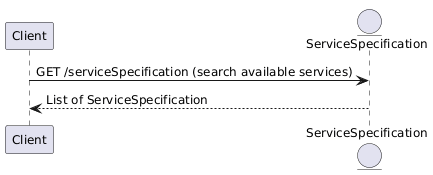
For details on the structure see Service Meta-Catalogue Service Catalogue For details on the API, see Service Catalogue API
A Service Specification defines a set of characteristics and features that need to be configured to define the values to be sent to the Create Service Order endpoint to order the service.
Characteristics scope
Characteristics are used to define or inform values that define and control a service. Characteristics may appear in Service Specifications under 3 main groups:
Service Characteristics: Used for service-level characteristicsIntent Characteristics: Used for characteristics relevant only during orderingFeature Characteristics: Used for characteristics meaningful in the context of a specific feature
Characteristics configurability
Each Characteristics serves a distinct purpose and may have different visibility.
Characteristic Specifications define the following relevant properties:
configurable: Controls if Clients can define values for them.False: These characteristics should not be included in orders. If they are, they will be ignored and the system will revert to the values in the Service SpecificationTrue: These characteristics are meant to be defined by clients when placing Service Orders. The system is still able to update their values when refreshing service data from the Vendors
minCardinality: Controls the minimum number of values the characteristic can be configured with by either the Client or the System, depending on theconfigurableproperty.There is a use case for this property to be configured with
0 (zero), defined below as information only characteristics. On these characteristics, neither the client or the system is able to change the hard-coded value on the ServiceSpecification- *
maxCardinality: Controls the maximum number of values a characteristic can be configured with. Allows for characteristics to hold multiple values.
Information only characteristics
- Definition:
minCardinality: 0maxCardinality: 0configurable: False - This type of characteristics is used to transmit read only data from the Catalogue to the client for information purposes only.
- These characteristics are identifiable by defining
configurableas False and havingminCardinalityas 0, meaning the client can't define a value when ordering. They also havemaxCardinalityas 0, meaning they cannot be changed and are only set automatically by Inventory when instantiating a service. - E.g. ALLOWANCE_TYPE defines
minCardinality=0,maxCardinality=0andconfigurable=Falsemeaning it is informational only. In this case, the ServiceSpecification defines a single value with the allowance type of the bolt on. This means it is a characteristic that provides information that may be displayed to a user during the ordering process, or used by the client to build the discovery and configuration UI
Vendor controlled characteristics
- Definition:
minCardinality: x >= 0maxCardinality: y >= 1configurable: False - This type of characteristic is used to hold values defined by Vendors and which are not allowed to be set by Clients. This means:
- Clients cannot set them on ServiceOrders
- Inventory allows setting and patching them, since Activation components need to be allowed to write them
Mandatory characteristic for ordering
- Definition:
minCardinality: 1maxCardinality: x >= 1configurable: True - Mandatory characteristics define a minimum cardinality of 1, which means the client needs to choose a value for the characteristics when ordering the service
- The maximum cardinality defines the number of values that the client may choose for the characteristic. A number larger than 1 is used for characteristics which allow multiple values
- E.g. Tariff defines
min=1andmax=1, meaning exactly 1 value, i.e. it is mandatory to choose one tariff
Optional characteristic for ordering
- Definition:
minCardinality: 0maxCardinality: x >= 1configurable: True - Optional characteristics define a minimum cardinality of 0, which means the client doesn't need to choose a value for the characteristics when ordering the service
- The maximum cardinality defines the number of values that the client may choose for the characteristic. A number larger than 1 is used for characteristics which allow multiple values
- E.g. PAC defines
min=0andmax=1, meaning it is optional. If this value is defined, it triggers a portability provisioning operation
Characteristics relationship
Characteristics also define dependency relationships between them, meaning they should only be included in a Service definition in a Service Order Item if the required characteristic is defined.
- E.g.
requires: PAC requires MSISDN. For a portability use case, it is mandatory to include the subscriber number for the PAC to be meaningful - E.g.
value_eq: ESIM_DELIVERY_EMAIL requires the value of the characteristic SIM_TYPE to be equal to e_sim to allow the system to deliver the eSIM via email to the end customer. This property only makes sense for eSIM and is only defined by the Vodafone service managed by Giacom
Characteristics isDefault value behaviour
ServiceSpecification have a list of CharacteristicSpecification. Each one can have one or more CharacteristicValueSpecification, defining the values they can assume. Value specifications can take a few forms:
- CharacteristicValueSpecification with a
valueproperty: TheServiceSpecificationprovides one or more pre-defined values which the characteristic can be configured with (obeying to the cardinality and configurable rules)- May be configured with
isDefault = True, meaning, the client and system (depending on theconfigurableproperty) may omit defining the characteristic. In that case, the system shall automatically add the characteristic, considering its default value(s)
- May be configured with
- CharacteristicValueSpecification with a
regexproperty: TheServiceSpecificationprovides one or more value specifications defining a regex to be used to validate the value(s) with which the characteristic is configured (obeying to the cardinality and configurable rules)- Cannot be configured with
isDefault = Truesince the value is unknown until it is configured by the client or the system
- Cannot be configured with
CharacteristicValueSpecification also set their isDefault property
Defining Features
Features are used to enable or disable specific functional aspects of mobile services.
Features are grouped into bundles. Mobile Services include feature bundles for the following aspects of a mobile service:
- Bars
- Network services
- APN
Each of the above feature bundles define a set of features that compose them.
When ordering a service, clients need to define the features property of the Service definition in the Service Order Item with the following considerations:
- Features defining bundles should not be included. Only individual features. The system will ignore bundle features and always revert to the specification for reference
- Features not included are still part of the provisioned service, configured with their default state
Features also define dependency relationships between them, meaning enabling a feature may affect other features:
- E.g.
includes: The feature "BARS" is a bundle feature and has severalincludesrelationships to define the features which are part of its bundle. A feature may only be part of one bundle - E.g.
excludes: ROAMING_ROAMING_CALLS excludes ROAMING_ROAMING_CALLS_IN and ROAMING_ROAMING_CALLS_OUT. If ROAMING_ROAMING_CALLS is enabled, ROAMING_ROAMING_CALLS_IN and ROAMING_ROAMING_CALLS_OUT cannot be enabled. If the rule is not observed, the system will fail the request
A new service is provisioned by invoking the Create Service Order endpoint and passing it a Service Order.
A Service Order is composed of Service Order Items. Each Service Order Item defines a Service Configuration which will be used to activate the service.
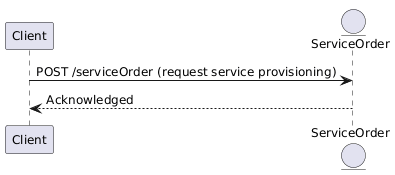
To provision a new Service, a client needs to create a Service Order with:
- A
Service Order Itemwith theaction = add - Define the Service Configuration inside the
Service Order Itemby specifying:- The Service Specification
IDand itsversion
- The Service Specification
For more detail, consult:
Orders can take an arbitrary time to complete, depending on their nature and the Vendor system. Once placed, Tenant clients receive the order object with relevant information for order follow up:
- id: Provides an identifier for the order
- state: Provides the current state of the order
Whenever a Service Order changes state, it produces a ServiceOrderStateChangeEvent event. This event is delivered via a Notification to the client's defined webhook(s) Clients can also poll the Service Order state using the Get by ID operation
Other Service Order Notifications
Service Orders may also raise additional events:
- ServiceOrderAttributeValueChangeEvent
- When an internal attribute changes. E.g. the
priorityor theexpectedCompletionDate
- When an internal attribute changes. E.g. the
- ServiceOrderJeopardyEvent
- When the Vendor adds a new Jeopardy alert to the order
- This event might require information to be added to the order, by calling the amend order endpoint
- ServiceOrderMilestoneEvent
- When the Vendor adds a new Milestone to the order
To ensure API security, we use OAuth 2.0 with the Client Credentials grant type for authentication. This method is designed for server-to-server interactions, where your application can securely access our API without user intervention. It is your responsibility to secure the end-user access to the application using the API.
What is OAuth 2.0?
OAuth 2.0 is an industry-standard protocol for authorization. It allows third-party applications to obtain limited access to an HTTP service on behalf of a resource owner. The Client Credentials grant type is a specific flow within OAuth 2.0 that is used for machine-to-machine communication.
Additional details available at:
How Does It Work?
Client Registration: Before you can interact with our API, you need to be onboarded. You will be provided you with a
Client IDandClient Secret.Token Request: Your application will request an access token from our authorization server by providing the
Client IDandClient Secret.Access Token: The authorization server will validate your credentials and issue an access token. This token is a string that represents the authorization granted to your application.
Scopes: Your access token will contain one or more scopes. Giacom API validates scopes from Access Token against required scopes on API methods to control access.
API Requests: Your application will include the access token in the
Authorizationheader of your API requests. This token will be used to authenticate your requests and grant access to the API resources.
Example Token Request
Here is an example of how to request an access token using the Client Credentials grant type:
POST /oauth2/token HTTP/1.1
Host: auth.integrations.giacom.com
Content-Type: application/x-www-form-urlencoded

grant_type=client_credentials&client_id=YOUR_CLIENT_ID&client_secret=YOUR_CLIENT_SECRET&scope=REQUESTED_SCOPE
The scope parameter is optional which should be used to limit scopes in the generated Access Token to minimum required list. If it is omitted, Access Token will contain all scopes available to your Client.
Example API Request
Once you have obtained an access token, you can use it to make authenticated requests to the API:
GET /api/resource HTTP/1.1
Host: integrations.giacom.com
Authorization: Bearer YOUR_ACCESS_TOKEN
Token Expiration and Refresh Tokens
Access tokens have a limited lifespan to enhance security. When an access token expires, your application will need to request a new one. Here’s how to handle token expiration and refresh tokens:
Token Expiry: Access tokens are valid for a specific duration, after which they expire. The expiration time is typically included in the token response.
Handling Expired Tokens: When your application receives a response indicating that the access token has expired, it should request a new token using the same Client Credentials grant type.
Security Considerations
- Keep Your Credentials Secure: Ensure that your
Client IDandClient Secretare stored securely and not exposed in your client-side code. - Only request Scopes you need: Ensure Access tokens follow principle of least priviledge by explicitely requesting only Scopes you need to perform specific API actions.
- Token Expiry: Access tokens have a limited lifespan. Be prepared to handle token expiration and request new tokens as needed.
- HTTPS: Always use HTTPS to encrypt your API requests and responses.
By following these guidelines, you can securely integrate with the Giacom Integrations API and take advantage of our services.
The Giacom API is a subset of the TMF Open APIs. Being a sub-set means:
- We implement a subset of the Open APIs defined by TMF
- We implement only the minimum viable subset of endpoints of each API Specification
- We implement only the minimum viable subset of schemas of each API Specification
- We may implement only a subset of the features of the TMF APIs
e.g. we don't implement schema polymorphism at the time
The Giacom API also follows the TMF630 REST API Design Guidelines. This section clarifies our implementation of the TMF REST API Guidelines and provides a quick reference to API usage patterns. Below we describe the common patterns in the API usage.
|This section clarifies section "4.4. Query entities with attribute filtering" of the TMF630 guideline
Filter parameters
Filter parameters are passed to GET /{entity} endpoints through query parameters. The API supports multiple filter parameters. E.g.:
- It is possible to filter by any field present on schema of the returned object on each endpoint
# Find live services in a failure state
GET /service?state=active&hasStarted=true&isServiceEnabled=false
Note: Filter parameter values must be passed in their URL encoded form
Filter using VALUE IN
It is possible to filter and obtain the list of entities whose value of a specific field is in a list provided by the client. To define multiple values, the Client needs to repeat the query parameter for the specific field. TMF630 defines the alternative of passing a list of values in a comma separated list but the approach implemented avoids complexity in value management when considering that values may themselves contain commas.
# Find live services in a failure OR stopped state
GET /service?state=failed&state=stopped
Matching multiple fields
When filtering by multiple fields the API will apply the following logic:
- AND: The API will apply an AND logic when multiple fields are passed in the query string. The entities returned in the request will match all the values of all fields
- OR: Is applied only to VALUE IN queries
- Equals: At the moment, only equals is supported for value matching. This means that the exact value must be passed in filters
# Find live services in a failure OR stopped state AND which have already started
GET /service?state=failed&state=stopped&hasStarted=true
Filtering by nested fields
It is possible to filter entities by values of nested fields. This allows e.g. searching services instantiated from a particular Service Specification. The '.' notation is used to search by nested fields. It is possible to combine nested fields with top level fields filtering
# Find the services instantiated from VF_Mobile_Connection and which are active
GET /service?serviceSpecification.id=VF_Mobile_Connection&state=active
Advanced filtering
To allow searching in complex structures, namely any type of lists, TMF defines the usage of JSONPath filters in Part 6 of the TMF630 REST API Design Guidelines.
- The JSONPath filter is sent on the "filter" field available on the endpoints supporting it
- The filter is applied as an AND to other query parameters
E.g. Find a mobile service by subscriber number 07800987654
GET /service?filter=$.serviceCharacteristic[?(@.id=="MSISDN")].value[?(@.value=="07800987654")]
Sample service representation for reference
Sample service representation for reference
This is an example of a Service Instance response
{
    "id": "dd5244e1-13e3-45a5-b2f0-47b111a65142",
    "lastUpdate": "2025-02-12T16:06:44.318Z",
    "version": 1,
    "name": "Mobile Voice Giacom-O2",
    "description": "Mobile Voice Giacom-O2",
    "category": "Mobile Voice Service",
    "isBundle": false,
    "operatingStatus": "pending",
    "hasStarted": false,
    "isServiceEnabled": false,
    "serviceDate": "2025-02-12T16:46:58.852Z",
    "startDate": "2025-02-12T16:46:58.852Z",
    "endDate": "2026-02-12T16:46:58.852Z",
    "serviceSpecification": {
        "id": "MOBILE_VOICE_SRV_GIACOM_O2",
        "version": "1"
    },
    "serviceOrderItem": [
        {
            "serviceOrderId": "38056a58-f783-453a-bc80-18d25ba8f3dc",
            "itemAction": "add",
            "itemId": "1"
        }
    ],
    "externalIdentifier": [
        {
            "owner": "ACME Comms",
            "externalIdentifierType": "service_id",
            "id": "123"
        }
    ],
    "relatedParty": [
        {
            "role": "VENDOR_ACCOUNT",
            "partyOrPartyRole": {
                "id": "ACME Comms"
            }
        },
        {
            "role": "VENDOR",
            "partyOrPartyRole": {
                "id": "GIACOM"
            }
        },
        {
            "role": "NETWORK",
            "partyOrPartyRole": {
                "id": "O2"
            }
        }
    ],
    "serviceCharacteristic": [
        {
            "id": "BILL_LIMIT",
            "name": "Bill limit",
            "description": "Bill limit",
            "valueType": "int",
            "value": [
                {
                    "name": "Bill limit",
                    "description": "Bill limit value",
                    "valueType": "int",
                    "value": "100"
                }
            ]
        },
        {
            "id": "VENDOR_OFFERING",
            "name": "Tariff",
            "description": "Giacom mobile tariff. Corresponds to the Giacom Mobile product",
            "valueType": "string",
            "value": [
                {
                    "name": "AIO2GBPIC - All In One Pooled Data 2GB inc. International Caller V24Q2",
                    "description": "AIO2GBPIC - All In One Pooled Data 2GB inc. International Caller V24Q2",
                    "valueType": "string",
                    "value": "62231"
                }
            ]
        },
        {
            "id": "SIM_TYPE",
            "name": "SIM type",
            "description": "Type of SIM card",
            "valueType": "string",
            "value": [
                {
                    "name": "Triple SIM",
                    "description": "Triple SIM",
                    "valueType": "string",
                    "value": "triple"
                }
            ]
        },
        {
            "id": "ICCID",
            "name": "SIM Serial",
            "description": "SIM Serial",
            "valueType": "iccid",
            "value": [
                {
                    "name": "SIM Serial",
                    "description": "SIM Serial",
                    "valueType": "iccid",
                    "value": "8944201122334455667"
                }
            ]
        }
    ],
    "feature": [
        {
            "id": "SUSPENSIONS_FULL_SUSPEND",
            "name": "Full suspend",
            "description": "Bars all features",
            "isEnabled": false
        },
        {
            "id": "SUSPENSIONS_SERVICE_PROVIDER_FULL_SUSPEND",
            "name": "Service provider full suspend",
            "description": "Admin full service bar placed",
            "isEnabled": false
        },
        {
            "id": "CALLS_CALLS_PREMIUM",
            "name": "Calls premium",
            "description": "Can make calls to premium numbers",
            "isEnabled": true
        },
        {
            "id": "ROAMING_ROAMING_CALLS",
            "name": "Roaming calls",
            "description": "Can make and receive calls outside of the UK",
            "isEnabled": true
        },
        {
            "id": "ROAMING_ROAMING_CALLS_IN",
            "name": "Roaming calls in",
            "description": "Can receive calls outside of the UK",
            "isEnabled": false
        },
        {
            "id": "ROAMING_ROAMING_CALLS_OUT",
            "name": "Roaming calls out",
            "description": "Can make calls outside of the UK",
            "isEnabled": false
        },
        {
            "id": "SERVICE_CONF_CALLING",
            "name": "Conf calling",
            "description": "Conference calling is enabled",
            "isEnabled": true
        },
        {
            "id": "SMS_MMS_IN_OUT",
            "name": "MMS in out",
            "description": "Can send and receive MMS",
            "isEnabled": true
        },
        {
            "id": "SERVICE_WIFI_CALLING",
            "name": "Wifi calling",
            "description": "Wifi calling is enabled",
            "isEnabled": true
        },
        {
            "id": "APN_INTERNET",
            "name": "O2 Internet APN",
            "description": "5G service",
            "isEnabled": true
        },
        {
            "id": "APN_IPHONE_985",
            "name": "O2 iPhone APN 985",
            "description": "O2 iPhone APN 985",
            "isEnabled": true
        },
        {
            "id": "APN_IPHONE_986",
            "name": "O2 iPhone APN 986",
            "description": "O2 iPhone APN 986",
            "isEnabled": false
        }
    ]
}
This feature is defined in Part 1, section 4.3 of the TMF630 REST API Design Guidelines
Response shaping, i.e. controlling the subset of fields returned by an API is not yet available in any of the Giacom API endpoints
This feature is defined in Part 1, section 4.5 of the TMF630 REST API Design Guidelines
Results paging is not yet available in any of the Giacom API endpoints, apart from the special use cases defined in this section
All search endpoints return two headers with record counters:
X-Total-Count: Total number of items matching criteriaX-Result-Count: Actual number of items returned in the response body
Counting matching records
To just obtain a count of matching records without any data, a Client may pass 0 in the limit query parameter. Currently this is the only supported limit value and any other value will result in a 400 Bar Request response.
If the Client defines a limit=0, the system will return:
X-Total-Count: Total number of items matching criteriaX-Result-Count: 0- An empty list of entities
Special case: Large number of matching results
In cases where the number of results exceeds any internal limit the system may trim the results and return a partial result list. In this case, the system will return:
X-Total-Count: Total number of items matching criteriaX-Result-Count: Actual number of items returned in the response body, less than X-Total-Count- A partial list of entities
This feature is defined in Part 1, section 4.7 of the TMF630 REST API Design Guidelines
Results sorting is not yet available in any of the Giacom API endpoints
This section details all HTTP Responses a client may receive when using the Giacom Integrations API.
Success response codes
Success messages are defined individually by each operation in the API. Possible HTTP response status codes are:
- 200 OK
Used in:
GET,PATCH
Generic success status returned, typically by GET operations, indicating a successful execution and including the requested entity or search result. PATCH operations also use this error code - 201 Created
Used in:
POST
Only returned by POST operations, meaning the Entity has been successfully created. A unique ID is always included in the response as part of the entity's schema.
Note: The created entity may still produce async updates as part of its lifecycle. E.g. ServiceOrder is created in anACKNOWLEDGEDstate and is subsequently updated as the service order progresses - 204 No Content
Used in:
DELETE
Only returned by DELETE operations, meaning the Entity has been successfully deleted
Error response codes
Error responses are defined globally for the Giacom Integrations API and each operation type has a specific set of HTTP response status codes it can use. Possible HTTP response status codes are:
- 400 Bad Request
Used in:
All operation types
Returned by: All operation types Used to signal client side errors. E.g.: Some error in parameter definition - 401 Unauthorized
Used in:
All operation types
Returned when the client doesn't have authorisation to access the requested resource - 404 Not Found
Used in:
All operation types, except POST
Returned when the resource requested does not exist, or is not accessible to the client - 500 Internal Server Error
Used in:
All operation types
Returned when there is an error processing the client's request which was not caused by the request or the client
Note: This list only defines response codes returned as part of this API. Other HTTP error response status codes may be received by a client application if the request is handled and failed directly by any network element.
Error response schema
Error responses include detail additional to the HTTP response code to improve the Client and Developer experience. All Error responses follow the components/schemas/Error schema.
Sample error response:
{
  "code": "ERR_000001",
  "reason": "ERR_000001: Request body validation error at field level",
  "message": "Error parsing field 'name'",
  "status": "Error"
}
The components/schemas/Error returns:
code: Application level error code managed as a centralised enumerationreason: Description of the values returned in the code fieldi.e. an explanation of the reason for the error which can be shown to a client user
message: Information or debug details generated at runtime when each error occursE.g.: More details and corrective actions related to the error which can be shown to a client user
status: Absolute status of the request. Currently only supporting:Error: Means the request has completely failed
Error Codes list
Below we include the complete reference for possible values of code and reason:
code |
reason |
|---|---|
ERR_000001 |
ERR_000001: Request body validation error at field level |
In order to start receiving notifications from the Notifications Hub, follow these steps:
Register Listener with Notifications Hub
curl --location 'https://api.integrations.giacom.com/v1/topic/default/hub' \
--header 'Content-Type: application/json' \
--header 'Accept: application/json' \
--header "Authorization: Bearer <your_access_token_here>" \

--data '{
  "callback": "https://yourportal.com/webhook"
}'
(Optional) Webhook endpoint authentication
If your webhook link is protected, you can optionally specify a Credentials object to pass an API key. Notifications service will send this key in Authorization: Basic <apikey> header.
curl --location 'https://api.integrations.giacom.com/v1/topic/default/hub' \
--header 'Content-Type: application/json' \
--header 'Accept: application/json' \
--header "Authorization: Bearer <your_access_token_here>" \

--data '{
  "callback": "https://yourportal.com/webhook",
  "credentials": {
    "type": "apikey",
    "value": "<your_secret_api_key>"
  }
}'
The Notifications Hub will respond to confirm your listener was created:
201 Created

{
  "id": "550e8400-e29b-41d4-a716-446655440000",
  "callback": "https://yourportal.com/webhook",
  "credentials": {
    "type": "apikey",
  }
}
Notification delivery
When an event happens, Notifications service will automatically notify your Webhook endpoint. This will be in a form of POST request with the following structure:
curl --location 'https://yourportal.com/webhook' \
--header 'Content-Type: application/json' \
--header 'Accept: application/json' \
--header "Authorization: Basic <your_secret_api_key>" \

--data '{
  "eventId": "550e8400-e29b-41d4-a716-446655440000",
  "eventTime": "2015-11-16T16:42:25-04:00",
  "eventType": "ServiceOrderStateChangeEvent",
  "event": {
    "ServiceOrder": {
        "id": "c9d8c1f1-7523-476a-b89f-774bfd390f46",
        "version": 6,
        "... Remaining entity properties ..."
    }
  }
}
The event property is used to transport the full representation of the entity that raised the event.
Each entity in this specification may define a listener endpoint, like the Client listener for entity ServiceOrderStateChangeEvent. These endpoints are meant to provide the full specification of each particular Event, including the schema of the entity inside the event property. They are meant to be implemented as internal logic of the client's callback.
Retries and idempotency
If the Listener is unavailable, or does not respond with a 202 ACCEPTED response code, Notifications Service will attempt at least 2 retries with 30 second backoff window.
If the notification is not delivered after 3 retries, no further retries will be attempted.
In some cases, notification for the same event may be delivered more than once, or out of order. Notification consumers can use:
- Idempotency: The
eventIdEvent property uniquely identifies each event and can be used to detect duplicate events - Order: The
versionproperty which is part of all entities which produce events is incremented atomically with every change. It may be used for detecting out of order entity updates
Stop receiving notifications
If at any point you want to stop receiving event Notification, you can do so by deleting the Hub.
curl --location --request DELETE \
  --header "Authorization: Bearer your_access_token_here" \
  "https://api.integrations.giacom.com/v1/topic/default/hub/<listener_id>"
- Stakeholders register Callback Listeners in order to receive Notifications using the Create Hub endpoint.
Any API Key required to deliver notifications to a client's callback is stored securely
- When receiving an event, Notifications Service notifies all subscribed Callback Listeners, within the context of the specific tenant
- Giacom guarantees at-least 3 delivery attempts with a 30s retry interval but does not try to guarantee strict event ordering
- There is currently no event filtering. All events are delivered to all callbacks in the context of a specific tenant.
Notifying Listeners
When receiving an Event, Notifications Service will notify all Callback Listeners subscribed to the specified Event type. The exact structure of the event will depend on the Event schema - make sure to check the API-specific listener schemas.
Authentication for managing Hubs
An Access token must be included in Authorization HTTP header for all requests. For all current use-cases there is only one scope required:
integrations/notifications.read
Multi-tenancy
Notifications Hub is a multi-tenant service. All requests must specify the tenant context,which is retrieved from the access token.
Notifications Event Hub API is an internal API used by trusted systems to publish events.
You can check out following documentation to gain more understanding behind API concepts :
Creates a Hub
Sets the callback endpoint for a client to receive event Notifications from services in the Giacom API.
The registration of a listener is done by creating a Notifications HUB resource unique to the listener (equivalent of a
subscription). Only API destinations are supported.
The resource requires a Credentials object when the API destination is secured by a static API key.
In that case, the API key will be securely stored and the Notifications service will include it in the Authorization header when delivering the notification.
Authorizations:
header Parameters
| X-Idempotency-Key required | string <uuid> Key used to implement idempotency in write requests |
Request Body schema: application/jsonrequired
Data containing the callback endpoint to deliver the information
| callback required | string The callback being registered. |
object |
Responses
Request samples
- Payload
{- "callback": "string",
- "credentials": {
- "type": "apikey",
- "value": "123secret"
}
}Response samples
- 201
- 400
- 401
- 500
{- "id": "string",
- "callback": "string",
- "credentials": {
- "type": "apikey"
}
}Deletes a Hub
This operation deletes a Hub entity.
Authorizations:
path Parameters
| id required | string Identifier of the Resource |
header Parameters
| X-Idempotency-Key required | string <uuid> Key used to implement idempotency in write requests |
Responses
Response samples
- 400
- 401
- 404
- 409
- 500
{- "code": "ERR_000001",
- "reason": "ERR_000001: Request body validation error at field level",
- "message": "string",
- "status": "Error"
}Create a silver/bronze address
This operation allows creating a silver/bronze address
Authorizations:
Request Body schema: application/jsonrequired
The GeographicAddress to be created
| city | string City that the address is in |
| locality | string An area of defined or undefined boundaries within a local authority or other legislatively defined area, usually rural or semi rural in nature. [ANZLIC-STREET], or a suburb, a bounded locality within a city, town or shire principally of urban character [ANZLICSTREET] |
| postcode | string descriptor for a postal delivery area, used to speed and simplify the delivery of mail (also know as zipcode) |
| stateOrProvince | string the State or Province that the address is in |
| streetName | string Name of the street or other street type |
| streetNr | string Number identifying a specific property on a public street. It may be combined with streetNrLast for ranged addresses |
GeographicSite_FVO (object) (GeographicSiteRefOrValue_FVO) The polymorphic attributes @type, @schemaLocation & @referredType are related to the GeographicSite entity and not the GeographicSiteRefOrValue class itself | |
| openreachALK | string Openreach (Access Level Key) |
| districtCode | string The short code representation of the district |
object (GeographicSubAddress_FVO) Representation of a GeographicSubAddress It is used for addressing within a property in an urban area (country properties are often defined differently). It may refer to a building, a building cluster, or a floor of a multistory building. |
Responses
Request samples
- Payload
{- "city": "string",
- "locality": "string",
- "postcode": "string",
- "stateOrProvince": "string",
- "streetName": "string",
- "streetNr": "string",
- "geographicSite": {
- "relatedParty": [
- {
- "role": "string",
- "partyOrPartyRole": { }
}
], - "contactMedium": [
- {
- "contactType": "Primary",
- "name": "string",
- "surname": "string",
- "phoneNumber": "string"
}
]
}, - "openreachALK": "string",
- "districtCode": "string",
- "geographicSubAddress": {
- "buildingName": "string",
- "levelNumber": "string",
- "levelType": "string"
}
}Response samples
- 201
- 400
- 401
- 500
{- "city": "string",
- "locality": "string",
- "postcode": "string",
- "stateOrProvince": "string",
- "streetName": "string",
- "streetNr": "string",
- "geographicSite": {
- "code": "BTS",
- "relatedParty": [
- {
- "role": "string",
- "partyOrPartyRole": {
- "id": "string"
}
}
], - "externalIdentifier": [
- {
- "owner": "MagentoCommerce",
- "externalIdentifierType": "ProductOrder",
- "id": "string"
}
], - "contactMedium": [
- {
- "contactType": "Primary",
- "name": "string",
- "surname": "string",
- "phoneNumber": "string"
}
]
}, - "openreachALK": "string",
- "districtCode": "string",
- "openreachQualifier": "Gold",
- "geographicSubAddress": {
- "buildingName": "string",
- "levelNumber": "string",
- "levelType": "string"
}
}Address validation/matching
This operation allows validating an address, i.e. performing address matching
The response will include:
submittedGeographicAddress: The address object as defined by the client in the requestvalidGeographicAddress: An address object built from the Vendor with the exact address matching, if one was producedalternateGeographicAddress: Alternative address objects matching the request
Authorizations:
Request Body schema: application/jsonrequired
The GeographicAddressValidation to be created
| provideAlternative | boolean Indicator provided by the requester to specify if alternate addresses must be provided in case of partial or fail result. |
object (GeographicAddress_FVO) Structured textual way of describing how to find a Property in an urban area (country properties are often defined differently). Note : Address corresponds to SID UrbanPropertyAddress |
Responses
Request samples
- Payload
{- "provideAlternative": true,
- "submittedGeographicAddress": {
- "city": "string",
- "locality": "string",
- "postcode": "string",
- "stateOrProvince": "string",
- "streetName": "string",
- "streetNr": "string",
- "geographicSite": {
- "relatedParty": [
- {
- "role": "string",
- "partyOrPartyRole": { }
}
], - "contactMedium": [
- {
- "contactType": "Primary",
- "name": "string",
- "surname": "string",
- "phoneNumber": "string"
}
]
}, - "openreachALK": "string",
- "districtCode": "string",
- "geographicSubAddress": {
- "buildingName": "string",
- "levelNumber": "string",
- "levelType": "string"
}
}
}Response samples
- 201
- 400
- 401
- 500
{- "provideAlternative": true,
- "state": "acknowledged",
- "submittedGeographicAddress": {
- "city": "string",
- "locality": "string",
- "postcode": "string",
- "stateOrProvince": "string",
- "streetName": "string",
- "streetNr": "string",
- "geographicSite": {
- "code": "BTS",
- "relatedParty": [
- {
- "role": "string",
- "partyOrPartyRole": {
- "id": "string"
}
}
], - "externalIdentifier": [
- {
- "owner": "MagentoCommerce",
- "externalIdentifierType": "ProductOrder",
- "id": "string"
}
], - "contactMedium": [
- {
- "contactType": "Primary",
- "name": "string",
- "surname": "string",
- "phoneNumber": "string"
}
]
}, - "openreachALK": "string",
- "districtCode": "string",
- "openreachQualifier": "Gold",
- "geographicSubAddress": {
- "buildingName": "string",
- "levelNumber": "string",
- "levelType": "string"
}
}, - "validGeographicAddress": {
- "city": "string",
- "locality": "string",
- "postcode": "string",
- "stateOrProvince": "string",
- "streetName": "string",
- "streetNr": "string",
- "geographicSite": {
- "code": "BTS",
- "relatedParty": [
- {
- "role": "string",
- "partyOrPartyRole": {
- "id": "string"
}
}
], - "externalIdentifier": [
- {
- "owner": "MagentoCommerce",
- "externalIdentifierType": "ProductOrder",
- "id": "string"
}
], - "contactMedium": [
- {
- "contactType": "Primary",
- "name": "string",
- "surname": "string",
- "phoneNumber": "string"
}
]
}, - "openreachALK": "string",
- "districtCode": "string",
- "openreachQualifier": "Gold",
- "geographicSubAddress": {
- "buildingName": "string",
- "levelNumber": "string",
- "levelType": "string"
}
}, - "alternateGeographicAddress": [
- {
- "city": "string",
- "locality": "string",
- "postcode": "string",
- "stateOrProvince": "string",
- "streetName": "string",
- "streetNr": "string",
- "geographicSite": {
- "code": "BTS",
- "relatedParty": [
- {
- "role": "string",
- "partyOrPartyRole": {
- "id": "string"
}
}
], - "externalIdentifier": [
- {
- "owner": "MagentoCommerce",
- "externalIdentifierType": "ProductOrder",
- "id": "string"
}
], - "contactMedium": [
- {
- "contactType": "Primary",
- "name": "string",
- "surname": "string",
- "phoneNumber": "string"
}
]
}, - "openreachALK": "string",
- "districtCode": "string",
- "openreachQualifier": "Gold",
- "geographicSubAddress": {
- "buildingName": "string",
- "levelNumber": "string",
- "levelType": "string"
}
}
]
}Book an appointment
This operation books an appointment
Authorizations:
Request Body schema: application/json;charset=utf-8required
The Appointment to be created
object (RelatedSrvCfgValue) A reference to an entity, where the type of the entity is not known in advance. A related entity defines a entity described by reference or by value linked to a specific entity. The polymorphic attributes @type, @schemaLocation & @referredType are related to the Entity and not the RelatedEntityRefOrValue class itself | |
object (TimePeriod) A period of time, either as a deadline (endDateTime only) a startDateTime only, or both | |
| category | string (AppointmentCategoryEnum) Enum: "Standard" "Expedited" "Supplier missed" The category of the Appointment to create. The tenant chooses the value following the logic for each allowed value.
|
Responses
Request samples
- Payload
{- "relatedEntity": {
- "role": "Appointment",
- "entity": {
- "feature": [
- {
- "featureCharacteristic": [
- {
- "id": "string",
- "value": [
- {
- "value": "string"
}
]
}
], - "isEnabled": true,
- "id": "string"
}
], - "externalIdentifier": [
- {
- "owner": "MagentoCommerce",
- "externalIdentifierType": "ProductOrder",
- "id": "string"
}
], - "serviceCharacteristic": [
- {
- "id": "string",
- "value": [
- {
- "value": "string"
}
]
}
], - "serviceRelationship": [
- {
- "relationshipType": "addon_for",
- "service": {
- "id": "string"
}
}
], - "intent": {
- "characteristic": [
- {
- "id": "string",
- "value": [
- {
- "value": "string"
}
]
}
]
}, - "id": "string",
- "relatedParty": [
- {
- "role": "string",
- "partyOrPartyRole": {
- "id": "string"
}
}
], - "serviceSpecification": {
- "id": "string",
- "version": "string"
}, - "place": {
- "role": "Installation Address",
- "place": {
- "city": "string",
- "locality": "string",
- "postcode": "string",
- "stateOrProvince": "string",
- "streetName": "string",
- "streetNr": "string",
- "geographicSite": {
- "code": "BTS",
- "relatedParty": [
- {
- "role": "string",
- "partyOrPartyRole": {
- "id": "string"
}
}
], - "externalIdentifier": [
- {
- "owner": "MagentoCommerce",
- "externalIdentifierType": "ProductOrder",
- "id": "string"
}
], - "contactMedium": [
- {
- "contactType": "Primary",
- "name": "string",
- "surname": "string",
- "phoneNumber": "string"
}
]
}, - "openreachALK": "string",
- "districtCode": "string",
- "openreachQualifier": "Gold",
- "geographicSubAddress": {
- "buildingName": "string",
- "levelNumber": "string",
- "levelType": "string"
}
}
}
}
}, - "validFor": {
- "endDateTime": "2019-08-24T14:15:22Z",
- "startDateTime": "2019-08-24T14:15:22Z"
}, - "category": "Standard"
}Response samples
- 201
- 400
- 401
- 500
{- "creationDate": "2019-08-24T14:15:22Z",
- "externalId": "string",
- "relatedEntity": {
- "role": "Appointment",
- "entity": {
- "feature": [
- {
- "featureCharacteristic": [
- {
- "id": "string",
- "value": [
- {
- "value": "string"
}
]
}
], - "isEnabled": true,
- "id": "string"
}
], - "externalIdentifier": [
- {
- "owner": "MagentoCommerce",
- "externalIdentifierType": "ProductOrder",
- "id": "string"
}
], - "serviceCharacteristic": [
- {
- "id": "string",
- "value": [
- {
- "value": "string"
}
]
}
], - "serviceRelationship": [
- {
- "relationshipType": "addon_for",
- "service": {
- "id": "string"
}
}
], - "intent": {
- "characteristic": [
- {
- "id": "string",
- "value": [
- {
- "value": "string"
}
]
}
]
}, - "id": "string",
- "relatedParty": [
- {
- "role": "string",
- "partyOrPartyRole": {
- "id": "string"
}
}
], - "serviceSpecification": {
- "id": "string",
- "version": "string"
}, - "place": {
- "role": "Installation Address",
- "place": {
- "city": "string",
- "locality": "string",
- "postcode": "string",
- "stateOrProvince": "string",
- "streetName": "string",
- "streetNr": "string",
- "geographicSite": {
- "code": "BTS",
- "relatedParty": [
- {
- "role": "string",
- "partyOrPartyRole": {
- "id": "string"
}
}
], - "externalIdentifier": [
- {
- "owner": "MagentoCommerce",
- "externalIdentifierType": "ProductOrder",
- "id": "string"
}
], - "contactMedium": [
- {
- "contactType": "Primary",
- "name": "string",
- "surname": "string",
- "phoneNumber": "string"
}
]
}, - "openreachALK": "string",
- "districtCode": "string",
- "openreachQualifier": "Gold",
- "geographicSubAddress": {
- "buildingName": "string",
- "levelNumber": "string",
- "levelType": "string"
}
}
}
}
}, - "status": "initialized",
- "validFor": {
- "endDateTime": "2019-08-24T14:15:22Z",
- "startDateTime": "2019-08-24T14:15:22Z"
}, - "category": "Standard"
}Search appointment slots
This operation allows searching for available time slots to be used when booking Appointments
Authorizations:
Request Body schema: application/json;charset=utf-8required
The SearchTimeSlot to be created
object (RelatedSrvCfgValue) A reference to an entity, where the type of the entity is not known in advance. A related entity defines a entity described by reference or by value linked to a specific entity. The polymorphic attributes @type, @schemaLocation & @referredType are related to the Entity and not the RelatedEntityRefOrValue class itself | |
Array of objects (TimeSlot) | |
| category | string (AppointmentCategoryEnum) Enum: "Standard" "Expedited" "Supplier missed" The category of the Appointment to create. The tenant chooses the value following the logic for each allowed value.
|
Responses
Request samples
- Payload
{- "relatedEntity": {
- "role": "Appointment",
- "entity": {
- "feature": [
- {
- "featureCharacteristic": [
- {
- "id": "string",
- "value": [
- {
- "value": "string"
}
]
}
], - "isEnabled": true,
- "id": "string"
}
], - "externalIdentifier": [
- {
- "owner": "MagentoCommerce",
- "externalIdentifierType": "ProductOrder",
- "id": "string"
}
], - "serviceCharacteristic": [
- {
- "id": "string",
- "value": [
- {
- "value": "string"
}
]
}
], - "serviceRelationship": [
- {
- "relationshipType": "addon_for",
- "service": {
- "id": "string"
}
}
], - "intent": {
- "characteristic": [
- {
- "id": "string",
- "value": [
- {
- "value": "string"
}
]
}
]
}, - "id": "string",
- "relatedParty": [
- {
- "role": "string",
- "partyOrPartyRole": {
- "id": "string"
}
}
], - "serviceSpecification": {
- "id": "string",
- "version": "string"
}, - "place": {
- "role": "Installation Address",
- "place": {
- "city": "string",
- "locality": "string",
- "postcode": "string",
- "stateOrProvince": "string",
- "streetName": "string",
- "streetNr": "string",
- "geographicSite": {
- "code": "BTS",
- "relatedParty": [
- {
- "role": "string",
- "partyOrPartyRole": {
- "id": "string"
}
}
], - "externalIdentifier": [
- {
- "owner": "MagentoCommerce",
- "externalIdentifierType": "ProductOrder",
- "id": "string"
}
], - "contactMedium": [
- {
- "contactType": "Primary",
- "name": "string",
- "surname": "string",
- "phoneNumber": "string"
}
]
}, - "openreachALK": "string",
- "districtCode": "string",
- "openreachQualifier": "Gold",
- "geographicSubAddress": {
- "buildingName": "string",
- "levelNumber": "string",
- "levelType": "string"
}
}
}
}
}, - "requestedTimeSlot": [
- {
- "validFor": {
- "endDateTime": "2019-08-24T14:15:22Z",
- "startDateTime": "2019-08-24T14:15:22Z"
}
}
], - "category": "Standard"
}Response samples
- 201
- 400
- 401
- 500
{- "searchDate": "2019-08-24T14:15:22Z",
- "availableTimeSlot": [
- {
- "validFor": {
- "endDateTime": "2019-08-24T14:15:22Z",
- "startDateTime": "2019-08-24T14:15:22Z"
}
}
], - "relatedEntity": {
- "role": "Appointment",
- "entity": {
- "feature": [
- {
- "featureCharacteristic": [
- {
- "id": "string",
- "value": [
- {
- "value": "string"
}
]
}
], - "isEnabled": true,
- "id": "string"
}
], - "externalIdentifier": [
- {
- "owner": "MagentoCommerce",
- "externalIdentifierType": "ProductOrder",
- "id": "string"
}
], - "serviceCharacteristic": [
- {
- "id": "string",
- "value": [
- {
- "value": "string"
}
]
}
], - "serviceRelationship": [
- {
- "relationshipType": "addon_for",
- "service": {
- "id": "string"
}
}
], - "intent": {
- "characteristic": [
- {
- "id": "string",
- "value": [
- {
- "value": "string"
}
]
}
]
}, - "id": "string",
- "relatedParty": [
- {
- "role": "string",
- "partyOrPartyRole": {
- "id": "string"
}
}
], - "serviceSpecification": {
- "id": "string",
- "version": "string"
}, - "place": {
- "role": "Installation Address",
- "place": {
- "city": "string",
- "locality": "string",
- "postcode": "string",
- "stateOrProvince": "string",
- "streetName": "string",
- "streetNr": "string",
- "geographicSite": {
- "code": "BTS",
- "relatedParty": [
- {
- "role": "string",
- "partyOrPartyRole": {
- "id": "string"
}
}
], - "externalIdentifier": [
- {
- "owner": "MagentoCommerce",
- "externalIdentifierType": "ProductOrder",
- "id": "string"
}
], - "contactMedium": [
- {
- "contactType": "Primary",
- "name": "string",
- "surname": "string",
- "phoneNumber": "string"
}
]
}, - "openreachALK": "string",
- "districtCode": "string",
- "openreachQualifier": "Gold",
- "geographicSubAddress": {
- "buildingName": "string",
- "levelNumber": "string",
- "levelType": "string"
}
}
}
}
}, - "requestedTimeSlot": [
- {
- "validFor": {
- "endDateTime": "2019-08-24T14:15:22Z",
- "startDateTime": "2019-08-24T14:15:22Z"
}
}
], - "status": "inProgress",
- "category": "Standard"
}Resource Specifications define the finer grained orderable entities in the API and provide a link between Services that Clients can order and what is provisioned on suppliers by the API. E.g. Resource Specifications may define a SIM card or a particular mobile Bar
List or find ResourceSpecification objects
List or find ServiceSpecification objects.
Search Resource Specifications
TODO full list of fields allowed in the search query parameters.
Search examples
# E.g. list all resource specifications with "category" == "Mobile SIM" and with "VODAFONE" as the "network" on the "relatedParty" property
GET /resourceSpecification?category=Mobile SIM&filter=$.relatedParty[?(@.role=="network" && @.partyOrPartyRole.id=="O2")]
Authorizations:
query Parameters
| id | string <SCREAMING_SNAKE_CASE> Identifier of the entity. Performs full case-sensitive match |
integer or versionQualifiersEnum (string) The version to obtain. Returns the most recent version when this field is omitted. Supports passing a concrete version or specific qualifiers |
Responses
Response samples
- 200
- 400
- 401
- 404
- 500
[- {
- "id": "VF_triple_sim",
- "lastUpdate": "2025-02-12T16:06:44.318Z",
- "version": 1,
- "name": "VF triple sim",
- "description": "VF triple sim",
- "category": "Mobile SIM",
- "relatedParty": [
- {
- "role": "NETWORK",
- "partyOrPartyRole": {
- "id": "VODAFONE"
}
}
], - "resourceSpecCharacteristic": [
- {
- "id": "SIM_TYPE",
- "name": "SIM type",
- "description": "SIM type",
- "valueType": "string",
- "minCardinality": 1,
- "maxCardinality": 1,
- "isUnique": false,
- "configurable": false,
- "characteristicValueSpecification": [
- {
- "isDefault": true,
- "name": "Triple",
- "description": "Triple SIM",
- "valueType": "string",
- "value": "triple"
}
]
}, - {
- "id": "ICCID",
- "name": "SIM serial",
- "description": "SIM serial",
- "valueType": "iccid",
- "minCardinality": 1,
- "maxCardinality": 1,
- "isUnique": true,
- "configurable": true,
- "characteristicValueSpecification": [
- {
- "isDefault": true,
- "name": "SIM Serial",
- "description": "SIM Serial",
- "valueType": "iccid",
- "regex": "^89\\d{17,20}$"
}
]
}, - {
- "id": "SIM_SPID",
- "name": "SPID",
- "description": "SPID",
- "valueType": "SPID",
- "minCardinality": 1,
- "maxCardinality": 1,
- "isUnique": false,
- "configurable": true,
- "characteristicValueSpecification": [
- {
- "isDefault": true,
- "name": "SPID",
- "description": "SPID",
- "valueType": "SPID",
- "regex": "regex_to_match_SPID"
}
]
}
], - "resourceSpecRelationship": [
- {
- "relationshipType": "requires",
- "id": "Mobile_Subscriber_number"
}
]
}, - {
- "id": "VF_e_sim",
- "lastUpdate": "2025-02-12T16:06:44.318Z",
- "version": 1,
- "name": "VF e-sim",
- "description": "VF e-sim",
- "category": "Mobile SIM",
- "relatedParty": [
- {
- "role": "NETWORK",
- "partyOrPartyRole": {
- "id": "VODAFONE"
}
}
], - "resourceSpecCharacteristic": [
- {
- "id": "SIM_TYPE",
- "name": "SIM type",
- "description": "SIM type",
- "valueType": "string",
- "minCardinality": 1,
- "maxCardinality": 1,
- "isUnique": false,
- "configurable": false,
- "characteristicValueSpecification": [
- {
- "isDefault": true,
- "name": "e-SIM",
- "description": "e-SIM",
- "valueType": "string",
- "value": "e_sim"
}
]
}, - {
- "id": "ICCID",
- "name": "SIM serial",
- "description": "SIM serial",
- "valueType": "iccid",
- "minCardinality": 1,
- "maxCardinality": 1,
- "isUnique": true,
- "configurable": true,
- "characteristicValueSpecification": [
- {
- "isDefault": true,
- "name": "SIM Serial",
- "description": "SIM Serial",
- "valueType": "iccid",
- "regex": "^89\\d{17,20}$"
}
]
}, - {
- "id": "SIM_SPID",
- "name": "SPID",
- "description": "SPID",
- "valueType": "SPID",
- "minCardinality": 1,
- "maxCardinality": 1,
- "isUnique": false,
- "configurable": true,
- "characteristicValueSpecification": [
- {
- "isDefault": true,
- "name": "SPID",
- "description": "SPID",
- "valueType": "SPID",
- "regex": "regex_to_match_SPID"
}
]
}, - {
- "id": "ESIM_QR_CODE",
- "name": "eSIM QR CODE",
- "description": "eSIM CODE value to be sent as a QR code",
- "valueType": "base64",
- "minCardinality": 0,
- "maxCardinality": 1,
- "isUnique": true,
- "configurable": false,
- "characteristicValueSpecification": [
- {
- "isDefault": true,
- "name": "eSIM QR CODE",
- "description": "eSIM CODE value to be sent as a QR code",
- "valueType": "base64",
- "regex": "regex_to_match_base64"
}
]
}, - {
- "id": "ESIM_DELIVERY_EMAIL",
- "name": "eSIM delivery email",
- "description": "eSIM delivery email",
- "valueType": "email",
- "minCardinality": 1,
- "maxCardinality": 1,
- "isUnique": false,
- "configurable": true,
- "characteristicValueSpecification": [
- {
- "isDefault": true,
- "name": "eSIM delivery email",
- "description": "eSIM delivery email",
- "valueType": "email",
- "regex": "regex_to_match_email"
}
]
}, - {
- "id": "ESIM_CONTACT_NAME",
- "name": "eSIM Contact name",
- "description": "eSIM Contact name",
- "valueType": "string",
- "minCardinality": 1,
- "maxCardinality": 1,
- "isUnique": false,
- "configurable": false,
- "characteristicValueSpecification": [
- {
- "isDefault": true,
- "name": "eSIM Contact name",
- "description": "eSIM Contact name",
- "valueType": "string",
- "regex": "regex_to_match_name"
}
]
}
], - "resourceSpecRelationship": [
- {
- "relationshipType": "requires",
- "id": "Mobile_Subscriber_number"
}
]
}
]Retrieves a ResourceSpecification by ID
This operation retrieves a ResourceSpecification entity. Attribute selection enabled for all first level attributes.
Authorizations:
path Parameters
| id required | string <SCREAMING_SNAKE_CASE> Identifier of the entity |
query Parameters
| version | integer <int64> >= 1 The version to obtain. Returns the most recent version when this field is omitted |
Responses
Response samples
- 200
- 400
- 401
- 404
- 500
{- "id": "O2_e_sim",
- "lastUpdate": "2025-02-12T16:06:44.318Z",
- "version": 1,
- "name": "O2 e-sim",
- "description": "O2 e-sim",
- "category": "Mobile SIM",
- "relatedParty": [
- {
- "role": "NETWORK",
- "partyOrPartyRole": {
- "id": "O2"
}
}
], - "resourceSpecCharacteristic": [
- {
- "id": "SIM_TYPE",
- "name": "SIM type",
- "description": "SIM type",
- "valueType": "string",
- "minCardinality": 1,
- "maxCardinality": 1,
- "isUnique": false,
- "configurable": false,
- "characteristicValueSpecification": [
- {
- "isDefault": true,
- "name": "e-SIM",
- "description": "e-SIM",
- "valueType": "string",
- "value": "e_sim"
}
]
}, - {
- "id": "ICCID",
- "name": "SIM serial",
- "description": "SIM serial",
- "valueType": "iccid",
- "minCardinality": 1,
- "maxCardinality": 1,
- "isUnique": true,
- "configurable": true,
- "characteristicValueSpecification": [
- {
- "isDefault": true,
- "name": "SIM Serial",
- "description": "SIM Serial",
- "valueType": "iccid",
- "regex": "^89\\d{17,20}$"
}
]
}, - {
- "id": "SIM_SPID",
- "name": "SPID",
- "description": "SPID",
- "valueType": "SPID",
- "minCardinality": 1,
- "maxCardinality": 1,
- "isUnique": false,
- "configurable": true,
- "characteristicValueSpecification": [
- {
- "isDefault": true,
- "name": "SPID",
- "description": "SPID",
- "valueType": "SPID",
- "regex": "regex_to_match_SPID"
}
]
}
], - "resourceSpecRelationship": [
- {
- "relationshipType": "requires",
- "id": "Mobile_Subscriber_number"
}
]
}List or find Resource objects
List or find Resource objects
Authorizations:
query Parameters
| limit | integer Requested number of resources to be provided in response |
| filter | string Example: filter=attachment[?(@size==300)] Filter a collection using JSONPath |
Responses
Response samples
- 200
- 400
- 401
- 404
- 500
[- {
- "id": "string",
- "endOperatingDate": "2019-08-24T14:15:22Z",
- "administrativeState": "locked",
- "operationalState": "enable",
- "resourceStatus": "alarm",
- "relatedParty": [
- {
- "role": "string",
- "partyOrPartyRole": {
- "id": "string"
}
}
], - "resourceRelationship": [
- {
- "id": "string",
- "relationshipType": "requires"
}
], - "resourceCharacteristic": [
- {
- "id": "string",
- "valueType": "string",
- "name": "string",
- "description": "string",
- "value": [
- {
- "name": "string",
- "description": "string",
- "valueType": "string",
- "value": "string"
}
]
}
], - "resourceSpecification": {
- "id": "string",
- "version": "string"
}, - "startOperatingDate": "2019-08-24T14:15:22Z",
- "externalIdentifier": [
- {
- "owner": "MagentoCommerce",
- "externalIdentifierType": "ProductOrder",
- "id": "string"
}
], - "category": "string",
- "version": 1,
- "lastUpdate": "2019-08-24T14:15:22Z"
}
]Creates a Resource
This operation creates a Resource entity.
Authorizations:
header Parameters
| X-Idempotency-Key required | string <uuid> Key used to implement idempotency in write requests |
Request Body schema: application/jsonrequired
The Resource to be created
| administrativeState | string (ResourceAdministrativeStateType) Enum: "locked" "unlocked" "shutdown" ResourceAdministrativeStateType enumerations; values defined by ITU X.731: 'locked': The resource is administratively prohibited from performing services for its users; 'shutdown': Use of the resource is administratively permitted to existing instances of use only. While the system remains in the shutting down state the manager may at any time cause the managed object to revert to the unlocked state; 'unlocked': The resource is administratively permitted to perform services for its users. This is independent of its inherent operability. |
| operationalState | string (ResourceOperationalStateType) Enum: "enable" "disable" ResourceOperationalStateType enumerations; values defined by ITU X.731: 'disable': The resource is totally inoperable and unable to provide service to the user(s); 'enable': The resource is partially or fully operable and available for use. |
| resourceStatus | string (ResourceStatusType) Enum: "alarm" "available" "installed" "not exists" "pendingRemoval" "planned" "reserved" "standby" "suspended" "unknown" ResourceStatusType enumerations |
Array of objects (RelatedPartyRefOrPartyRoleRef) | |
Array of objects (ResourceRelationship) | |
Array of objects (Characteristic_FVO) | |
object (ResourceSpecificationRef) Base schema for addressable entities | |
Array of objects (ExternalIdentifier_FVO) An identification of this resource that is owned by or originates in a software system different from the current system. The structure identifies the system itself, the nature of the resource within the system and the unique ID of the resource within the system. It is anticipated that multiple external IDs can be held for a single resource, e.g. if the resource passed through multiple systems on the way to the current system. | |
| category | string Category of the concrete resource, as copied from the Resource Specification. e.g Mobile SIM or Mobile Subscriber Number.
The value of this field is defined by the value in the |
Responses
Request samples
- Payload
{- "administrativeState": "locked",
- "operationalState": "disable",
- "resourceStatus": "planned",
- "relatedParty": [
- {
- "role": "VENDOR_ACCOUNT",
- "partyOrPartyRole": {
- "id": "ACME Comms"
}
}, - {
- "role": "VENDOR",
- "partyOrPartyRole": {
- "id": "GIACOM"
}
}, - {
- "role": "NETWORK",
- "partyOrPartyRole": {
- "id": "VODAFONE"
}
}
], - "resourceSpecification": {
- "id": "Mobile_Subscriber_number"
}, - "resourceCharacteristic": [
- {
- "id": "MSISDN",
- "value": [
- {
- "value": "07571234567"
}
]
}, - {
- "id": "SN_SPID",
- "value": [
- {
- "value": "GS901234"
}
]
}
]
}Response samples
- 201
- 400
- 401
- 409
- 500
{- "id": "1",
- "lastUpdate": "2025-02-12T17:20:27.720Z",
- "version": 1,
- "startOperatingDate": "2025-02-12T17:20:27.720Z",
- "endOperatingDate": "2026-02-12T17:20:27.720Z",
- "administrativeState": "locked",
- "operationalState": "disable",
- "resourceStatus": "planned",
- "relatedParty": [
- {
- "role": "VENDOR_ACCOUNT",
- "partyOrPartyRole": {
- "id": "ACME Comms"
}
}, - {
- "role": "VENDOR",
- "partyOrPartyRole": {
- "id": "GIACOM"
}
}, - {
- "role": "NETWORK",
- "partyOrPartyRole": {
- "id": "VODAFONE"
}
}
], - "resourceSpecification": {
- "id": "Mobile_Subscriber_number"
}, - "resourceCharacteristic": [
- {
- "id": "MSISDN",
- "name": "phone number in subscriber number format",
- "description": "phone number in subscriber number format",
- "valueType": "subscriber number",
- "value": [
- {
- "name": "phone number in subscriber number format",
- "description": "phone number in subscriber number format",
- "valueType": "subscriber number",
- "value": "07571234567"
}
]
}, - {
- "id": "SN_SPID",
- "name": "SPID",
- "description": "SPID",
- "valueType": "SPID",
- "value": [
- {
- "name": "SPID",
- "description": "SPID",
- "valueType": "SPID",
- "value": "GS901234"
}
]
}
]
}Retrieves a Resource by ID
This operation retrieves a Resource entity. Attribute selection enabled for all first level attributes.
Authorizations:
path Parameters
| id required | string Identifier of the Resource |
Responses
Response samples
- 200
- 400
- 401
- 404
- 500
{- "id": "string",
- "endOperatingDate": "2019-08-24T14:15:22Z",
- "administrativeState": "locked",
- "operationalState": "enable",
- "resourceStatus": "alarm",
- "relatedParty": [
- {
- "role": "string",
- "partyOrPartyRole": {
- "id": "string"
}
}
], - "resourceRelationship": [
- {
- "id": "string",
- "relationshipType": "requires"
}
], - "resourceCharacteristic": [
- {
- "id": "string",
- "valueType": "string",
- "name": "string",
- "description": "string",
- "value": [
- {
- "name": "string",
- "description": "string",
- "valueType": "string",
- "value": "string"
}
]
}
], - "resourceSpecification": {
- "id": "string",
- "version": "string"
}, - "startOperatingDate": "2019-08-24T14:15:22Z",
- "externalIdentifier": [
- {
- "owner": "MagentoCommerce",
- "externalIdentifierType": "ProductOrder",
- "id": "string"
}
], - "category": "string",
- "version": 1,
- "lastUpdate": "2019-08-24T14:15:22Z"
}Updates partially a Resource
This operation updates partially a Resource entity.
Authorizations:
path Parameters
| id required | string Identifier of the Resource |
header Parameters
| X-Idempotency-Key required | string <uuid> Key used to implement idempotency in write requests |
Request Body schema: required
The Resource to be patched
| endOperatingDate | string <date-time> A date time( DateTime). The date till the resource is operating |
| administrativeState | string (ResourceAdministrativeStateType) Enum: "locked" "unlocked" "shutdown" ResourceAdministrativeStateType enumerations; values defined by ITU X.731: 'locked': The resource is administratively prohibited from performing services for its users; 'shutdown': Use of the resource is administratively permitted to existing instances of use only. While the system remains in the shutting down state the manager may at any time cause the managed object to revert to the unlocked state; 'unlocked': The resource is administratively permitted to perform services for its users. This is independent of its inherent operability. |
| operationalState | string (ResourceOperationalStateType) Enum: "enable" "disable" ResourceOperationalStateType enumerations; values defined by ITU X.731: 'disable': The resource is totally inoperable and unable to provide service to the user(s); 'enable': The resource is partially or fully operable and available for use. |
| resourceStatus | string (ResourceStatusType) Enum: "alarm" "available" "installed" "not exists" "pendingRemoval" "planned" "reserved" "standby" "suspended" "unknown" ResourceStatusType enumerations |
Array of objects (RelatedPartyRefOrPartyRoleRef) | |
Array of objects (ResourceRelationship) | |
Array of objects (Characteristic_MVO) | |
object (ResourceSpecificationRef) Base schema for addressable entities | |
| startOperatingDate | string <date-time> A date time( DateTime). The date from which the resource is operating |
Array of objects (ExternalIdentifier_MVO) An identification of this resource that is owned by or originates in a software system different from the current system. The structure identifies the system itself, the nature of the resource within the system and the unique ID of the resource within the system. It is anticipated that multiple external IDs can be held for a single resource, e.g. if the resource passed through multiple systems on the way to the current system. | |
| category | string Category of the concrete resource, as copied from the Resource Specification. e.g Mobile SIM or Mobile Subscriber Number.
The value of this field is defined by the value in the |
Responses
Request samples
- Payload
{- "endOperatingDate": "2019-08-24T14:15:22Z",
- "administrativeState": "locked",
- "operationalState": "enable",
- "resourceStatus": "alarm",
- "relatedParty": [
- {
- "role": "string",
- "partyOrPartyRole": {
- "id": "string"
}
}
], - "resourceRelationship": [
- {
- "id": "string",
- "relationshipType": "requires"
}
], - "resourceCharacteristic": [
- {
- "id": "string",
- "value": [
- {
- "value": "string"
}
]
}
], - "resourceSpecification": {
- "id": "string",
- "version": "string"
}, - "startOperatingDate": "2019-08-24T14:15:22Z",
- "externalIdentifier": [
- {
- "owner": "MagentoCommerce",
- "externalIdentifierType": "ProductOrder",
- "id": "string"
}
], - "category": "string"
}Response samples
- 200
- 400
- 401
- 404
- 409
- 500
{- "id": "string",
- "endOperatingDate": "2019-08-24T14:15:22Z",
- "administrativeState": "locked",
- "operationalState": "enable",
- "resourceStatus": "alarm",
- "relatedParty": [
- {
- "role": "string",
- "partyOrPartyRole": {
- "id": "string"
}
}
], - "resourceRelationship": [
- {
- "id": "string",
- "relationshipType": "requires"
}
], - "resourceCharacteristic": [
- {
- "id": "string",
- "valueType": "string",
- "name": "string",
- "description": "string",
- "value": [
- {
- "name": "string",
- "description": "string",
- "valueType": "string",
- "value": "string"
}
]
}
], - "resourceSpecification": {
- "id": "string",
- "version": "string"
}, - "startOperatingDate": "2019-08-24T14:15:22Z",
- "externalIdentifier": [
- {
- "owner": "MagentoCommerce",
- "externalIdentifierType": "ProductOrder",
- "id": "string"
}
], - "category": "string",
- "version": 1,
- "lastUpdate": "2019-08-24T14:15:22Z"
}Deletes a Resource
This operation deletes a Resource entity.
Authorizations:
path Parameters
| id required | string Identifier of the Resource |
header Parameters
| X-Idempotency-Key required | string <uuid> Key used to implement idempotency in write requests |
Responses
Response samples
- 400
- 401
- 404
- 409
- 500
{- "code": "ERR_000001",
- "reason": "ERR_000001: Request body validation error at field level",
- "message": "string",
- "status": "Error"
}The Service Catalogue allows managing and providing the catalogue of services available in the system. The service catalogue is provided as a list of Service Specifications
When interpreting a ServiceSpecification it is important to understand the relation between characteristics and the relation between features.
Characteristicsmay specify relationships between themselves to control when certain characteristics are available for configuring a service based on other characteristics, such as only when another characteristic has been included and configured, or configured with a particular valueFeaturesmay specify relationships between themselves to create feature bundles and to implement mutual exclusion rules between features
Service Specification life cycle status
Service Specification entities have a life cycle that enables developing, testing, publishing and returning specifications.
API Clients with read-only access to Service Specifications can only read specifications in the following states:
Launched: A Specification which is live and available for orderingRetired: A Specification which is still visible but no longer available for ordering. Since some live Inventory items may still be using the Specification, it is returned for reference only
Note: To access Specifications in other states, the Client needs the integrations/service.write scope
The following are examples of queries a client might use:
List all services supplied by Giacom
# Using the filter parameter with a JSONPath that matches services with "GIACOM" as the relatedParty with the "supplier" role
GET /serviceSpecification?filter=$.relatedParty[?(@.role=="supplier" && @.partyOrPartyRole.id=="GIACOM")]
The JSONPath filter matches the following JSON within a Service Specification:
{
    "relatedParty": [
        {
            "role": "VENDOR",
            "partyOrPartyRole": {
                "id": "GIACOM"
            }
        }
    ]
}
List all services supplied by Giacom, but only within the "Mobile Voice Service" category
# Using the filter parameter with a JSONPath that matches services with "GIACOM" as the relatedParty with the "supplier" role combined with a direct query to the category "category" property
GET /serviceSpecification?category=Mobile Voice Service&filter=$.relatedParty[?(@.role=="supplier" && @.partyOrPartyRole.id=="GIACOM")]
**Click to expand an example of a Mobile Service Specification**
{
"id": "MOBILE_VOICE_SRV_GIACOM_VF",
"lastUpdate": "2025-02-12T16:06:44.318Z",
"version": 1,
"name": "Mobile Voice Giacom-VF",
"description": "Mobile Voice Giacom-VF",
"category": "Mobile Voice Service",
"isBundle": false,
"lifecycleStatus": "Launched",
"relatedParty": [
{
"role": "VENDOR",
"partyOrPartyRole": {
"id": "GIACOM"
}
},
{
"role": "NETWORK",
"partyOrPartyRole": {
"id": "VF"
}
}
],
"specCharacteristic": [
{
"id": "BILL_LIMIT",
"name": "Bill limit",
"description": "Bill limit",
"valueType": "int",
"minCardinality": 0,
"maxCardinality": 1,
"isUnique": false,
"configurable": true,
"characteristicValueSpecification": [
{
"name": "Bill limit",
"description": "Bill limit value",
"isDefault": true,
"valueType": "int",
"valueFrom": 0,
"valueTo": 1000,
"regex": "^(0|[1-9]\\d{0,2}|1000)0$"
}
]
},
{
"id": "VENDOR_OFFERING",
"name": "Tariff",
"description": "Giacom mobile tariff. Corresponds to the Giacom Mobile product",
"valueType": "string",
"configurable": true,
"minCardinality": 1,
"maxCardinality": 1,
"isUnique": true,
"characteristicValueSpecification": [
{
"name": "WS20GBBSE - O&O 20GB Special + WTS (ETS)",
"description": "WS20GBBSE - O&O 20GB Special + WTS (ETS)",
"valueType": "string",
"isDefault": true,
"value": "55629"
},
{
"name": "WS20GBICE - O&O 20GB Special + WTS/IC (ETS)",
"description": "WS20GBICE - O&O 20GB Special + WTS/IC (ETS)",
"valueType": "string",
"isDefault": false,
"value": "55630"
},
{
"name": "WS24GBRE - O&O 24GB Retention (ETS)",
"description": "WS24GBRE - O&O 24GB Retention (ETS)",
"valueType": "string",
"isDefault": false,
"value": "55638"
}
]
},
{
"id": "MSISDN",
"name": "Subscriber number",
"description": "Subscriber number. Not required for new provisionings since Giacom will attribute one from its pool",
"valueType": "subscriber number",
"minCardinality": 0,
"maxCardinality": 1,
"isUnique": true,
"configurable": true,
"characteristicValueSpecification": [
{
"isDefault": true,
"name": "Subscriber number",
"description": "Subscriber number",
"valueType": "subscriber number",
"regex": "regex_to_match_sn"
}
]
},
{
"id": "PAC",
"name": "PAC",
"description": "PAC used for porting the number to this network. This characteristic is deleted after porting",
"valueType": "PAC",
"minCardinality": 0,
"maxCardinality": 1,
"isUnique": true,
"configurable": true,
"characteristicValueSpecification": [
{
"isDefault": true,
"name": "PAC",
"description": "PAC used for porting the number to this network. This characteristic is deleted after porting",
"valueType": "PAC",
"regex": "regex_to_match_pac"
}
],
"charSpecRelationship": [
{
"relationshipType": "requires",
"characteristicSpecificationId": "MSISDN"
}
]
},
{
"id": "PAC_EXPIRATION_DATE",
"name": "PAC Expiration date",
"description": "Expiration date of the PAC code. May represent the expiration date of a PAC code used to port in or the expiration date of a PAC code requested to enable port out",
"valueType": "iso8601_date",
"minCardinality": 0,
"maxCardinality": 0,
"isUnique": true,
"configurable": false,
"characteristicValueSpecification": [
{
"isDefault": true,
"name": "PAC Expiration date",
"description": "Expiration date of the PAC code. May represent the expiration date of a PAC code used to port in or the expiration date of a PAC code requested to enable port out",
"valueType": "iso8601_date",
"regex": "^\\d{4}-(0[1-9]|1[0-2])-(0[1-9]|[12]\\d|3[01])$"
}
],
"charSpecRelationship": [
{
"relationshipType": "requires",
"characteristicSpecificationId": "PAC"
}
]
},
{
"id": "SIM_TYPE",
"name": "SIM type",
"description": "Type of SIM card",
"valueType": "string",
"minCardinality": 1,
"maxCardinality": 1,
"isUnique": false,
"configurable": true,
"characteristicValueSpecification": [
{
"isDefault": true,
"name": "e-SIM",
"description": "e-SIM",
"valueType": "string",
"value": "e_sim"
},
{
"isDefault": false,
"name": "Triple SIM",
"description": "Triple SIM",
"valueType": "string",
"value": "triple"
}
]
},
{
"id": "ICCID",
"name": "SIM Serial",
"description": "SIM Serial",
"valueType": "iccid",
"minCardinality": 1,
"maxCardinality": 1,
"isUnique": true,
"configurable": true,
"characteristicValueSpecification": [
{
"isDefault": true,
"name": "SIM Serial",
"description": "SIM Serial",
"valueType": "iccid",
"regex": "^89\\d{17,20}$"
}
]
},
{
"id": "ESIM_QR_CODE",
"name": "eSIM QR CODE",
"description": "eSIM CODE value to be sent as a QR code",
"valueType": "base64",
"minCardinality": 0,
"maxCardinality": 0,
"isUnique": true,
"configurable": false,
"characteristicValueSpecification": [
{
"isDefault": true,
"name": "eSIM QR CODE",
"description": "eSIM CODE value to be sent as a QR code",
"valueType": "base64",
"regex": "regex_to_match_base64"
}
],
"charSpecRelationship": [
{
"relationshipType": "value_eq",
"characteristicSpecificationId": "SIM_TYPE",
"characteristicSpecificationValue": "e_sim"
}
]
},
{
"id": "ESIM_DELIVERY_EMAIL",
"name": "eSIM Delivery Email",
"description": "eSIM Delivery Email",
"valueType": "email",
"minCardinality": 1,
"maxCardinality": 1,
"isUnique": false,
"configurable": true,
"characteristicValueSpecification": [
{
"isDefault": true,
"name": "eSIM Delivery Email",
"description": "eSIM Delivery Email",
"valueType": "email",
"regex": "regex_to_match_email"
}
],
"charSpecRelationship": [
{
"relationshipType": "value_eq",
"characteristicSpecificationId": "SIM_TYPE",
"characteristicSpecificationValue": "e_sim"
}
]
},
{
"id": "ESIM_CONTACT_NAME",
"name": "eSIM contact name",
"description": "eSIM delivery contact name",
"valueType": "string",
"minCardinality": 1,
"maxCardinality": 1,
"isUnique": false,
"configurable": true,
"characteristicValueSpecification": [
{
"isDefault": true,
"name": "eSIM Contact name",
"description": "eSIM Contact name",
"valueType": "string",
"regex": "regex_to_match_name"
}
],
"charSpecRelationship": [
{
"relationshipType": "value_eq",
"characteristicSpecificationId": "SIM_TYPE",
"characteristicSpecificationValue": "e_sim"
}
]
}
],
"featureSpecification": [
{
"id": "SUSPENSIONS_FULL_SUSPEND",
"name": "Full suspend",
"description": "Bars all features",
"isBundle": false,
"isEnabled": false
},
{
"id": "SUSPENSIONS_SERVICE_PROVIDER_FULL_SUSPEND",
"name": "Admin bar",
"description": "Admin bar",
"isBundle": false,
"isEnabled": false
},
{
"id": "CALLS_CALLS_PREMIUM",
"name": "Calls premium",
"description": "Can make calls to premium numbers",
"isBundle": false,
"isEnabled": true
},
{
"id": "ROAMING_ROAMING_CALLS",
"name": "Roaming calls",
"description": "Can make and receive calls outside of the UK",
"isBundle": false,
"isEnabled": true,
"featureSpecRelationship": [
{
"relationshipType": "excludes",
"featureId": "ROAMING_ROAMING_CALLS_IN"
},
{
"relationshipType": "excludes",
"featureId": "ROAMING_ROAMING_CALLS_OUT"
}
]
},
{
"id": "ROAMING_ROAMING_CALLS_IN",
"name": "Roaming calls in",
"description": "Can receive calls outside of the UK",
"isBundle": false,
"isEnabled": false,
"featureSpecRelationship": [
{
"relationshipType": "excludes",
"featureId": "ROAMING_ROAMING_CALLS"
}
]
},
{
"id": "ROAMING_ROAMING_CALLS_OUT",
"name": "Outgoing Roaming",
"description": "Outgoing Roaming",
"isBundle": false,
"isEnabled": false,
"featureSpecRelationship": [
{
"relationshipType": "excludes",
"featureId": "ROAMING_ROAMING_CALLS"
}
]
},
{
"id": "SERVICE_CONF_CALLING",
"name": "Conf calling",
"description": "Conference calling is enabled",
"isBundle": false,
"isEnabled": false
},
{
"id": "SMS_MMS_IN_OUT",
"name": "MMS in out",
"description": "Can send and receive MMS",
"isBundle": false,
"isEnabled": true
},
{
"id": "SERVICE_WIFI_CALLING",
"name": "Wifi calling",
"description": "Wifi calling is enabled",
"isBundle": false,
"isEnabled": false
},
{
"id": "APN_INTERNET",
"name": "VF Internet APN",
"description": "5G service",
"isBundle": false,
"isEnabled": true
},
{
"id": "APN_TETHERING",
"name": "Tethering",
"description": "Tethering",
"isBundle": false,
"isEnabled": false
}
]
}
**Click to expand an example of a Broadband Service Specification**
{
"name": "BTW Broadband FTTP",
"description": "BTW Broadband FTTP",
"category": "Broadband FTTP",
"isBundle": false,
"lifecycleStatus": "Launched",
"serviceSpecRelationship": [],
"relatedParty": [
{
"role": "VENDOR_ACCOUNT",
"partyOrPartyRole": {
"id": "DAISY"
}
},
{
"role": "VENDOR",
"partyOrPartyRole": {
"id": "BTW"
}
},
{
"role": "NETWORK",
"partyOrPartyRole": {
"id": "BTW"
}
}
],
"specCharacteristic": [
{
"id": "VENDOR_OFFERING",
"name": "Vendor offering",
"description": "The product or service that will be ordered with the vendor",
"valueType": "string",
"minCardinality": 1,
"maxCardinality": 1,
"isUnique": false,
"configurable": true,
"characteristicValueSpecification": [
{
"name": "FTTP 80_20M",
"description": "FTTP 80_20M",
"isDefault": false,
"valueType": "string",
"value": "E0000021"
},
{
"name": "FTTP 160_30M",
"description": "FTTP 160_30M",
"isDefault": false,
"valueType": "string",
"value": "E0000160"
},
{
"name": "FTTP 330_50M",
"description": "FTTP 330_50M",
"isDefault": false,
"valueType": "string",
"value": "E0000174"
},
{
"name": "FTTP 0.5_0.5M",
"description": "FTTP 0.5_0.5M",
"isDefault": false,
"valueType": "string",
"value": "E0000182"
},
{
"name": "FTTP 40_10M",
"description": "FTTP 40_10M",
"isDefault": false,
"valueType": "string",
"value": "E0000183"
},
{
"name": "FTTP 115_20M",
"description": "FTTP 115_20M",
"isDefault": false,
"valueType": "string",
"value": "E0000186"
},
{
"name": "FTTP 550_75M",
"description": "FTTP 550_75M",
"isDefault": false,
"valueType": "string",
"value": "E0000187"
},
{
"name": "FTTP 220_30M",
"description": "FTTP 220_30M",
"isDefault": false,
"valueType": "string",
"value": "E0000188"
},
{
"name": "FTTP 1000_115M",
"description": "FTTP 1000_115M",
"isDefault": false,
"valueType": "string",
"value": "E0000189"
}
]
},
{
"id": "VENDOR_SUB_ACCOUNT",
"name": "Vendor sub account ID",
"description": "A logical sub-division of the Vendor Account. May represent a sub-account of an account, an account of a tenant, or other vendor specific terminology",
"valueType": "string",
"minCardinality": 1,
"maxCardinality": 1,
"isUnique": false,
"configurable": true,
"characteristicValueSpecification": [
{
"name": "Vendor sub account ID",
"description": "A logical sub-division of the Vendor Account. May represent a sub-account of an account, an account of a tenant, or other vendor specific terminology",
"isDefault": false,
"valueType": "string",
"regex": "^.*$"
}
]
},
{
"id": "CARE_LEVEL",
"name": "Care level",
"description": "Service care level defines response times for faults",
"valueType": "string",
"minCardinality": 1,
"maxCardinality": 1,
"isUnique": false,
"configurable": true,
"characteristicValueSpecification": [
{
"name": "Standard",
"description": "Standard care - refer to product handbook for more information",
"valueType": "string",
"isDefault": true,
"value": "STANDARD"
},
{
"name": "Enhanced",
"description": "Enhanced care - refer to product handbook for more information",
"valueType": "string",
"isDefault": false,
"value": "ENHANCED"
},
{
"name": "Premium",
"description": "Premium care - refer to product handbook for more information",
"valueType": "string",
"isDefault": false,
"value": "PREMIUM"
}
]
},
{
"id": "NETWORK_ADDRESSES",
"name": "Network Addresses",
"description": "First and last IPs of the address range and IP allocated to the WAN interface",
"valueType": "string",
"minCardinality": 0,
"maxCardinality": 4,
"isUnique": false,
"configurable": false,
"characteristicValueSpecification": [
{
"name": "Network Address",
"description": "Subnetwork's IP",
"valueType": "string",
"isDefault": false,
"value": "0.0.0.0"
},
{
"name": "IP Range First Address",
"description": "First IP of the address range",
"valueType": "string",
"isDefault": false,
"value": "0.0.0.0"
},
{
"name": "IP Range Last Address",
"description": "Last IP of the address range",
"valueType": "string",
"isDefault": false,
"value": "0.0.0.0"
},
{
"name": "Broadcast Address",
"description": "Subnetwork's broadcast IP",
"valueType": "string",
"isDefault": false,
"value": "0.0.0.0"
},
{
"name": "Public Address",
"description": "Single public address. Supports dynamic and single static address",
"valueType": "string",
"isDefault": false,
"value": "0.0.0.0"
}
]
},
{
"id": "STATIC_IP_COUNT",
"name": "Static Ip Count",
"description": "Choice between dynamic and static allocation. Allows choosing the number of static IPs",
"valueType": "string",
"minCardinality": 1,
"maxCardinality": 1,
"isUnique": false,
"configurable": true,
"characteristicValueSpecification": [
{
"name": "Dynamic IP",
"description": "The service will be allocated a dynamic IP address that will be subject to change",
"valueType": "string",
"isDefault": true,
"value": "DYNAMIC"
},
{
"name": "Single static IP",
"description": "The service will be allocated a single static IP address",
"valueType": "string",
"isDefault": false,
"value": "1"
},
{
"name": "Two static IPs",
"description": "The service will be allocated two addressable IPs",
"valueType": "string",
"isDefault": false,
"value": "2"
},
{
"name": "Six static IPs",
"description": "The service will be allocated six addressable IPs",
"valueType": "string",
"isDefault": false,
"value": "6"
}
]
},
{
"id": "TRAFFIC_WEIGHTING",
"name": "Traffic weighting",
"description": "Elevated traffic weighting provides preferential network performance during periods of congestion",
"valueType": "string",
"minCardinality": 1,
"maxCardinality": 1,
"isUnique": false,
"configurable": true,
"characteristicValueSpecification": [
{
"name": "Standard",
"description": "Standard weighting",
"valueType": "string",
"isDefault": true,
"value": "STANDARD"
},
{
"name": "Elevated",
"description": "Elevated (preferential) weighting",
"valueType": "string",
"isDefault": false,
"value": "ELEVATED"
}
]
}
],
"intentSpecification": {
"specCharacteristic": [
{
"id": "JOURNEY_TYPE",
"name": "Order Journey",
"description": "The type of order that is to be placed with the vendor. Changing this value may trigger a new journey",
"valueType": "string",
"minCardinality": 1,
"maxCardinality": 1,
"isUnique": false,
"configurable": true,
"characteristicValueSpecification": [
{
"name": "Provide new",
"description": "Provide a new service at the site",
"valueType": "string",
"isDefault": false,
"value": "NEW"
},
{
"name": "Migrate",
"description": "Migrate an existing service owned by the same end customer",
"valueType": "string",
"isDefault": false,
"value": "MIGRATE"
},
{
"name": "Start of stopped line",
"description": "Start a stopped line",
"valueType": "string",
"isDefault": false,
"value": "START_STOPPED"
},
{
"name": "Working line takeover",
"description": "Take over a working service owned by a different end customer",
"valueType": "string",
"isDefault": false,
"value": "TAKEOVER"
}
]
},
{
"id": "ORDER_COPPER_CEASE_REQUIRED",
"name": "Cease copper service",
"description": "Request for the legacy copper line to be ceased as part of the installation",
"valueType": "boolean",
"minCardinality": 1,
"maxCardinality": 1,
"isUnique": false,
"configurable": true,
"characteristicValueSpecification": [
{
"name": "Cease required",
"description": "The copper line will be ceased",
"valueType": "boolean",
"isDefault": false,
"value": true
},
{
"name": "Cease not required",
"description": "The copper line will not be ceased",
"valueType": "string",
"isDefault": true,
"value": false
}
]
},
{
"id": "ORDER_INSTALL_OPTION",
"name": "Install Option",
"description": "Managed installation requires an engineer appointment",
"valueType": "string",
"minCardinality": 1,
"maxCardinality": 1,
"isUnique": false,
"configurable": true,
"characteristicValueSpecification": [
{
"name": "Self",
"description": "Self install, no engineer will attend",
"valueType": "string",
"isDefault": true,
"value": "SELF"
},
{
"name": "Managed",
"description": "Managed install, an engineer appointment is required",
"valueType": "string",
"isDefault": false,
"value": "MANAGED"
}
]
},
{
"id": "ORDER_ONT_TYPE",
"name": "ONT Type",
"description": "ONT type information for order",
"valueType": "string",
"minCardinality": 1,
"maxCardinality": 1,
"isUnique": false,
"configurable": true,
"characteristicValueSpecification": [
{
"name": "New ONT",
"description": "Install a ONT at the site",
"valueType": "string",
"isDefault": false,
"value": "NEW"
},
{
"name": "Existing ONT",
"description": "Provide service on an existing ONT at the site",
"valueType": "string",
"isDefault": false,
"value": "EXISTING"
},
{
"name": "Multiport",
"description": "Request installation of a Multiport ONT",
"valueType": "string",
"isDefault": false,
"value": "MULTIPORT"
},
{
"name": "Restrict swap",
"description": "Request current ONT is not swapped for a Multiport ONT",
"valueType": "string",
"isDefault": false,
"value": "RESTRICT_SWAP"
}
]
},
{
"id": "ORDER_RID",
"name": "Reseller ID",
"description": "Ofcom RID for the service provider contracting with the end customer",
"valueType": "string",
"minCardinality": 1,
"maxCardinality": 1,
"isUnique": false,
"configurable": true,
"characteristicValueSpecification": [
{
"name": "Reseller ID",
"description": "Ofcom RID for the service provider contracting with the end customer",
"valueType": "string",
"isDefault": false,
"regex": "^[A-Z]{3}$"
}
]
},
{
"id": "ORDER_CUSTOMER_NOTES",
"name": "Customer notes",
"description": "List of notes to be passed from the Tenant/Customer to the Vendor and installation teams",
"valueType": "string",
"minCardinality": 0,
"maxCardinality": 10,
"isUnique": false,
"configurable": true,
"characteristicValueSpecification": [
{
"name": "INSTALLATION_NOTES",
"description": "Installation notes",
"valueType": "string",
"isDefault": false,
"regex": "^(?!.*[<>])[\\p{L}\\p{N}\\p{P}\\p{S}\\p{Zs}]{0,200}$"
},
{
"name": "PARKING_NOTES",
"description": "Parking notes",
"valueType": "string",
"isDefault": false,
"regex": "^(?!.*[<>])[\\p{L}\\p{N}\\p{P}\\p{S}\\p{Zs}]{0,200}$"
},
{
"name": "HAZARD_NOTES",
"description": "Hazard notes",
"valueType": "string",
"isDefault": false,
"regex": "^(?!.*[<>])[\\p{L}\\p{N}\\p{P}\\p{S}\\p{Zs}]{0,200}$"
},
{
"name": "FREE_TEXT_NOTES",
"description": "Free text notes",
"valueType": "string",
"isDefault": false,
"regex": "^(?!.*[<>])[\\p{L}\\p{N}\\p{P}\\p{S}\\p{Zs}]{0,200}$"
}
]
},
{
"id": "ORDER_EXISTING_LINE_ID",
"name": "Access Line ID",
"description": "The ALID of the line specified in the order",
"valueType": "string",
"minCardinality": 1,
"maxCardinality": 1,
"isUnique": false,
"configurable": true,
"characteristicValueSpecification": [
{
"id": "ORDER_EXISTING_LINE_ID",
"name": "Access Line ID",
"description": "The ALID of the line specified in the order",
"valueType": "string",
"isDefault": false,
"regex": "^.*$"
}
]
},
{
"id": "ORDER_EXISTING_LINE_ONT_NUMBER",
"name": "FTTP ONT Reference",
"description": "The reference number of the ONT specified in the order",
"valueType": "string",
"minCardinality": 1,
"maxCardinality": 1,
"isUnique": false,
"configurable": true,
"characteristicValueSpecification": [
{
"name": "FTTP ONT Reference",
"description": "The reference number of the ONT specified in the order",
"valueType": "string",
"isDefault": false,
"regex": "^.*$"
}
]
},
{
"id": "ORDER_EXISTING_LINE_ONT_PORT_NUMBER",
"name": "FTTP Port Number",
"description": "Port number of the FTTP port specified in order",
"valueType": "string",
"minCardinality": 1,
"maxCardinality": 1,
"isUnique": false,
"configurable": true,
"characteristicValueSpecification": [
{
"name": "FTTP Port Number",
"description": "Port number of the FTTP port specified in order",
"valueType": "string",
"isDefault": false,
"regex": "^\\d$"
}
]
},
{
"id": "ORDER_EXISTING_LINE_ONT_PORT_STATUS",
"name": "FTTP Port Status",
"description": "Status of the FTTP port specified in order",
"valueType": "string",
"minCardinality": 1,
"maxCardinality": 1,
"isUnique": false,
"configurable": false,
"characteristicValueSpecification": [
{
"name": "Spare",
"description": "Specified port is not in use",
"valueType": "string",
"isDefault": false,
"value": "SPARE"
},
{
"name": "Working",
"description": "Specified port is in use",
"valueType": "string",
"isDefault": false,
"value": "WORKING"
}
]
},
{
"id": "ORDER_MNG_INST_COST_ECC_CHARGES",
"name": "Extra construction charge band",
"description": "Pre-approve excess construction charges (ECCs) to install the line",
"valueType": "string",
"minCardinality": 1,
"maxCardinality": 1,
"isUnique": false,
"configurable": true,
"characteristicValueSpecification": [
{
"name": "No pre-approval",
"description": "No pre-approval, contact us first",
"valueType": "string",
"isDefault": false,
"value": "0"
},
{
"name": "Band 1",
"description": "Band 1 - refer to product handbook for more information",
"valueType": "string",
"isDefault": false,
"value": "1"
},
{
"name": "Band 2",
"description": "Band 2 - refer to product handbook for more information",
"valueType": "string",
"isDefault": false,
"value": "2"
},
{
"name": "Band 3",
"description": "Band 3 - refer to product handbook for more information",
"valueType": "string",
"isDefault": false,
"value": "3"
},
{
"name": "Band 4",
"description": "Band 4 - refer to product handbook for more information",
"valueType": "string",
"isDefault": false,
"value": "4"
},
{
"name": "Band 5",
"description": "Band 5 - refer to product handbook for more information",
"valueType": "string",
"isDefault": false,
"value": "5"
}
],
"charSpecRelationship": [
{
"characteristicSpecificationId": "ORDER_INSTALL_OPTION",
"relationshipType": "value_eq",
"characteristicSpecificationValue": "MANAGED"
}
]
},
{
"id": "ORDER_MNG_INST_CRITICAL",
"name": "critical",
"description": "Is this service regarded as critical network infrastructure",
"valueType": "string",
"minCardinality": 1,
"maxCardinality": 1,
"isUnique": false,
"configurable": true,
"characteristicValueSpecification": [
{
"name": "Not critical",
"description": "Not critical",
"valueType": "string",
"isDefault": true,
"value": "Not critical"
},
{
"name": "CNI",
"description": "Critical Network Infrastructure",
"valueType": "string",
"isDefault": false,
"value": "CNI"
},
{
"name": "999",
"description": "999 services",
"valueType": "string",
"isDefault": false,
"value": "999"
}
],
"charSpecRelationship": [
{
"characteristicSpecificationId": "ORDER_INSTALL_OPTION",
"relationshipType": "value_eq",
"characteristicSpecificationValue": "MANAGED"
},
{
"characteristicSpecificationId": "ORDER_MNG_INST_SVR",
"relationshipType": "value_eq",
"characteristicSpecificationValue": "ADVANCED"
}
]
},
{
"id": "ORDER_MNG_INST_EU_CONSENT",
"name": "End Customer Consent for external visit",
"description": "Permission to install networking up to the exterior wall without end user present",
"valueType": "string",
"minCardinality": 1,
"maxCardinality": 1,
"isUnique": false,
"configurable": true,
"characteristicValueSpecification": [
{
"name": "Access granted",
"description": "Permission granted for installation without customer presence",
"valueType": "string",
"isDefault": false,
"value": "EU_ACCESS_GRANTED"
},
{
"name": "Presence Required",
"description": "Customer must be present during external equipment installation",
"valueType": "string",
"isDefault": false,
"value": "EU_PRESENCE_REQUIRED"
}
],
"charSpecRelationship": [
{
"characteristicSpecificationId": "ORDER_INSTALL_OPTION",
"relationshipType": "value_eq",
"characteristicSpecificationValue": "MANAGED"
}
]
},
{
"id": "ORDER_MNG_INST_PROCESS",
"name": "Installation type",
"description": "FTTP installation type as defined during the line qualification check",
"valueType": "string",
"minCardinality": 1,
"maxCardinality": 1,
"isUnique": false,
"configurable": true,
"characteristicValueSpecification": [
{
"name": "1 Stage",
"description": "Remote activation (where ONT exists) or short engineering visit to install ONT",
"valueType": "string",
"isDefault": false,
"value": "1_STAGE"
},
{
"name": "KCI2 Assure",
"description": "External and internal engineering visits required, and possibility of additional installation work",
"valueType": "string",
"isDefault": false,
"value": "KCI2"
}
],
"charSpecRelationship": [
{
"characteristicSpecificationId": "ORDER_INSTALL_OPTION",
"relationshipType": "value_eq",
"characteristicSpecificationValue": "MANAGED"
}
]
},
{
"id": "ORDER_MNG_INST_SVR",
"name": "Site Visit Reason",
"description": "Defines required engineer activity during installation",
"valueType": "string",
"minCardinality": 1,
"maxCardinality": 1,
"isUnique": false,
"configurable": true,
"characteristicValueSpecification": [
{
"name": "Standard",
"description": "Standard Installation - refer to product handbook for more information",
"valueType": "string",
"isDefault": true,
"value": "STANDARD"
},
{
"name": "Premium",
"description": "Premium Installation - refer to product handbook for more information",
"valueType": "string",
"isDefault": false,
"value": "PREMIUM"
},
{
"name": "Advanced",
"description": "Advanced Installation - refer to product handbook for more information",
"valueType": "string",
"isDefault": false,
"value": "ADVANCED"
},
{
"name": "Shift ONT",
"description": "Shift ONT - refer to product handbook for more information",
"valueType": "string",
"isDefault": false,
"value": "SHIFT_ONT"
}
],
"charSpecRelationship": [
{
"characteristicSpecificationId": "ORDER_INSTALL_OPTION",
"relationshipType": "value_eq",
"characteristicSpecificationValue": "MANAGED"
}
]
},
{
"id": "ORDER_MNG_INST_SITE_ACCESS_INFO",
"name": "SITE_ACCESS_INFO",
"description": "Free text description for the visiting engineer access notes",
"valueType": "string",
"minCardinality": 1,
"maxCardinality": 1,
"isUnique": false,
"configurable": true,
"characteristicValueSpecification": [
{
"name": "Site Access Information",
"description": "Free text description for the visiting engineer access notes",
"valueType": "string",
"isDefault": false,
"regex": "^.*$"
}
],
"charSpecRelationship": [
{
"characteristicSpecificationId": "ORDER_INSTALL_OPTION",
"relationshipType": "value_eq",
"characteristicSpecificationValue": "MANAGED"
},
{
"characteristicSpecificationId": "ORDER_MNG_INST_SVR",
"relationshipType": "value_eq",
"characteristicSpecificationValue": "ADVANCED"
}
]
},
{
"id": "ORDER_MNG_INST_SITE_ACCESS_W3W",
"name": "Site Access W3W",
"description": "What Three Words location for site entrance ",
"valueType": "string",
"minCardinality": 1,
"maxCardinality": 1,
"isUnique": false,
"configurable": true,
"characteristicValueSpecification": [
{
"name": "Site Access W3W",
"description": "What three words location for site entrance ",
"valueType": "string",
"isDefault": false,
"regex": "^[a-z]+(\\.[a-z]+){2}$"
}
],
"charSpecRelationship": [
{
"characteristicSpecificationId": "ORDER_INSTALL_OPTION",
"relationshipType": "value_eq",
"characteristicSpecificationValue": "MANAGED"
},
{
"characteristicSpecificationId": "ORDER_MNG_INST_SVR",
"relationshipType": "value_eq",
"characteristicSpecificationValue": "ADVANCED"
}
]
},
{
"id": "ORDER_MNG_INST_SITE_COMPANY_NAME",
"name": "Company name",
"description": "Name of the company the installation is being undertaken for",
"valueType": "string",
"minCardinality": 1,
"maxCardinality": 1,
"isUnique": false,
"configurable": true,
"characteristicValueSpecification": [
{
"name": "Company name",
"description": "Name of the company the installation is being undertaken for",
"valueType": "string",
"isDefault": false,
"regex": "^.*$"
}
],
"charSpecRelationship": [
{
"characteristicSpecificationId": "ORDER_INSTALL_OPTION",
"relationshipType": "value_eq",
"characteristicSpecificationValue": "MANAGED"
},
{
"characteristicSpecificationId": "ORDER_MNG_INST_SVR",
"relationshipType": "value_eq",
"characteristicSpecificationValue": "ADVANCED"
}
]
},
{
"id": "ORDER_MNG_INST_SITE_EQUIP_W3W",
"name": "Site Equipment W3W",
"description": "What Three Words location for siting of network termination point ",
"valueType": "string",
"minCardinality": 1,
"maxCardinality": 1,
"isUnique": false,
"configurable": true,
"characteristicValueSpecification": [
{
"name": "Site Equipment W3W",
"description": "What Three Words location for siting of network termination point ",
"valueType": "string",
"isDefault": false,
"regex": "^[a-z]+(\\.[a-z]+){2}$"
}
],
"charSpecRelationship": [
{
"characteristicSpecificationId": "ORDER_INSTALL_OPTION",
"relationshipType": "value_eq",
"characteristicSpecificationValue": "MANAGED"
},
{
"characteristicSpecificationId": "ORDER_MNG_INST_SVR",
"relationshipType": "value_eq",
"characteristicSpecificationValue": "ADVANCED"
}
]
},
{
"id": "ORDER_MNG_INST_SITE_NTE_FLOOR",
"name": "NTE Location: Floor",
"description": "Floor location for network termination point installation",
"valueType": "string",
"minCardinality": 1,
"maxCardinality": 1,
"isUnique": false,
"configurable": true,
"characteristicValueSpecification": [
{
"name": "NTE Location: Floor",
"description": "Floor location for network termination point installation",
"valueType": "string",
"isDefault": false,
"regex": "^.*$"
}
],
"charSpecRelationship": [
{
"characteristicSpecificationId": "ORDER_INSTALL_OPTION",
"relationshipType": "value_eq",
"characteristicSpecificationValue": "MANAGED"
},
{
"characteristicSpecificationId": "ORDER_MNG_INST_SVR",
"relationshipType": "value_eq",
"characteristicSpecificationValue": "ADVANCED"
}
]
},
{
"id": "ORDER_MNG_INST_SITE_NTE_POSITION",
"name": "NTE Location: Position",
"description": "Position within room for network termination point installation",
"valueType": "string",
"minCardinality": 1,
"maxCardinality": 1,
"isUnique": false,
"configurable": true,
"characteristicValueSpecification": [
{
"name": "NTE Location: Position",
"description": "Position within room for network termination point installation",
"valueType": "string",
"isDefault": false,
"regex": "^.*$"
}
],
"charSpecRelationship": [
{
"characteristicSpecificationId": "ORDER_INSTALL_OPTION",
"relationshipType": "value_eq",
"characteristicSpecificationValue": "MANAGED"
},
{
"characteristicSpecificationId": "ORDER_MNG_INST_SVR",
"relationshipType": "value_eq",
"characteristicSpecificationValue": "ADVANCED"
}
]
},
{
"id": "ORDER_MNG_INST_SITE_NTE_ROOM",
"name": "NTE Location: Room",
"description": "Specific room location for network termination point installation",
"valueType": "string",
"minCardinality": 1,
"maxCardinality": 1,
"isUnique": false,
"configurable": true,
"characteristicValueSpecification": [
{
"name": "NTE Location: Room",
"description": "Specific room location for network termination point installation",
"valueType": "string",
"isDefault": false,
"regex": "^.*$"
}
],
"charSpecRelationship": [
{
"characteristicSpecificationId": "ORDER_INSTALL_OPTION",
"relationshipType": "value_eq",
"characteristicSpecificationValue": "MANAGED"
},
{
"characteristicSpecificationId": "ORDER_MNG_INST_SVR",
"relationshipType": "value_eq",
"characteristicSpecificationValue": "ADVANCED"
}
]
},
{
"id": "ORDER_MNG_INST_SITE_X_MARKS_THE_SPOT",
"name": "X Marks the Spot",
"description": "Include this value if the preferred location for the installation of the network termination equipment been marked",
"valueType": "string",
"minCardinality": 1,
"maxCardinality": 1,
"isUnique": false,
"configurable": true,
"characteristicValueSpecification": [
{
"name": "X Marks the Spot",
"description": "Include this value if the preferred location for the installation of the network termination equipment has been marked",
"valueType": "string",
"isDefault": false,
"value": "X_MARKS_THE_SPOT"
},
{
"name": "Spot not marked",
"description": "Include this value if the preferred location for the installation of the network termination equipment has NOT been marked",
"valueType": "string",
"isDefault": true,
"value": "X_NOT_MARKED"
}
],
"charSpecRelationship": [
{
"characteristicSpecificationId": "ORDER_INSTALL_OPTION",
"relationshipType": "value_eq",
"characteristicSpecificationValue": "MANAGED"
},
{
"characteristicSpecificationId": "ORDER_MNG_INST_SVR",
"relationshipType": "value_eq",
"characteristicSpecificationValue": "ADVANCED"
}
]
},
{
"id": "ORDER_SITE_END_USER_TYPE",
"name": "End user type",
"description": "Type of end user for which the installation is being undertaken",
"valueType": "string",
"minCardinality": 1,
"maxCardinality": 1,
"isUnique": false,
"configurable": true,
"characteristicValueSpecification": [
{
"name": "Residential",
"description": "Residential end user type",
"valueType": "string",
"isDefault": false,
"value": "RESIDENTIAL"
},
{
"name": "Business",
"description": "Business end user type",
"valueType": "string",
"isDefault": false,
"value": "BUSINESS"
}
]
},
{
"id": "ORDER_MIN_DOWNLOAD_SPEED",
"name": "Minimum Download Speed",
"description": "The minimum download speed guaranteed for the service during the line qualification check",
"valueType": "string",
"minCardinality": 1,
"maxCardinality": 1,
"isUnique": false,
"configurable": true,
"characteristicValueSpecification": [
{
"name": "Minimum Download Speed",
"description": "The minimum download speed guaranteed for the service during the line qualification check",
"valueType": "string",
"isDefault": false,
"regex": "^\\d{2,4}(\\.\\d{1,2}){0,1}$"
}
]
}
]
},
"featureSpecification": [
{
"id": "SUSPENSIONS",
"name": "Suspensions",
"description": "Suspensions features",
"isBundle": true,
"isEnabled": true,
"featureSpecRelationship": [
{
"relationshipType": "includes",
"featureId": "SUSPENSIONS_FULL_SUSPEND"
},
{
"relationshipType": "includes",
"featureId": "SUSPENSIONS_SERVICE_PROVIDER_FULL_SUSPEND"
}
]
},
{
"id": "SUSPENSIONS_FULL_SUSPEND",
"name": "Full suspend",
"description": "Bars all features",
"isBundle": false,
"isEnabled": false
},
{
"id": "SUSPENSIONS_SERVICE_PROVIDER_FULL_SUSPEND",
"name": "Service provider full suspend",
"description": "Admin full service bar placed",
"isBundle": false,
"isEnabled": false
}
]
}
Service Specification life cycle status
Service Specification entities have a life cycle that enables developing, testing, publishing and returning specifications.
API Clients with read-only access to Service Specifications can only read specifications in the following states:
Launched: A Specification which is live and available for orderingRetired: A Specification which is still visible but no longer available for ordering. Since some live Inventory items may still be using the Specification, it is returned for reference only
Note: To access Specifications in other states, the Client needs the integrations/service.write scope
| Mandatoriness | Cardinality | Uniqueness | Configurability |
|---|---|---|---|
| Optional / Mandatory | Single value / multiple | Unique in the Tenant space / Allows duplicates | Client defined / Vendor defined / |
List or find ServiceSpecification objects
List or find ResourceSpecification objects.
Filter capabilities
- Only allows access to specs on the tenant defined on the access token.
- The
integrations/service.writescope is required to read specs in states other thanLaunchedandRetired - Can search by top level properties (exact match) using query parameters:
- id
- name
- category
- lifecycleStatus
- version
Note: this field supports
*to obtain all versions of each matched ServiceSpecification
- Can search nested fields using JSONPATH:
- relatedParty
# E.g. list all service specifications with "category" == "Mobile Voice Service" supplied by Giacom
GET /serviceSpecification?category=Mobile Voice Service&filter=$.relatedParty[?(@.role=="supplier" && @.partyOrPartyRole.id=="GIACOM")]
Authorizations:
query Parameters
| limit | integer Requested number of resources to be provided in response. At the moment only |
| id | string <SCREAMING_SNAKE_CASE> Identifier of the entity. Performs full case-sensitive match |
| name | string Name of the entity. If defined, a full case-sensitive equals match is applied |
| category | string (ServiceCategoryEnum) Enum: "Mobile Voice Service" "Mobile Data only Service" "Mobile Bolt On" "Broadband FTTP" "Broadband SOADSL" "Broadband SOGEA" Category of the entity. Supports IN queries by defining this parameter multiple times in the query with the different values |
| lifecycleStatus | string (CatalogueLifeCycleStatusEnum) Enum: "In study" "In design" "In test" "Launched" "Active" "Retired" "Obsolete" "Rejected" Status of the entity. Supports IN queries by defining this parameter multiple times in the query with the different values |
integer or versionQualifiersEnum (string) The version to obtain. Returns the most recent version when this field is omitted. Supports passing a concrete version or specific qualifiers | |
| filter | string Example: filter=$.relatedParty[?(@.role=="supplier" && @.partyOrPartyRole.id=="GIACOM")] Filter using JSONPath. Supports searching |
Responses
Response samples
- 200
- 400
- 401
- 404
- 500
[- {
- "id": "MOBILE_VOICE_SRV_GIACOM_VF",
- "lastUpdate": "2025-02-12T16:06:44.318Z",
- "version": 1,
- "name": "Mobile Voice Giacom-VF",
- "description": "Mobile Voice Giacom-VF",
- "category": "Mobile Voice Service",
- "isBundle": false,
- "lifecycleStatus": "Launched",
- "relatedParty": [
- {
- "role": "VENDOR",
- "partyOrPartyRole": {
- "id": "GIACOM"
}
}, - {
- "role": "NETWORK",
- "partyOrPartyRole": {
- "id": "VF"
}
}
], - "specCharacteristic": [
- {
- "id": "BILL_LIMIT",
- "name": "Bill limit",
- "description": "Bill limit",
- "valueType": "int",
- "minCardinality": 0,
- "maxCardinality": 1,
- "isUnique": false,
- "configurable": true,
- "characteristicValueSpecification": [
- {
- "name": "Bill limit",
- "description": "Bill limit value",
- "isDefault": true,
- "valueType": "int",
- "valueFrom": 0,
- "valueTo": 1000,
- "regex": "^(0|[1-9]\\d{0,2}|1000)0$"
}
]
}, - {
- "id": "VENDOR_OFFERING",
- "name": "Tariff",
- "description": "Giacom mobile tariff. Corresponds to the Giacom Mobile product",
- "valueType": "string",
- "configurable": true,
- "minCardinality": 1,
- "maxCardinality": 1,
- "isUnique": true,
- "characteristicValueSpecification": [
- {
- "name": "WS20GBBSE - O&O 20GB Special + WTS (ETS)",
- "description": "WS20GBBSE - O&O 20GB Special + WTS (ETS)",
- "valueType": "string",
- "isDefault": true,
- "value": "55629"
}, - {
- "name": "WS20GBICE - O&O 20GB Special + WTS/IC (ETS)",
- "description": "WS20GBICE - O&O 20GB Special + WTS/IC (ETS)",
- "valueType": "string",
- "isDefault": false,
- "value": "55630"
}, - {
- "name": "WS24GBRE - O&O 24GB Retention (ETS)",
- "description": "WS24GBRE - O&O 24GB Retention (ETS)",
- "valueType": "string",
- "isDefault": false,
- "value": "55638"
}
]
}, - {
- "id": "MSISDN",
- "name": "Subscriber number",
- "description": "Subscriber number. Not required for new provisionings since Giacom will attribute one from its pool",
- "valueType": "subscriber number",
- "minCardinality": 0,
- "maxCardinality": 1,
- "isUnique": true,
- "configurable": true,
- "characteristicValueSpecification": [
- {
- "isDefault": true,
- "name": "Subscriber number",
- "description": "Subscriber number",
- "valueType": "subscriber number",
- "regex": "regex_to_match_sn"
}
]
}, - {
- "id": "PAC",
- "name": "PAC",
- "description": "PAC used for porting the number to this network. This characteristic is deleted after porting",
- "valueType": "PAC",
- "minCardinality": 0,
- "maxCardinality": 1,
- "isUnique": true,
- "configurable": true,
- "characteristicValueSpecification": [
- {
- "isDefault": true,
- "name": "PAC",
- "description": "PAC used for porting the number to this network. This characteristic is deleted after porting",
- "valueType": "PAC",
- "regex": "regex_to_match_pac"
}
], - "charSpecRelationship": [
- {
- "relationshipType": "requires",
- "characteristicSpecificationId": "MSISDN"
}
]
}, - {
- "id": "PAC_EXPIRATION_DATE",
- "name": "PAC Expiration date",
- "description": "Expiration date of the PAC code. May represent the expiration date of a PAC code used to port in or the expiration date of a PAC code requested to enable port out",
- "valueType": "iso8601_date",
- "minCardinality": 0,
- "maxCardinality": 0,
- "isUnique": true,
- "configurable": false,
- "characteristicValueSpecification": [
- {
- "isDefault": true,
- "name": "PAC Expiration date",
- "description": "Expiration date of the PAC code. May represent the expiration date of a PAC code used to port in or the expiration date of a PAC code requested to enable port out",
- "valueType": "iso8601_date",
- "regex": "^\\d{4}-(0[1-9]|1[0-2])-(0[1-9]|[12]\\d|3[01])$"
}
], - "charSpecRelationship": [
- {
- "relationshipType": "requires",
- "characteristicSpecificationId": "PAC"
}
]
}, - {
- "id": "SIM_TYPE",
- "name": "SIM type",
- "description": "Type of SIM card",
- "valueType": "string",
- "minCardinality": 1,
- "maxCardinality": 1,
- "isUnique": false,
- "configurable": true,
- "characteristicValueSpecification": [
- {
- "isDefault": true,
- "name": "e-SIM",
- "description": "e-SIM",
- "valueType": "string",
- "value": "e_sim"
}, - {
- "isDefault": false,
- "name": "Triple SIM",
- "description": "Triple SIM",
- "valueType": "string",
- "value": "triple"
}
]
}, - {
- "id": "ICCID",
- "name": "SIM Serial",
- "description": "SIM Serial",
- "valueType": "iccid",
- "minCardinality": 1,
- "maxCardinality": 1,
- "isUnique": true,
- "configurable": true,
- "characteristicValueSpecification": [
- {
- "isDefault": true,
- "name": "SIM Serial",
- "description": "SIM Serial",
- "valueType": "iccid",
- "regex": "^89\\d{17,20}$"
}
]
}, - {
- "id": "ESIM_QR_CODE",
- "name": "eSIM QR CODE",
- "description": "eSIM CODE value to be sent as a QR code",
- "valueType": "base64",
- "minCardinality": 0,
- "maxCardinality": 0,
- "isUnique": true,
- "configurable": false,
- "characteristicValueSpecification": [
- {
- "isDefault": true,
- "name": "eSIM QR CODE",
- "description": "eSIM CODE value to be sent as a QR code",
- "valueType": "base64",
- "regex": "regex_to_match_base64"
}
], - "charSpecRelationship": [
- {
- "relationshipType": "value_eq",
- "characteristicSpecificationId": "SIM_TYPE",
- "characteristicSpecificationValue": "e_sim"
}
]
}, - {
- "id": "ESIM_DELIVERY_EMAIL",
- "name": "eSIM Delivery Email",
- "description": "eSIM Delivery Email",
- "valueType": "email",
- "minCardinality": 1,
- "maxCardinality": 1,
- "isUnique": false,
- "configurable": true,
- "characteristicValueSpecification": [
- {
- "isDefault": true,
- "name": "eSIM Delivery Email",
- "description": "eSIM Delivery Email",
- "valueType": "email",
- "regex": "regex_to_match_email"
}
], - "charSpecRelationship": [
- {
- "relationshipType": "value_eq",
- "characteristicSpecificationId": "SIM_TYPE",
- "characteristicSpecificationValue": "e_sim"
}
]
}, - {
- "id": "ESIM_CONTACT_NAME",
- "name": "eSIM contact name",
- "description": "eSIM delivery contact name",
- "valueType": "string",
- "minCardinality": 1,
- "maxCardinality": 1,
- "isUnique": false,
- "configurable": true,
- "characteristicValueSpecification": [
- {
- "isDefault": true,
- "name": "eSIM Contact name",
- "description": "eSIM Contact name",
- "valueType": "string",
- "regex": "regex_to_match_name"
}
], - "charSpecRelationship": [
- {
- "relationshipType": "value_eq",
- "characteristicSpecificationId": "SIM_TYPE",
- "characteristicSpecificationValue": "e_sim"
}
]
}
], - "featureSpecification": [
- {
- "id": "SERVICE_SUSPENSION",
- "name": "Service suspension feature",
- "description": "Service suspension control. Enable to suspend. When enabled, the service is suspended on the system and on the network",
- "isBundle": false,
- "isEnabled": false
}, - {
- "id": "SUSPENSIONS_SERVICE_PROVIDER_FULL_SUSPEND",
- "name": "Admin bar",
- "description": "Admin bar",
- "isBundle": false,
- "isEnabled": false
}, - {
- "id": "CALLS_CALLS_PREMIUM",
- "name": "Premium Calls",
- "description": "Premium Calls",
- "isBundle": false,
- "isEnabled": true
}, - {
- "id": "ROAMING_ROAMING_CALLS",
- "name": "International Roaming",
- "description": "International Roaming",
- "isBundle": false,
- "isEnabled": true,
- "featureSpecRelationship": [
- {
- "relationshipType": "excludes",
- "featureId": "ROAMING_ROAMING_CALLS_IN"
}, - {
- "relationshipType": "excludes",
- "featureId": "ROAMING_ROAMING_CALLS_OUT"
}
]
}, - {
- "id": "ROAMING_ROAMING_CALLS_IN",
- "name": "Incoming Roaming",
- "description": "Incoming Roaming",
- "isBundle": false,
- "isEnabled": false,
- "featureSpecRelationship": [
- {
- "relationshipType": "excludes",
- "featureId": "ROAMING_ROAMING_CALLS"
}
]
}, - {
- "id": "ROAMING_ROAMING_CALLS_OUT",
- "name": "Outgoing Roaming",
- "description": "Outgoing Roaming",
- "isBundle": false,
- "isEnabled": false,
- "featureSpecRelationship": [
- {
- "relationshipType": "excludes",
- "featureId": "ROAMING_ROAMING_CALLS"
}
]
}, - {
- "id": "SERVICE_CONF_CALLING",
- "name": "Conference call",
- "description": "Conference call",
- "isBundle": false,
- "isEnabled": false
}, - {
- "id": "SMS_MMS_IN_OUT",
- "name": "MMS service",
- "description": "MMS service",
- "isBundle": false,
- "isEnabled": true
}, - {
- "id": "SERVICE_WIFI_CALLING",
- "name": "WiFi calling service",
- "description": "WiFi calling service",
- "isBundle": false,
- "isEnabled": false
}, - {
- "id": "APN_INTERNET",
- "name": "VF Internet APN",
- "description": "5G service",
- "isBundle": false,
- "isEnabled": true
}, - {
- "id": "APN_TETHERING",
- "name": "Tethering",
- "description": "Tethering",
- "isBundle": false,
- "isEnabled": false
}
]
}, - {
- "id": "MOBILE_VOICE_SRV_GIACOM_O2",
- "lastUpdate": "2025-02-12T16:06:44.318Z",
- "version": 1,
- "name": "Mobile Voice Giacom-O2",
- "description": "Mobile Voice Giacom-O2",
- "category": "Mobile Voice Service",
- "isBundle": false,
- "lifecycleStatus": "Launched",
- "relatedParty": [
- {
- "role": "VENDOR",
- "partyOrPartyRole": {
- "id": "GIACOM"
}
}, - {
- "role": "NETWORK",
- "partyOrPartyRole": {
- "id": "O2"
}
}
], - "specCharacteristic": [
- {
- "id": "BILL_LIMIT",
- "name": "Bill limit",
- "description": "Bill limit",
- "valueType": "int",
- "minCardinality": 0,
- "maxCardinality": 1,
- "isUnique": false,
- "configurable": true,
- "characteristicValueSpecification": [
- {
- "name": "Bill limit",
- "description": "Bill limit value",
- "isDefault": true,
- "valueType": "int",
- "valueFrom": 0,
- "valueTo": 1000,
- "regex": "^(0|[1-9]\\d{0,2}|1000)0$"
}
]
}, - {
- "id": "VENDOR_OFFERING",
- "name": "Tariff",
- "description": "Giacom mobile tariff. Corresponds to the Giacom Mobile product",
- "valueType": "string",
- "configurable": true,
- "minCardinality": 1,
- "maxCardinality": 1,
- "isUnique": true,
- "characteristicValueSpecification": [
- {
- "name": "AIO25GB - All In One 25GB V24Q2",
- "description": "AIO25GB - All In One 25GB V24Q2",
- "valueType": "string",
- "isDefault": true,
- "value": "62212"
}, - {
- "name": "AIO2GBP - All In One Pooled Data 2GB V24Q2",
- "description": "AIO2GBP - All In One Pooled Data 2GB V24Q2",
- "valueType": "string",
- "isDefault": false,
- "value": "62230"
}, - {
- "name": "AIO2GBPIC - All In One Pooled Data 2GB inc. International Caller V24Q2",
- "description": "AIO2GBPIC - All In One Pooled Data 2GB inc. International Caller V24Q2",
- "valueType": "string",
- "isDefault": false,
- "value": "62231"
}
]
}, - {
- "id": "MSISDN",
- "name": "Subscriber number",
- "description": "Subscriber number. Not required for new provisionings since Giacom will attribute one from its pool",
- "valueType": "subscriber number",
- "minCardinality": 0,
- "maxCardinality": 1,
- "isUnique": true,
- "configurable": true,
- "characteristicValueSpecification": [
- {
- "isDefault": true,
- "name": "Subscriber number",
- "description": "Subscriber number",
- "valueType": "subscriber number",
- "regex": "regex_to_match_sn"
}
]
}, - {
- "id": "PAC",
- "name": "PAC",
- "description": "PAC used for porting the number to this network. This characteristic is deleted after porting",
- "valueType": "PAC",
- "minCardinality": 0,
- "maxCardinality": 1,
- "isUnique": true,
- "configurable": true,
- "characteristicValueSpecification": [
- {
- "isDefault": true,
- "name": "PAC",
- "description": "PAC used for porting the number to this network. This characteristic is deleted after porting",
- "valueType": "PAC",
- "regex": "regex_to_match_pac"
}
], - "charSpecRelationship": [
- {
- "relationshipType": "requires",
- "characteristicSpecificationId": "MSISDN"
}
]
}, - {
- "id": "PAC_EXPIRATION_DATE",
- "name": "PAC Expiration date",
- "description": "Expiration date of the PAC code. May represent the expiration date of a PAC code used to port in or the expiration date of a PAC code requested to enable port out",
- "valueType": "iso8601_date",
- "minCardinality": 0,
- "maxCardinality": 0,
- "isUnique": true,
- "configurable": false,
- "characteristicValueSpecification": [
- {
- "isDefault": true,
- "name": "PAC Expiration date",
- "description": "Expiration date of the PAC code. May represent the expiration date of a PAC code used to port in or the expiration date of a PAC code requested to enable port out",
- "valueType": "iso8601_date",
- "regex": "^\\d{4}-(0[1-9]|1[0-2])-(0[1-9]|[12]\\d|3[01])$"
}
], - "charSpecRelationship": [
- {
- "relationshipType": "requires",
- "characteristicSpecificationId": "PAC"
}
]
}, - {
- "id": "SIM_TYPE",
- "name": "SIM type",
- "description": "Type of SIM card",
- "valueType": "string",
- "minCardinality": 1,
- "maxCardinality": 1,
- "isUnique": false,
- "configurable": true,
- "characteristicValueSpecification": [
- {
- "isDefault": true,
- "name": "e-SIM",
- "description": "e-SIM",
- "valueType": "string",
- "value": "e_sim"
}, - {
- "isDefault": false,
- "name": "Triple SIM",
- "description": "Triple SIM",
- "valueType": "string",
- "value": "triple"
}
]
}, - {
- "id": "ICCID",
- "name": "SIM Serial",
- "description": "SIM Serial",
- "valueType": "iccid",
- "minCardinality": 1,
- "maxCardinality": 1,
- "isUnique": true,
- "configurable": true,
- "characteristicValueSpecification": [
- {
- "isDefault": true,
- "name": "SIM Serial",
- "description": "SIM Serial",
- "valueType": "iccid",
- "regex": "^89\\d{17,20}$"
}
]
}
], - "featureSpecification": [
- {
- "id": "SERVICE_SUSPENSION",
- "name": "Service suspension feature",
- "description": "Service suspension control. Enable to suspend. When enabled, the service is suspended on the system and on the network",
- "isBundle": false,
- "isEnabled": false
}, - {
- "id": "SUSPENSIONS_SERVICE_PROVIDER_FULL_SUSPEND",
- "name": "Admin bar",
- "description": "Admin bar",
- "isBundle": false,
- "isEnabled": false
}, - {
- "id": "CALLS_CALLS_PREMIUM",
- "name": "Premium Calls",
- "description": "Premium Calls",
- "isBundle": false,
- "isEnabled": true
}, - {
- "id": "ROAMING_ROAMING_CALLS",
- "name": "International Roaming",
- "description": "International Roaming",
- "isBundle": false,
- "isEnabled": true,
- "featureSpecRelationship": [
- {
- "relationshipType": "excludes",
- "featureId": "ROAMING_ROAMING_CALLS_IN"
}, - {
- "relationshipType": "excludes",
- "featureId": "ROAMING_ROAMING_CALLS_OUT"
}
]
}, - {
- "id": "ROAMING_ROAMING_CALLS_IN",
- "name": "Incoming Roaming",
- "description": "Incoming Roaming",
- "isBundle": false,
- "isEnabled": false,
- "featureSpecRelationship": [
- {
- "relationshipType": "excludes",
- "featureId": "ROAMING_ROAMING_CALLS"
}
]
}, - {
- "id": "ROAMING_ROAMING_CALLS_OUT",
- "name": "Outgoing Roaming",
- "description": "Outgoing Roaming except to UK",
- "isBundle": false,
- "isEnabled": false,
- "featureSpecRelationship": [
- {
- "relationshipType": "excludes",
- "featureId": "ROAMING_ROAMING_CALLS"
}
]
}, - {
- "id": "SERVICE_CONF_CALLING",
- "name": "Conference call",
- "description": "Conference call",
- "isBundle": false,
- "isEnabled": false
}, - {
- "id": "SMS_MMS_IN_OUT",
- "name": "MMS service",
- "description": "MMS service",
- "isBundle": false,
- "isEnabled": true
}, - {
- "id": "SERVICE_WIFI_CALLING",
- "name": "WiFi calling service",
- "description": "WiFi calling service",
- "isBundle": false,
- "isEnabled": false
}, - {
- "id": "APN_INTERNET",
- "name": "O2 Internet APN",
- "description": "5G service",
- "isBundle": false,
- "isEnabled": true
}, - {
- "id": "APN_IPHONE_985",
- "name": "O2 iPhone APN 985",
- "description": "O2 iPhone APN 985",
- "isBundle": false,
- "isEnabled": false
}, - {
- "id": "APN_IPHONE_986",
- "name": "O2 iPhone APN 986",
- "description": "O2 iPhone APN 986",
- "isBundle": false,
- "isEnabled": false
}
]
}
]Retrieves a ServiceSpecification by ID
This operation retrieves a ServiceSpecification entity by ID.
- Only allow access to specs on the tenant from the access token
- The
integrations/service.writescope is required to read specs in states notLaunchedorRetired - The system must return only one version, considering:
- If the client specified a
versionin the query parameter, try to return that version - If the
versionis omitted, return the most current version, considering:- if the request has the
integrations/service.write, return the highest version overall - Otherwise, return the highest version in the 'Launched' state. If there is none, return the highest version in the
Retiredstate
- if the request has the
- If the client specified a
Authorizations:
path Parameters
| id required | string <SCREAMING_SNAKE_CASE> Identifier of the entity |
query Parameters
| version | integer <int64> >= 1 The version to obtain. Returns the most recent version when this field is omitted |
Responses
Response samples
- 200
- 400
- 401
- 404
- 500
{- "id": "MOBILE_VOICE_SRV_ACME_O2",
- "lastUpdate": "2025-02-12T16:06:44.318Z",
- "version": 1,
- "name": "Mobile Voice ACME-O2",
- "description": "Mobile Voice ACME-O2",
- "category": "Mobile Voice Service",
- "isBundle": false,
- "lifecycleStatus": "Launched",
- "relatedParty": [
- {
- "role": "VENDOR",
- "partyOrPartyRole": {
- "id": "O2"
}
}, - {
- "role": "NETWORK",
- "partyOrPartyRole": {
- "id": "O2"
}
}
], - "specCharacteristic": [
- {
- "id": "VENDOR_OFFERING",
- "name": "Tariff",
- "description": "Direct mobile tariff. Corresponds to the network tariff",
- "valueType": "string",
- "configurable": true,
- "minCardinality": 1,
- "maxCardinality": 1,
- "isUnique": true,
- "characteristicValueSpecification": [
- {
- "name": "O2- NET Tariff - V2IP1",
- "description": "O2- NET Tariff - V2IP1",
- "valueType": "string",
- "isDefault": true,
- "value": "4G8GB"
}, - {
- "name": "O2- NET Tariff - V3H1G",
- "description": "O2- NET Tariff - V3H1G",
- "valueType": "string",
- "isDefault": false,
- "value": "V2WMT"
}, - {
- "name": "O2- NET Tariff - V3HH5",
- "description": "O2- NET Tariff - V3HH5",
- "valueType": "string",
- "isDefault": false,
- "value": "V2I3T"
}
]
}, - {
- "id": "MSISDN",
- "name": "Subscriber number",
- "description": "Subscriber number from a partner managed pool. Required for direct provisioning",
- "valueType": "subscriber number",
- "minCardinality": 1,
- "maxCardinality": 1,
- "isUnique": true,
- "configurable": true,
- "characteristicValueSpecification": [
- {
- "isDefault": true,
- "name": "Subscriber number",
- "description": "Subscriber number",
- "valueType": "subscriber number",
- "regex": "regex_to_match_sn"
}
]
}, - {
- "id": "SPID",
- "name": "SPID",
- "description": "SPID",
- "valueType": "SPID",
- "minCardinality": 1,
- "maxCardinality": 1,
- "isUnique": false,
- "configurable": true,
- "characteristicValueSpecification": [
- {
- "name": "SPID",
- "description": "SPID",
- "isDefault": true,
- "valueType": "SPID",
- "regex": "regex_to_match_SPID"
}
]
}, - {
- "id": "PAC",
- "name": "PAC",
- "description": "PAC used for porting the number to this network. This characteristic is deleted after porting",
- "valueType": "PAC",
- "minCardinality": 0,
- "maxCardinality": 1,
- "isUnique": true,
- "configurable": true,
- "characteristicValueSpecification": [
- {
- "isDefault": true,
- "name": "PAC",
- "description": "PAC used for porting the number to this network. This characteristic is deleted after porting",
- "valueType": "PAC",
- "regex": "regex_to_match_pac"
}
], - "charSpecRelationship": [
- {
- "relationshipType": "requires",
- "characteristicSpecificationId": "MSISDN"
}
]
}, - {
- "id": "PAC_EXPIRATION_DATE",
- "name": "PAC Expiration date",
- "description": "Expiration date of the PAC code. May represent the expiration date of a PAC code used to port in or the expiration date of a PAC code requested to enable port out",
- "valueType": "iso8601_date",
- "minCardinality": 0,
- "maxCardinality": 0,
- "isUnique": true,
- "configurable": false,
- "characteristicValueSpecification": [
- {
- "isDefault": true,
- "name": "PAC Expiration date",
- "description": "Expiration date of the PAC code. May represent the expiration date of a PAC code used to port in or the expiration date of a PAC code requested to enable port out",
- "valueType": "iso8601_date",
- "regex": "^\\d{4}-(0[1-9]|1[0-2])-(0[1-9]|[12]\\d|3[01])$"
}
], - "charSpecRelationship": [
- {
- "relationshipType": "requires",
- "characteristicSpecificationId": "PAC"
}
]
}, - {
- "id": "SIM_TYPE",
- "name": "SIM type",
- "description": "Type of SIM card",
- "valueType": "string",
- "minCardinality": 1,
- "maxCardinality": 1,
- "isUnique": false,
- "configurable": true,
- "characteristicValueSpecification": [
- {
- "isDefault": true,
- "name": "e-SIM",
- "description": "e-SIM",
- "valueType": "string",
- "value": "e_sim"
}, - {
- "isDefault": false,
- "name": "Triple SIM",
- "description": "Triple SIM",
- "valueType": "string",
- "value": "triple"
}
]
}, - {
- "id": "ICCID",
- "name": "SIM Serial",
- "description": "SIM Serial",
- "valueType": "iccid",
- "minCardinality": 1,
- "maxCardinality": 1,
- "isUnique": true,
- "configurable": true,
- "characteristicValueSpecification": [
- {
- "isDefault": true,
- "name": "SIM Serial",
- "description": "SIM Serial",
- "valueType": "iccid",
- "regex": "^89\\d{17,20}$"
}
]
}
], - "featureSpecification": [
- {
- "id": "SUSPENSIONS_FULL_SUSPEND",
- "name": "Full suspend",
- "description": "Bars all features",
- "isBundle": false,
- "isEnabled": false
}, - {
- "id": "SUSPENSIONS_SERVICE_PROVIDER_FULL_SUSPEND",
- "name": "Admin bar",
- "description": "Admin bar",
- "isBundle": false,
- "isEnabled": false
}, - {
- "id": "CALLS_CALLS_PREMIUM",
- "name": "Calls premium",
- "description": "Can make calls to premium numbers",
- "isBundle": false,
- "isEnabled": true
}, - {
- "id": "ROAMING_ROAMING_CALLS",
- "name": "Roaming calls",
- "description": "Can make and receive calls outside of the UK",
- "isBundle": false,
- "isEnabled": true,
- "featureSpecRelationship": [
- {
- "relationshipType": "excludes",
- "featureId": "ROAMING_ROAMING_CALLS_IN"
}, - {
- "relationshipType": "excludes",
- "featureId": "ROAMING_ROAMING_CALLS_OUT"
}
]
}, - {
- "id": "ROAMING_ROAMING_CALLS_IN",
- "name": "Roaming calls in",
- "description": "Can receive calls outside of the UK",
- "isBundle": false,
- "isEnabled": false,
- "featureSpecRelationship": [
- {
- "relationshipType": "excludes",
- "featureId": "ROAMING_ROAMING_CALLS"
}
]
}, - {
- "id": "ROAMING_ROAMING_CALLS_OUT",
- "name": "Roaming calls out",
- "description": "Can make calls outside of the UK",
- "isBundle": false,
- "isEnabled": false,
- "featureSpecRelationship": [
- {
- "relationshipType": "excludes",
- "featureId": "ROAMING_ROAMING_CALLS"
}
]
}, - {
- "id": "SERVICE_CONF_CALLING",
- "name": "Conf calling",
- "description": "Conference calling is enabled",
- "isBundle": false,
- "isEnabled": false
}, - {
- "id": "SMS_MMS_IN_OUT",
- "name": "MMS in out",
- "description": "Can send and receive MMS",
- "isBundle": false,
- "isEnabled": true
}, - {
- "id": "SERVICE_WIFI_CALLING",
- "name": "Wifi calling",
- "description": "Wifi calling is enabled",
- "isBundle": false,
- "isEnabled": false
}, - {
- "id": "APN_INTERNET",
- "name": "O2 Internet APN",
- "description": "5G service",
- "isBundle": false,
- "isEnabled": true
}, - {
- "id": "APN_IPHONE_985",
- "name": "O2 iPhone APN 985",
- "description": "O2 iPhone APN 985",
- "isBundle": false,
- "isEnabled": false
}, - {
- "id": "APN_IPHONE_986",
- "name": "O2 iPhone APN 986",
- "description": "O2 iPhone APN 986",
- "isBundle": false,
- "isEnabled": false
}
]
}The Service entity represents an instance of a service. It is a read-only entity for Client applications, with write access provided only for internal system components
Service status is governed by the properties described below:
hasStarted: Boolean state set to true when the service first becomes operational. Never set back to falseisServiceEnabled: Boolean state indicating if the service is enabled or not. May be used as a global state indicator.
True means the service is operating in a normal or degraded form
False means the service is not operating at all, including being stopped or suspendedoperatingStatus: Reflects the state of the Service. Primary source for detailed service state indication, representing the service's operating status
The state machine diagram for the Service operatingStatus property is represented in the diagram below.
This state machine represents the operational state of the service and does not change during normal in-life service management operations.
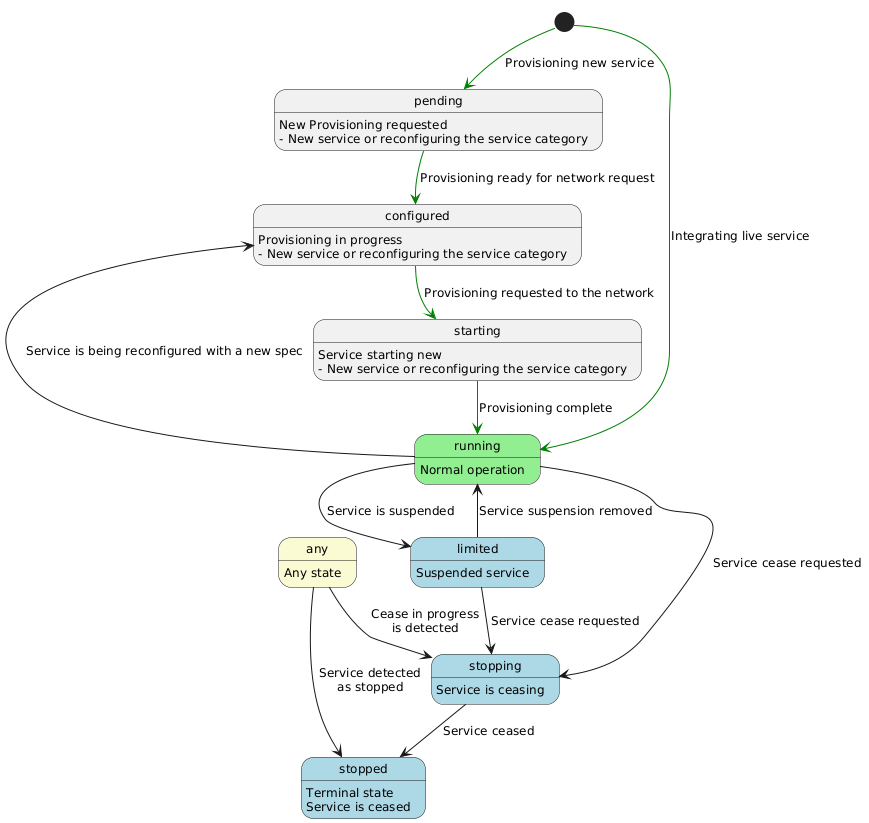
To read the status of an active Service, tenants call the List or find Service objects or the Retrieve a Service by ID endpoints
Service Instance example
Expand Service Instance response example
This is an example of a GET Service Instance response
{
    "id": "dd5244e1-13e3-45a5-b2f0-47b111a65142",
    "lastUpdate": "2025-02-12T16:06:44.318Z",
    "version": 1,
    "name": "Mobile Voice Giacom-O2",
    "description": "Mobile Voice Giacom-O2",
    "category": "Mobile Voice Service",
    "isBundle": false,
    "operatingStatus": "pending",
    "hasStarted": false,
    "isServiceEnabled": false,
    "serviceDate": "2025-02-12T16:46:58.852Z",
    "startDate": "2025-02-12T16:46:58.852Z",
    "endDate": "2026-02-12T16:46:58.852Z",
    "serviceSpecification": {
        "id": "MOBILE_VOICE_SRV_GIACOM_O2",
        "version": "1"
    },
    "serviceOrderItem": [
        {
            "serviceOrderId": "38056a58-f783-453a-bc80-18d25ba8f3dc",
            "itemAction": "add",
            "itemId": "1"
        }
    ],
    "externalIdentifier": [
        {
            "owner": "ACME Comms",
            "externalIdentifierType": "service_id",
            "id": "123"
        }
    ],
    "relatedParty": [
        {
            "role": "VENDOR_ACCOUNT",
            "partyOrPartyRole": {
                "id": "ACME Comms"
            }
        },
        {
            "role": "VENDOR",
            "partyOrPartyRole": {
                "id": "GIACOM"
            }
        },
        {
            "role": "NETWORK",
            "partyOrPartyRole": {
                "id": "O2"
            }
        }
    ],
    "serviceCharacteristic": [
        {
            "id": "BILL_LIMIT",
            "name": "Bill limit",
            "description": "Bill limit",
            "valueType": "int",
            "value": [
                {
                    "name": "Bill limit",
                    "description": "Bill limit value",
                    "valueType": "int",
                    "value": "100"
                }
            ]
        },
        {
            "id": "VENDOR_OFFERING",
            "name": "Tariff",
            "description": "Giacom mobile tariff. Corresponds to the Giacom Mobile product",
            "valueType": "string",
            "value": [
                {
                    "name": "AIO2GBPIC - All In One Pooled Data 2GB inc. International Caller V24Q2",
                    "description": "AIO2GBPIC - All In One Pooled Data 2GB inc. International Caller V24Q2",
                    "valueType": "string",
                    "value": "62231"
                }
            ]
        },
        {
            "id": "SIM_TYPE",
            "name": "SIM type",
            "description": "Type of SIM card",
            "valueType": "string",
            "value": [
                {
                    "name": "Triple SIM",
                    "description": "Triple SIM",
                    "valueType": "string",
                    "value": "triple"
                }
            ]
        },
        {
            "id": "ICCID",
            "name": "SIM Serial",
            "description": "SIM Serial",
            "valueType": "iccid",
            "value": [
                {
                    "name": "SIM Serial",
                    "description": "SIM Serial",
                    "valueType": "iccid",
                    "value": "8944201122334455667"
                }
            ]
        }
    ],
    "feature": [
        {
            "id": "SUSPENSIONS_FULL_SUSPEND",
            "name": "Full suspend",
            "description": "Bars all features",
            "isEnabled": false
        },
        {
            "id": "SUSPENSIONS_SERVICE_PROVIDER_FULL_SUSPEND",
            "name": "Service provider full suspend",
            "description": "Admin full service bar placed",
            "isEnabled": false
        },
        {
            "id": "CALLS_CALLS_PREMIUM",
            "name": "Calls premium",
            "description": "Can make calls to premium numbers",
            "isEnabled": true
        },
        {
            "id": "ROAMING_ROAMING_CALLS",
            "name": "Roaming calls",
            "description": "Can make and receive calls outside of the UK",
            "isEnabled": true
        },
        {
            "id": "ROAMING_ROAMING_CALLS_IN",
            "name": "Roaming calls in",
            "description": "Can receive calls outside of the UK",
            "isEnabled": false
        },
        {
            "id": "ROAMING_ROAMING_CALLS_OUT",
            "name": "Roaming calls out",
            "description": "Can make calls outside of the UK",
            "isEnabled": false
        },
        {
            "id": "SERVICE_CONF_CALLING",
            "name": "Conf calling",
            "description": "Conference calling is enabled",
            "isEnabled": true
        },
        {
            "id": "SMS_MMS_IN_OUT",
            "name": "MMS in out",
            "description": "Can send and receive MMS",
            "isEnabled": true
        },
        {
            "id": "SERVICE_WIFI_CALLING",
            "name": "Wifi calling",
            "description": "Wifi calling is enabled",
            "isEnabled": true
        },
        {
            "id": "APN_INTERNET",
            "name": "O2 Internet APN",
            "description": "5G service",
            "isEnabled": true
        },
        {
            "id": "APN_IPHONE_985",
            "name": "O2 iPhone APN 985",
            "description": "O2 iPhone APN 985",
            "isEnabled": true
        },
        {
            "id": "APN_IPHONE_986",
            "name": "O2 iPhone APN 986",
            "description": "O2 iPhone APN 986",
            "isEnabled": false
        }
    ]
}
The API provides this mechanism in the advanced filtering section which uses JSONPath expressions
To search for services by their subscriber number:
# E.g.: Finding a mobile service by MSISDN (subscriber number) requires searching services by the value of its characteristics.
GET /service?filter=$.serviceCharacteristic[?(@.id=="MSISDN")].value[?(@.value=="07800987654")]
# E.g.: To search for services by the serial number of the SIM
GET /service?filter=$.serviceCharacteristic[?(@.id=="ICCID")].value[?(@.value=="8944201122334455667")]
It is possible to force a network refresh to obtain a Service Instance freshly updated from the supplier's system.
To force the refresh, set the network_refresh = true header in the Retrieve a Service by ID endpoint.
List or find Service objects
List or find Service objects
Filter capabilities
Only allows access to instances on the tenant defined on the access token.
Can search by top level properties (exact match) using query parameters:
- id
- serviceSpecification.id
- serviceSpecification.version
- category
- name
- isServiceEnabled
- hasStarted
- operatingStatus
Can search nested fields using JSONPATH:
- relatedParty
- externalIdentifier
- serviceCharacteristic
- serviceRelationship
# E.g. list all serviceInstances with "category" == "Mobile Voice Service" supplied by Giacom
GET /service?category=Mobile Voice Service&filter=$.relatedParty[?(@.role=="supplier" && @.partyOrPartyRole.id=="GIACOM")]
Authorizations:
query Parameters
| limit | integer Requested number of resources to be provided in response. At the moment only |
| id | string <uuid> Identifier of the entity |
| serviceSpecification.id | string <SCREAMING_SNAKE_CASE> Filter by service specification ID |
| serviceSpecification.version | integer <int64> Filter by service specification version |
| category | string (ServiceCategoryEnum) Enum: "Mobile Voice Service" "Mobile Data only Service" "Mobile Bolt On" "Broadband FTTP" "Broadband SOADSL" "Broadband SOGEA" Category of the entity. Supports IN queries by defining this parameter multiple times in the query with the different values |
| name | string Name of the entity. If defined, a full case-sensitive equals match is applied |
| isServiceEnabled | boolean If the services to search for are enabled or not |
| hasStarted | boolean If the services to search for have ever started or not |
| operatingStatus | string (ServiceOperatingStatusType) Enum: "pending" "configured" "starting" "running" "degraded" "failed" "limited" "stopping" "stopped" "unknown" Operating status of the entity. Supports IN queries by defining this parameter multiple times in the query with the different values |
| filter | string Example: filter=$.relatedParty[?(@.role=="supplier" && @.partyOrPartyRole.id=="GIACOM")] Filter using JSONPath. Supports searching |
Responses
Response samples
- 200
- 400
- 401
- 404
- 500
[- {
- "id": "string",
- "isServiceEnabled": true,
- "hasStarted": true,
- "startDate": "2019-08-24T14:15:22Z",
- "endDate": "2019-08-24T14:15:22Z",
- "serviceOrderItem": [
- {
- "serviceOrderId": "string",
- "itemAction": "add",
- "itemId": "string"
}
], - "isBundle": true,
- "feature": [
- {
- "featureCharacteristic": [
- {
- "id": "string",
- "valueType": "string",
- "name": "string",
- "description": "string",
- "value": [
- {
- "name": "string",
- "description": "string",
- "valueType": "string",
- "value": "string"
}
]
}
], - "isEnabled": true,
- "id": "string",
- "name": "string",
- "description": "string"
}
], - "externalIdentifier": [
- {
- "owner": "MagentoCommerce",
- "externalIdentifierType": "ProductOrder",
- "id": "string"
}
], - "serviceCharacteristic": [
- {
- "id": "string",
- "valueType": "string",
- "name": "string",
- "description": "string",
- "value": [
- {
- "name": "string",
- "description": "string",
- "valueType": "string",
- "value": "string"
}
]
}
], - "serviceRelationship": [
- {
- "relationshipType": "addon_for",
- "service": {
- "id": "string"
}
}
], - "relatedParty": [
- {
- "role": "string",
- "partyOrPartyRole": {
- "id": "string"
}
}
], - "operatingStatus": "pending",
- "serviceSpecification": {
- "id": "string",
- "version": "string"
}, - "serviceDate": "2019-08-24T14:15:22Z",
- "version": 1,
- "lastUpdate": "2019-08-24T14:15:22Z",
- "category": "Mobile Voice Service",
- "name": "string",
- "description": "string",
- "place": {
- "role": "Installation Address",
- "place": {
- "city": "string",
- "locality": "string",
- "postcode": "string",
- "stateOrProvince": "string",
- "streetName": "string",
- "streetNr": "string",
- "geographicSite": {
- "code": "BTS",
- "relatedParty": [
- {
- "role": "string",
- "partyOrPartyRole": {
- "id": "string"
}
}
], - "externalIdentifier": [
- {
- "owner": "MagentoCommerce",
- "externalIdentifierType": "ProductOrder",
- "id": "string"
}
], - "contactMedium": [
- {
- "contactType": "Primary",
- "name": "string",
- "surname": "string",
- "phoneNumber": "string"
}
]
}, - "openreachALK": "string",
- "districtCode": "string",
- "openreachQualifier": "Gold",
- "geographicSubAddress": {
- "buildingName": "string",
- "levelNumber": "string",
- "levelType": "string"
}
}
}
}
]Retrieves a Service by ID
This operation retrieves a Service entity. Attribute selection enabled for all first level attributes.
- Only allow access to instances on the tenant from the access token
- The system always returns the last version of the ServiceInstance, since it doesn't store multiple versions. PATCH operations change the records and don't store historic versions
Authorizations:
path Parameters
| id required | string Identifier of the Resource |
header Parameters
| network_refresh | boolean Set to true to trigger a network refresh of the service and obtain service instance freshly synchronised from the supplier's system |
Responses
Response samples
- 200
- 400
- 401
- 404
- 409
- 500
{- "id": "6b9d14d4-cca9-416e-9af5-452b77e63a7b",
- "lastUpdate": "2025-02-12T16:06:44.318Z",
- "version": 1,
- "name": "Mobile Voice Giacom-O2 DATA",
- "description": "Mobile Voice Giacom-O2 DATA",
- "category": "Mobile Data only Service",
- "isBundle": false,
- "operatingStatus": "pending",
- "isServiceEnabled": false,
- "hasStarted": false,
- "serviceDate": "2025-02-12T16:46:58.852Z",
- "startDate": "2025-02-12T16:46:58.852Z",
- "endDate": "2026-02-12T16:46:58.852Z",
- "serviceSpecification": {
- "id": "MOBILE_DATA_SRV_GIACOM_O2",
- "version": "1"
}, - "serviceOrderItem": [
- {
- "serviceOrderId": "c159aa0f-83f8-4387-b04a-84822728e153",
- "itemAction": "add",
- "itemId": "1"
}
], - "externalIdentifier": [
- {
- "owner": "ACME Comms",
- "externalIdentifierType": "ID",
- "id": "1233"
}
], - "relatedParty": [
- {
- "role": "VENDOR_ACCOUNT",
- "partyOrPartyRole": {
- "id": "ACME Comms"
}
}, - {
- "role": "VENDOR",
- "partyOrPartyRole": {
- "id": "GIACOM"
}
}, - {
- "role": "NETWORK",
- "partyOrPartyRole": {
- "id": "O2"
}
}
], - "serviceCharacteristic": [
- {
- "id": "BILL_LIMIT",
- "name": "Bill limit",
- "description": "Bill limit",
- "valueType": "int",
- "value": [
- {
- "name": "Bill limit",
- "description": "Bill limit value",
- "valueType": "int",
- "value": "100"
}
]
}, - {
- "id": "VENDOR_OFFERING",
- "name": "Tariff",
- "description": "Giacom mobile tariff. Corresponds to the Giacom Mobile product",
- "valueType": "string",
- "value": [
- {
- "name": "AIOMB100 - All In One Mobile Broadband 100GB V24Q2",
- "description": "AIOMB100 - All In One Mobile Broadband 100GB V24Q2",
- "valueType": "string",
- "value": "62228"
}
]
}, - {
- "id": "MSISDN",
- "name": "Subscriber number",
- "description": "Subscriber number. Not required for new provisionings since Giacom will attribute one from its pool",
- "valueType": "subscriber number",
- "value": [
- {
- "name": "Subscriber number",
- "description": "Subscriber number",
- "valueType": "subscriber number",
- "value": "07800987654"
}
]
}, - {
- "id": "SIM_TYPE",
- "name": "SIM type",
- "description": "Type of SIM card",
- "valueType": "string",
- "value": [
- {
- "name": "Triple SIM",
- "description": "Triple SIM",
- "valueType": "string",
- "value": "triple"
}
]
}, - {
- "id": "ICCID",
- "name": "SIM Serial",
- "description": "SIM Serial",
- "valueType": "iccid",
- "value": [
- {
- "name": "SIM Serial",
- "description": "SIM Serial",
- "valueType": "iccid",
- "value": "8944201122334455667"
}
]
}
], - "feature": [
- {
- "id": "SUSPENSIONS_SERVICE_PROVIDER_FULL_SUSPEND",
- "name": "Service provider full suspend",
- "description": "Admin full service bar placed",
- "isEnabled": false
}, - {
- "id": "CALLS_CALLS_PREMIUM",
- "name": "Calls premium",
- "description": "Can make calls to premium numbers",
- "isEnabled": true
}, - {
- "id": "ROAMING_ROAMING_CALLS",
- "name": "Roaming calls",
- "description": "Can make and receive calls outside of the UK",
- "isEnabled": true
}, - {
- "id": "ROAMING_ROAMING_CALLS_IN",
- "name": "Roaming calls in",
- "description": "Can receive calls outside of the UK",
- "isEnabled": false
}, - {
- "id": "ROAMING_ROAMING_CALLS_OUT",
- "name": "Roaming calls out",
- "description": "Can make calls outside of the UK",
- "isEnabled": false
}, - {
- "id": "SERVICE_CONF_CALLING",
- "name": "Conf calling",
- "description": "Conference calling is enabled",
- "isEnabled": true
}, - {
- "id": "SMS_MMS_IN_OUT",
- "name": "MMS in out",
- "description": "Can send and receive MMS",
- "isEnabled": true
}, - {
- "id": "SERVICE_WIFI_CALLING",
- "name": "Wifi calling",
- "description": "Wifi calling is enabled",
- "isEnabled": true
}, - {
- "id": "APN_INTERNET",
- "name": "O2 Internet APN",
- "description": "5G service",
- "isEnabled": true
}, - {
- "id": "APN_IPHONE_985",
- "name": "O2 iPhone APN 985",
- "description": "O2 iPhone APN 985",
- "isEnabled": true
}, - {
- "id": "APN_IPHONE_986",
- "name": "O2 iPhone APN 986",
- "description": "O2 iPhone APN 986",
- "isEnabled": false
}
]
}Updates a Service Instance
This operation updates a Service Instance entity.Only the Activation components can update a Service Instance. It is their responsibility to keep a service instance in sync with the network
Expand documentation
Versioning
Note: PATCH updates the version
Older versions are not stored. There is only one record which gets updated and a new version, i.e. not like ServiceCatalogue
Update types
The system supports Partial and Full update requests, as described next.
Partial updates
Activation components send requests using the
application/merge-patch+jsoncontent type, meaning the Activation component sends a partial object to edit the existing one
This type of request can be used by an Activation component to either modify specific fields or add values to a list. The system will only change the fields included in the request. All others will be left untouched.
Supported use cases (may be mixed in the same request):
- Update
statemanaging properties- UC: Change to Running
- UC: Change to Stopping
- UC: Change to other states
- UC: Suspend service (Also requires changing a feature)
- UC: Resume service (Also requires changing a feature)
- Update start and end
datesThis triggers no business rules in ServiceInventory
- Update individual
Featurestates- UC: Add/Remove BARS
- UC: Enable/Disable Services
- UC: Enable/Disable APN
- Update individual
CharacteristicvaluesThe Activation component only identifies the existing characteristic by ID and defines a new value
- UC: Change tariff
- Add
CharacteristicsThe Activation component identifies the new characteristic by ID and defines its value. The system identifies it is a new characteristic, allowed by the spec, and adds it to the list with the value defined in the request
- UC: Define subscriber number
- UC: Define eSIM Serial Number (Vodafone only)
- UC: Define eSIM QR Code
- Add
serviceOrderItemThis property only supports adding new values to the list. Changing or removing values isn't supported
- UC: Add serviceOrderItem
Example of all properties that can be updated with a partial update:
{
    "operatingStatus": "pending",
    "isServiceEnabled": false,
    "hasStarted": false,
    "startDate": "2025-02-12T16:46:58.852Z",
    "endDate": "2026-02-12T16:46:58.852Z",
    "serviceOrderItem": [
        {
            "serviceOrderId": "7bb64010-79eb-4984-9f1a-7bd02dafef81",
            "itemAction": "modify",
            "itemId": "1"
        }
    ],
    "serviceCharacteristic": [
        {
            "id": "VENDOR_OFFERING",
            "value": [
                {
                    "value": "62212"
                }
            ]
        }
    ],
    "feature": [
        {
            "id": "CALLS_CALLS_PREMIUM",
            "isEnabled": true
        }
    ]
}
Change status to a state not in the state machine
Note: Any state transition needs to follow the state machine
Any requests that tries to put a Service in a state not defined in the state machine triggers a 400 Bad Request with a "ERR_000004: Resulting state is not supported" error code and message
Change to Running
Note: Any state transition needs to follow the state machine
This request may be used as part of the provisioning flow, when all network operations have completed and the service is fully provisioned and live.
{
    "operatingStatus": "running",
    "hasStarted": true,
    "isServiceEnabled": true,
    "serviceOrderItem": [
        {
            "serviceOrderId": "38056a58-f783-453a-bc80-18d25ba8f3dc",
            "itemAction": "add",
            "itemId": "1"
        }
    ]
}
Change to Stopping
Note: Any state transition needs to follow the state machine
This request may be used as part of the cease service flow, as the 1st operation that immediately sets the service as stopping and prevents further use.
{
    "endDate": "2025-09-01T00:00:00.000Z",
    "operatingStatus": "stopping",
    "isServiceEnabled": false,
    "serviceOrderItem": [
        {
            "serviceOrderId": "c35297b0-0bf1-42f7-8bf8-63665fc8139e",
            "itemAction": "delete",
            "itemId": "1"
        }
    ]
}
Change to other states
Note: Any state transition needs to follow the state machine
Changing to other states is possible as long as the final state matches a valid state in the state machines.
Suspend service
Note: Any state transition needs to follow the state machine
To suspend a service, the Activation component will have to update the properties defined in the example below
{
    "operatingStatus": "limited",
    "isServiceEnabled": false,
    "serviceOrderItem": [
        {
            "serviceOrderId": "6e213d82-219b-4020-805f-693a2efeea3b",
            "itemAction": "modify",
            "itemId": "1"
        }
    ],
    "feature": [
        {
            "id": "SERVICE_SUSPENSION",
            "isEnabled": true
        }
    ]
}
Note: Typically this may also involve changing the ADMIN Bar, but that is dependent on the service provider
Resume service
Note: Any state transition needs to follow the state machine
To resume a suspended service, the Activation component will have to update the properties defined in the example below
{
    "operatingStatus": "running",
    "isServiceEnabled": true,
    "serviceOrderItem": [
        {
            "serviceOrderId": "c81abd77-b494-48c1-9afc-522096bd8ba1",
            "itemAction": "modify",
            "itemId": "1"
        }
    ],
    "feature": [
        {
            "id": "SERVICE_SUSPENSION",
            "isEnabled": false
        },
        {
            "id": "SUSPENSIONS_SERVICE_PROVIDER_FULL_SUSPEND",
            "isEnabled": false
        }
    ]
}
Note: Typically this may also involve changing the ADMIN Bar, but that is dependent on the service provider
Add/Remove BARS
Adding or removing bars is done by enabling or disabling Bars features, i.e. features included in the BARS bundle Feature
Note: The system must remain agnostic of feature bundles beyond validating
featureSpecRelationshipin the features.BARSis a value defined by the service modeller
- Requires only the service ID and the feature list with features with only ID and isEnabled
- Supports multiple values on the same request
- Respects relationships on the spec, i.e. when enabling a feature that defines an
excludes featureSpecRelationship, the system validates that the target feature will become disabled if the patch is applied. If not, the system fails the operation with ERR_000004 due to the feature relationships not being respected. It is the Activation component's responsibility to request the correct state.
{
    "serviceOrderItem": [
        {
            "serviceOrderId": "347cb184-b625-42f5-ac83-da4056affe02",
            "itemAction": "modify",
            "itemId": "1"
        }
    ],
    "feature": [
        {
            "id": "ROAMING_ROAMING_CALLS",
            "isEnabled": false
        },
        {
            "id": "ROAMING_ROAMING_CALLS_IN",
            "isEnabled": true
        },
        {
            "id": "ROAMING_ROAMING_CALLS_OUT",
            "isEnabled": true
        }
    ]
}
Enable/Disable Services
Enabling or disabling services is done by enabling or disabling Service features, i.e. features included in the NETWORK_SERVICES bundle Feature
Note: The system must remain agnostic of feature bundles beyond validating
featureSpecRelationshipin the features.NETWORK_SERVICESis a value defined by the service modeller
- Requires only the service ID and the feature list with features with only ID and isEnabled
- Supports multiple values on the same request
- Respects relationships on the spec. See "Add/Remove BARS" above for more details
{
    "serviceOrderItem": [
        {
            "serviceOrderId": "7d38cec5-0c29-4cdd-b799-e4a44beeca32",
            "itemAction": "modify",
            "itemId": "1"
        }
    ],
    "feature": [
        {
            "id": "SERVICE_CONF_CALLING",
            "isEnabled": false
        },
        {
            "id": "SERVICE_WIFI_CALLING",
            "isEnabled": false
        }
    ]
}
Enable/Disable APN
Enabling or disabling APN is done by enabling or disabling APN features, i.e. features included in the APNS bundle Feature
Note: The system must remain agnostic of feature bundles beyond validating
featureSpecRelationshipin the features.APNSis a value defined by the service modeller
- Requires only the service ID and the feature list with features with only ID and isEnabled
- Supports multiple values on the same request
- Respects relationships on the spec. See "Add/Remove BARS" above for more details
{
    "serviceOrderItem": [
        {
            "serviceOrderId": "bea545bf-2214-4f83-94cf-eeec7839a6ea",
            "itemAction": "modify",
            "itemId": "1"
        }
    ],
    "feature": [
        {
            "id": "APN_IPHONE_985",
            "isEnabled": false
        },
        {
            "id": "APN_IPHONE_986",
            "isEnabled": true
        }
    ]
}
Change tariff
This example captures a change in the tariff and exemplifies how to execute a change to the value of a characteristic.
In this case, the system will see a change to the value of characteristic already in the Service Instance and will just accept the change.
Note: The system will validate the new value against the spec
{
    "serviceOrderItem": [
        {
            "serviceOrderId": "7ec0b3bd-ccc1-46c9-b6f7-c6af93a82166",
            "itemAction": "modify",
            "itemId": "1"
        }
    ],
    "serviceCharacteristic": [
        {
            "id": "VENDOR_OFFERING",
            "value": [
                {
                    "value": "62212"
                }
            ]
        }
    ]
}
Define subscriber number
This example captures how to add a new characteristic, in this case, the subscriber number.
In this case, the system will see a characteristic not in the Service Instance. The system will validate that the Characteristic can be added from the spec and that the value is valid for the Characteristic.
Giacom mobile services only define the subscriber number after the provisioning request. This means these services are instantiated without that characteristic and at some point the ServiceActivation service will need to update the service
{
    "serviceOrderItem": [
        {
            "serviceOrderId": "38056a58-f783-453a-bc80-18d25ba8f3dc",
            "itemAction": "add",
            "itemId": "1"
        }
    ],
    "serviceCharacteristic": [
        {
            "id": "MSISDN",
            "value": [
                {
                    "value": "07800987654"
                }
            ]
        }
    ]
}
Define eSIM Serial Number (Vodafone only)
This example captures how to add a new characteristic, in this case, defining the eSIM Serial Number. This operation is required for Vodafone eSims
Note: Same behaviour as detailed in defining the subscriber number
Vodafone services only return the eSIM Serial after the provisioning request. This means these services are instantiated without that characteristic and at some point the ServiceActivation service will need to update the service
{
    "serviceOrderItem": [
        {
            "serviceOrderId": "34ec093f-875e-499e-b004-2e3954eb8b36",
            "itemAction": "add",
            "itemId": "1"
        }
    ],
    "serviceCharacteristic": [
        {
            "id": "ESIM_QR_CODE",
            "value": [
                {
                    "value": "YmFzZTY0IGVuY29kZWQgdmFsdWU="
                }
            ]
        }
    ]
}
Define eSIM QR Code
This example captures how to add a new characteristic, in this case, defining the eSIM access QR code.
Note: Same behaviour as detailed in defining the subscriber number
Giacom mobile services only return the QR Code after the provisioning request. This means these services are instantiated without that characteristic and at some point the ServiceActivation service will need to update the service
{
    "serviceOrderItem": [
        {
            "serviceOrderId": "34ec093f-875e-499e-b004-2e3954eb8b36",
            "itemAction": "add",
            "itemId": "1"
        }
    ],
    "serviceCharacteristic": [
        {
            "id": "ESIM_QR_CODE",
            "value": [
                {
                    "value": "YmFzZTY0IGVuY29kZWQgdmFsdWU="
                }
            ]
        }
    ]
}
Add serviceOrderItem
Service Instance maintain a record of all ServiceOrderItem which caused changes to it.
A Service Activation component updating a Service Instance is expected to identify the service order item which triggered the update.
The system prevents duplicate entries in the serviceOrderItem list:
- Duplicate entries are identified by the same order Id and orderItemID. The action is not a key and is not mutable
- No error is generated in case of duplicates
- The system simple removes duplicates from the final list
- The system ignores duplicate entries with different actions. Action is not mutable
Full updates
Activation component send requests using the
application/jsoncontent type, meaning the Activation component sends full objects to replace existing ones
This type of request is required if an Activation component needs to change:
- A list of objects
- The ServiceSpecification, where the Activation component needs to provide a whole new object with values that may have to be derived or adapted from the current base spec to the new one
The logic to update an instance when the specification changes belongs to the service doing that particular activation. It needs to be controlled externally, meaning ServiceInventory won't automate deriving new values from previous ones when the spec changes
The Activation component may still send only specific properties. The difference to partial updates is that in full updates the objects are completely redefined, allowing to delete entries from lists.
Supported use cases (may be mixed in the same request):
- Update the
RelatedPartylist - Update the
externalIdentifierlist - Change the
ServiceSpecification:- UC: Change from Voice to Data and vice-versa, as long as the specs have the correct relationships
Requires redefining the
CharacteristicsandFeatureslists
- UC: Change from Voice to Data and vice-versa, as long as the specs have the correct relationships
- Update
statemanaging propertiesLike on partial updates, the system accepts modifying these properties in full updates using the same business rules
- Update start and end
datesLike on partial updates, the system accepts modifying these properties in full updates using the same business rules
- Add
serviceOrderItemThis property only supports adding new values to the list. Changing or removing values isn't supported.
Setting this property on a full patch requests has the same behaviour as in a partial patch- UC: Add serviceOrderItem
Works exactly the same as in partial updates. Only adds. Never changes or removes
- UC: Add serviceOrderItem
Unsupported use cases:
- Update the
serviceRelationshiplistThis list cannot currently be changed after creation
ANot implemented erroris returned if the cliActivation component defines this optional field in a full PATCH request - Change the ServiceSpecification between Voice or Data to Bolt-on and vice-versa
It is NOT possible to change the ServiceSpecification of a ServiceInstance from a Voice or Data mobile service to a Bolt-on service, and vice-versa. These are not compatible, which is also enforced by Spec Relationships
- Changing the list of
Featureswithout changing theServiceSpecification
Since the full list of features is added to the service when it is instantiated, this list cannot be changed without changing theServiceSpecification.
When theServiceSpecificationis not being changed, the system completely ignores the Features field in PATCH requests.The Activation component may send an empty list to keep requests compliant and compact
- Removing
CharacteristicsThere are no known use cases where an Activation component may need to remove characteristics, so this operation is not allowed on its own.
Change relatedParty (add, remove, change)
The Activation component needs to send the complete list of relatedParty to make any modification the relatedParty list.
The Activation component may start by getting the serviceInstance to obtain the current list and add, remove and or change it.
The related Party is a list which is partially defined by the Activation component and by the values on the specification. The values from the ServiceSpecification are always added to the list in instances and may not be modified by Activation components. Activation components are free to include those elements or not in the PATCH request. The system will always keep the values from the spec.
The system also prevents duplicate entries:
- Duplicate entries are identified by the same party and role
- No error is generated in case of duplicates
- The system simple removes duplicates from the final list
- There is no validation about defining multiple parties for the same role. Activation components are responsible for managing the parties.
This example adds a customer party to the service created from the New service Giacom O2 example available in the POST operation. distributorhas been added by the Activation component when the service was created. Other parties derive from the spec.
{
    "relatedParty": [
        {
            "role": "VENDOR_ACCOUNT",
            "partyOrPartyRole": {
                "id": "ACME Comms"
            }
        },
        {
            "role": "VENDOR",
            "partyOrPartyRole": {
                "id": "GIACOM"
            }
        },
        {
            "role": "customer",
            "partyOrPartyRole": {
                "id": "ACME Corp"
            }
        }
    ]
}
Add/remove/change an externalIdentifier
This use case is similar to adding a relatedParty, with the exception that the externalIdentifier list is fully managed by the Activation component and the system will simply accept any list the Activation component sends as the new list to persist
(Unsupported) Update the serviceRelationship list
There are no known use cases that require changing this list after creation.
The system returns an Operation not implemented error if this optional field is included in a PATCH request, even if it is a request that is changing the serviceSpecification
(Unsupported) Changing the list of Features
There are no use cases that require changing the list of Features on a ServiceInstance without changing its ServiceSpecification.
The system ignores the contents of these lists when the ServiceSpecification is not being modified.
Changing between Voice and Data only service
Changing from Voice and Data to a Data only service, and vice-versa, requires the Activation component to change the ServiceSpecification and provide values to the following properties as if the service was being instantiated for the 1st time.
The service will apply the same validations and rules for these properties as those used during a POST
ServiceSpecificationThe system will return an "Operation not supported" if the two ServiceSpecifications are not convertible
- ServiceSpecifications define this possibility through the
serviceSpecRelationshipin the ServiceSpecifications and theconvertible_tovalueNote: the relationship is defined as a one-way. Both specs need to define the relationship to allow two-way conversion
- ServiceSpecifications define this possibility through the
- List of
CharacteristicsThe Activation component is responsible for the values and must provide a list of
Characteristicsas if the service was being instantiated by the 1st time with the new spec - List of
FeaturesThe Activation component is responsible for the states and must provide a list of
Featuresas if the service was being instantiated by the 1st time with the new spec, i.e. providing the features and their state in a way as to modify the default values in the spec to match the desired state of the service after the update - List of
relatedPartyThe Activation component is responsible for passing the relatedParty elements to add to the ones defined in the new spec. The system will behave as if the service was being instant
- The 4 state governing properties
The system still accepts the modification of all 4 state governing properties in this scenario to allow managing the service's lifecycle required with this change
Note: The system still returns an Operation not implemented error if the Activation component defines the serviceRelationship optional field.
Other fields are freely modified . E.g. startDate
Voice to Data example
In the example below, the Activation component is:
- Defining the state the service should be in:
ConfiguredNote: Configured with hasStarted = true means it is being reconfigured
- Defining the new
ServiceSpecification - Redefining the entire
externalIdentifierlistNote: This list is Partner managed. The system won't interpret the list
- Redefining the
relatedPartylistIn this case the Activation component is only sending the values to be added to the list in the ServiceSpecification. The values on the spec are always added even they had been specified in the patch request
- Redefining the
serviceCharacteristiclistThe Activation component needs to send the complete list of characteristics to keep in the service and their values. It is the Activation component's responsibility to keep, convert or change any values from the previous version of the ServiceInstance, as well to provide the values for new characteristics
- Redefining the
featurelistIn this case the Activation component is sending the complete list of features and their states.
The Activation component could have also only sent the values for the feature that need to override the defaults in the spec - Adding a serviceOrderItem reference
In all cases, this list implements a log of serviceOrderItems that acted on the service, so it is append only
{
    "operatingStatus": "configured",
    "hasStarted": true,
    "isServiceEnabled": false,
    "serviceSpecification": {
        "id": "MOBILE_DATA_SRV_GIACOM_O2",
        "version": "1"
    },
    "serviceOrderItem": [
        {
            "serviceOrderId": "c658ce90-bc96-45bd-8803-bf85fdb64189",
            "itemAction": "modify",
            "itemId": "1"
        }
    ],
    "serviceCharacteristic": [
        {
            "id": "BILL_LIMIT",
            "value": [
                {
                    "value": "100"
                }
            ]
        },
        {
            "id": "VENDOR_OFFERING",
            "value": [
                {
                    "value": "62225"
                }
            ]
        },
        {
            "id": "SIM_TYPE",
            "value": [
                {
                    "value": "triple"
                }
            ]
        },
        {
            "id": "ICCID",
            "value": [
                {
                    "value": "8944201122334455669"
                }
            ]
        },
        {
            "id": "MSISDN",
            "value": [
                {
                    "value": "07800987654"
                }
            ]
        }
    ],
    "feature": [
        {
            "id": "SERVICE_SUSPENSION",
            "isEnabled": false
        },
        {
            "id": "SUSPENSIONS_SERVICE_PROVIDER_FULL_SUSPEND",
            "isEnabled": false
        },
        {
            "id": "CALLS_CALLS_PREMIUM",
            "isEnabled": true
        },
        {
            "id": "ROAMING_ROAMING_CALLS",
            "isEnabled": false
        },
        {
            "id": "ROAMING_ROAMING_CALLS_IN",
            "isEnabled": true
        },
        {
            "id": "ROAMING_ROAMING_CALLS_OUT",
            "isEnabled": true
        },
        {
            "id": "SERVICE_CONF_CALLING",
            "isEnabled": false
        },
        {
            "id": "SMS_MMS_IN_OUT",
            "isEnabled": true
        },
        {
            "id": "SERVICE_WIFI_CALLING",
            "isEnabled": false
        },
        {
            "id": "APN_INTERNET",
            "isEnabled": true
        },
        {
            "id": "APN_IPHONE_985",
            "isEnabled": false
        },
        {
            "id": "APN_IPHONE_986",
            "isEnabled": true
        }
    ]
}
Authorizations:
path Parameters
| id required | string Identifier of the Resource |
header Parameters
| simulate | boolean Default: false If set to true, the operation will be simulated and no changes will be committed to the database. Defaults to false. |
| X-Idempotency-Key required | string <uuid> Key used to implement idempotency in write requests |
Request Body schema: required
The Service to be patched
| isServiceEnabled | boolean If FALSE and hasStarted is FALSE, this particular Service has NOT been enabled for use - if FALSE and hasStarted is TRUE then the service has failed |
| hasStarted | boolean If TRUE, this Service has already been started |
Array of objects (RelatedServiceOrderItem_MVO) A list of service order items related to this service | |
Array of objects (Feature_MVO) A list of feature associated with this service | |
Array of objects (ExternalIdentifier_MVO) A list of external identifiers associated with this service | |
Array of objects (Characteristic_MVO) A list of characteristics that characterize this service (ServiceCharacteristic [*]) | |
| operatingStatus | string (ServiceOperatingStatusType) Enum: "pending" "configured" "starting" "running" "degraded" "failed" "limited" "stopping" "stopped" "unknown" Valid values for the Operating status of the service |
object (RelatedPlaceRefOrValue_MVO) Entity reference. The polymorphic attributes @type, @schemaLocation & @referredType are related to the RelatedPlace entity and not the RelatedPlaceRefOrValue class itself | |
object (ServiceSpecificationRef) Base schema for addressable entities | |
Array of objects (RelatedPartyRefOrPartyRoleRef) A list of related party references (RelatedParty [*]). A related party defines party or party role linked to a specific entity |
Responses
Request samples
- Payload
{- "isServiceEnabled": true,
- "hasStarted": true,
- "serviceOrderItem": [
- {
- "serviceOrderId": "string",
- "itemAction": "add",
- "itemId": "string"
}
], - "feature": [
- {
- "featureCharacteristic": [
- {
- "id": "string",
- "value": [
- {
- "value": "string"
}
]
}
], - "isEnabled": true,
- "id": "string"
}
], - "externalIdentifier": [
- {
- "owner": "MagentoCommerce",
- "externalIdentifierType": "ProductOrder",
- "id": "string"
}
], - "serviceCharacteristic": [
- {
- "id": "string",
- "value": [
- {
- "value": "string"
}
]
}
], - "operatingStatus": "pending",
- "place": {
- "role": "Installation Address",
- "place": {
- "geographicSite": {
- "contactMedium": [
- {
- "contactType": "Primary",
- "name": "string",
- "surname": "string",
- "phoneNumber": "string"
}
]
}
}
}, - "serviceSpecification": {
- "id": "string",
- "version": "string"
}, - "relatedParty": [
- {
- "role": "string",
- "partyOrPartyRole": {
- "id": "string"
}
}
]
}Response samples
- 200
- 400
- 401
- 404
- 409
- 500
{- "id": "6b9d14d4-cca9-416e-9af5-452b77e63a7b",
- "lastUpdate": "2025-02-12T16:06:44.318Z",
- "version": 1,
- "name": "Mobile Voice Giacom-O2 DATA",
- "description": "Mobile Voice Giacom-O2 DATA",
- "category": "Mobile Data only Service",
- "isBundle": false,
- "operatingStatus": "pending",
- "isServiceEnabled": false,
- "hasStarted": false,
- "serviceDate": "2025-02-12T16:46:58.852Z",
- "startDate": "2025-02-12T16:46:58.852Z",
- "endDate": "2026-02-12T16:46:58.852Z",
- "serviceSpecification": {
- "id": "MOBILE_DATA_SRV_GIACOM_O2",
- "version": "1"
}, - "serviceOrderItem": [
- {
- "serviceOrderId": "c159aa0f-83f8-4387-b04a-84822728e153",
- "itemAction": "add",
- "itemId": "1"
}
], - "externalIdentifier": [
- {
- "owner": "ACME Comms",
- "externalIdentifierType": "ID",
- "id": "1233"
}
], - "relatedParty": [
- {
- "role": "VENDOR_ACCOUNT",
- "partyOrPartyRole": {
- "id": "ACME Comms"
}
}, - {
- "role": "VENDOR",
- "partyOrPartyRole": {
- "id": "GIACOM"
}
}, - {
- "role": "NETWORK",
- "partyOrPartyRole": {
- "id": "O2"
}
}
], - "serviceCharacteristic": [
- {
- "id": "BILL_LIMIT",
- "name": "Bill limit",
- "description": "Bill limit",
- "valueType": "int",
- "value": [
- {
- "name": "Bill limit",
- "description": "Bill limit value",
- "valueType": "int",
- "value": "100"
}
]
}, - {
- "id": "VENDOR_OFFERING",
- "name": "Tariff",
- "description": "Giacom mobile tariff. Corresponds to the Giacom Mobile product",
- "valueType": "string",
- "value": [
- {
- "name": "AIOMB100 - All In One Mobile Broadband 100GB V24Q2",
- "description": "AIOMB100 - All In One Mobile Broadband 100GB V24Q2",
- "valueType": "string",
- "value": "62228"
}
]
}, - {
- "id": "MSISDN",
- "name": "Subscriber number",
- "description": "Subscriber number. Not required for new provisionings since Giacom will attribute one from its pool",
- "valueType": "subscriber number",
- "value": [
- {
- "name": "Subscriber number",
- "description": "Subscriber number",
- "valueType": "subscriber number",
- "value": "07800987654"
}
]
}, - {
- "id": "SIM_TYPE",
- "name": "SIM type",
- "description": "Type of SIM card",
- "valueType": "string",
- "value": [
- {
- "name": "Triple SIM",
- "description": "Triple SIM",
- "valueType": "string",
- "value": "triple"
}
]
}, - {
- "id": "ICCID",
- "name": "SIM Serial",
- "description": "SIM Serial",
- "valueType": "iccid",
- "value": [
- {
- "name": "SIM Serial",
- "description": "SIM Serial",
- "valueType": "iccid",
- "value": "8944201122334455667"
}
]
}
], - "feature": [
- {
- "id": "SUSPENSIONS_SERVICE_PROVIDER_FULL_SUSPEND",
- "name": "Service provider full suspend",
- "description": "Admin full service bar placed",
- "isEnabled": false
}, - {
- "id": "CALLS_CALLS_PREMIUM",
- "name": "Calls premium",
- "description": "Can make calls to premium numbers",
- "isEnabled": true
}, - {
- "id": "ROAMING_ROAMING_CALLS",
- "name": "Roaming calls",
- "description": "Can make and receive calls outside of the UK",
- "isEnabled": true
}, - {
- "id": "ROAMING_ROAMING_CALLS_IN",
- "name": "Roaming calls in",
- "description": "Can receive calls outside of the UK",
- "isEnabled": false
}, - {
- "id": "ROAMING_ROAMING_CALLS_OUT",
- "name": "Roaming calls out",
- "description": "Can make calls outside of the UK",
- "isEnabled": false
}, - {
- "id": "SERVICE_CONF_CALLING",
- "name": "Conf calling",
- "description": "Conference calling is enabled",
- "isEnabled": true
}, - {
- "id": "SMS_MMS_IN_OUT",
- "name": "MMS in out",
- "description": "Can send and receive MMS",
- "isEnabled": true
}, - {
- "id": "SERVICE_WIFI_CALLING",
- "name": "Wifi calling",
- "description": "Wifi calling is enabled",
- "isEnabled": true
}, - {
- "id": "APN_INTERNET",
- "name": "O2 Internet APN",
- "description": "5G service",
- "isEnabled": true
}, - {
- "id": "APN_IPHONE_985",
- "name": "O2 iPhone APN 985",
- "description": "O2 iPhone APN 985",
- "isEnabled": true
}, - {
- "id": "APN_IPHONE_986",
- "name": "O2 iPhone APN 986",
- "description": "O2 iPhone APN 986",
- "isEnabled": false
}
]
}The Service Order entity represents an order to create or update an instance of a service. It can be used to:
- Provision a new Service
- Manage a live Service
- Cease a live service
It is also possible to:
- Handle failed Service Orders
- Handle rejected Service Orders
- Amend an in-flight order
- Expedite an order
- Set a new Appointment
- Change contact details
- Cancel in flight orders
Each of the above mentioned use cases is described next, with details for each service category and specifics for each Vendor
Service Order status is governed by its state property.
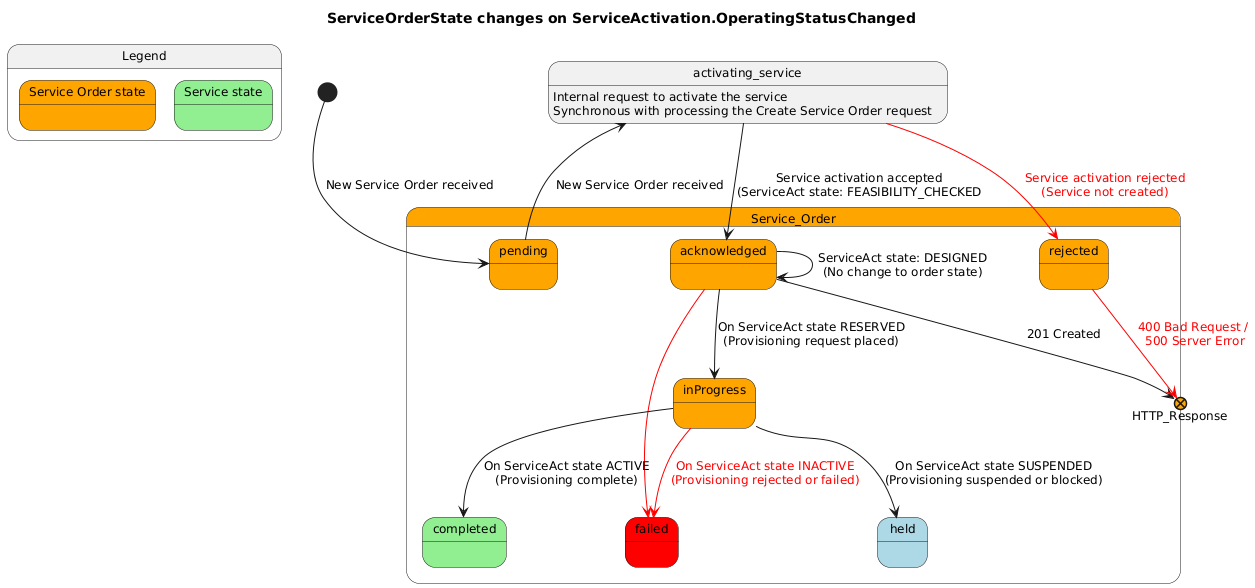
When an order is placed, the system tries to request the activation of the service.
- If the order creation is rejected or fails, the Service Order is NOT created and the system responds with 400 Bad Request or a 500 Server error, depending on the fault
- If the order is created but the activation request is rejected or fails, the system responds to the request with a 201 Accepted with the order in the
rejectedstate and with anerrorMessagefield - If the activation request is successfully accepted, the system responds to the request with 201 Accepted with the order in the
acknowledgedstate (or another, depending on the state machine) and, if applicable, with the created service's IDAfter a successful response, all communications become asynchronous, triggered by Service Order status changed events
Clients which don't handle asynchronous notification may poll the GET Service Order by ID to assess the order's state
If a serviceOrder is created but is not accepted and becomes rejected, the client still gets a 201 response with a serviceOrder object which reflects the rejection. It has:
Order ID- State
rejected - An
errorMessagefield with details about the rejection
# Snippet of a rejected order indicating a downstream error
{
    "id": "72",
    "state": "rejected",
    "errorMessage": {
        "code": "ERR_000006",
        "reason": "ERR_000006: Rejected operation",
        "message": "Operation rejected with error {error from downstream service}",
        "status": "Error"
    }
    ...
}
If a serviceOrder starts but fails before it is complete, the order will transition to the failed state and will include an errorMessage field with details about the failure, similarly to when it is rejected
| Category | Supported | Giacom Mobile | Gamma Mobile | BTW Broadband |
|---|---|---|---|---|
Mobile Voice Service |
No | No | No | |
Mobile Data only Service |
No | No | No | |
Mobile Bolt On |
No | No | No | |
Broadband FTTP |
Yes | Yes | ||
Broadband SOGEA |
Yes | Yes | ||
Broadband SOADSL |
Yes | Yes |
To cancel an order, Tenants call the DELETE /cancelServiceOrder endpoint
Cancelling an order may only be done to orders in the states:
acknowledgedinProgress
When a request to cancel an order is placed, the system returns:
201 createdif the order was immediately cancelled or has been accepted for asynchronous processing201 createdif a cancel order already exists in a non terminal state, returning that entity in the response (Idempotent behaviour)409 conflictif there is already another ongoing cancellation or activation immediately rejects the cancellation
Asynchronous updates
CancelServiceOrder:The system will trigger
CancelServiceOrderStateChangeEventfor state changes to theCancelServiceOrderentity. Tenants may observe thestateproperty to asses the success of the operationServiceOrder:In case the
ServiceOrderis effectively cancelled, the system will trigger## ServiceOrderStateChangeEventfor state changes to theServiceOrderentity. Tenants may observe thestateproperty to asses the success of the operation
| Category | Supported | Giacom Mobile | Gamma Mobile | BTW Broadband |
|---|---|---|---|---|
Mobile Voice Service |
No | No | No | |
Mobile Data only Service |
No | No | No | |
Mobile Bolt On |
No | No | No | |
Broadband FTTP |
Yes | Yes | ||
Broadband SOGEA |
Yes | Yes | ||
Broadband SOADSL |
Yes | Yes |
To amend an order, Tenants call the PATCH serviceOrder endpoint
Amending an order enables several specific use cases:
- Expediting an order
- Changing contact details
- Setting a new Appointment
Orders hold a priority property
- This property cannot be defined when an order is created
- It is set as
standardby default, meaning the order is not expedited when created - The priority may be changed only after an order has been created - to
expedited - When expediting an order:
- The tenant may optionally change the
requestedCompletionDate - Needs to provide an expedited Appointment
- The tenant may optionally change the
Requesting to the priority of an order may result in:
- Automatic rejection of the request with a
409 Conflictif the change is not possible - Acceptance, with
200 OK. This means the request has been accepted. Since this change requires an integration with the Vendor:- The order will show a
pending_expeditionvalue in thepriorityproperty - If the change is accepted:
- The
priorityproperty will change toexpedited - A ServiceOrderAttributeValueChangeEvent will be triggered to notify the tenant
- The
- If the change is rejected:
- The
priorityproperty will revert tostandard - A
JeopardyAlertwill be added to the ServiceOrder with thejeopardyType = AMEND_REJECTED - A
ServiceOrderJeopardyEventwill be triggered - A
ServiceOrderAttributeValueChangeEventwill be triggered
- The
- The order will show a
Tenants may only provide a new appointment when:
- A
ServiceOrderJeopardyEventwas triggered for aJeopardyAlertwith thejeopardyType = APPOINTMENT_NEEDED_SUPPLIER_MISSED- The Tenant must Book a new Appointment with
category = "Supplier missed"
- The Tenant must Book a new Appointment with
- A
ServiceOrderJeopardyEventwas triggered for aJeopardyAlertwith thejeopardyType = APPOINTMENT_NEEDED_CUSTOMER_MISSED- The Tenant must Book a new Appointment with
category = "Standard"
- The Tenant must Book a new Appointment with
- The Tenant is expediting an order and needs to book a new Appointment
- The Tenant must Book a new Appointment with
category = "Expedited"
- The Tenant must Book a new Appointment with
- The customer wants to change the appointment to a different date
- The Tenant must Book a new Appointment with
category = "Standard"
- The Tenant must Book a new Appointment with
Contact details are stored in the property serviceOrderItem[].service.place.place.geographicSite.contactMedium
Requesting to the contactMedium of an order may result in:
- Automatic rejection of the request with a
409 Conflictif the change is not possible - Acceptance, with
200 OK. This means the request has been accepted. Since this change requires an integration with the Vendor:- The order will show the updated
contactMedium - If the change is accepted:
- No action
- If the change is rejected:
- The
contactMediumproperty will revert to its previous state - A
JeopardyAlertwill be added to the ServiceOrder with thejeopardyType = AMEND_REJECTED - A
ServiceOrderJeopardyEventwill be triggered - A
ServiceOrderAttributeValueChangeEventwill be triggered
- The
- The order will show the updated
- A Service Order may contain multiple related Service Order Items
- A Service Order may NOT provision multiple connections or include unrelated items
E.g.: May provision a mobile service and related Bolt-ons. May NOT provision more than one mobile connection
- Service Order Items need to be all related with each other. The root order item must represent the connection service
A provisioning Service Order needs to define:
- Main
Service Order Itemaction = add- A
Service Configurationfor the main service (e.g. the mobile or broadband connection)- Needs to define:
- The
JOURNEY_TYPEon theIntent Characteristics - The
VENDOR_OFFERING - Values for its required
CharacteristicsThese will define the service's operating characteristics
- Values for its required
Intent CharacteristicsThese control installation details and refer to the Service Order context
- The state of each
Feature(enabled or disabled), when different from its default state - Some
Featuresmay also defineCharacteristics. Depending on the desired state, they should also be defined
- The
- Needs to define:
- Related Service Order Items
Some Service Orders might require an Appointment:
- Mobile service requests do not support Appointments
- Broadband has mandatory Appointment requirements in some scenarios, where in others the Appointment is optional
To create an Appointment see Booking an Appointment.
Appointment are passed to a Service Order in the serviceOrderItem.appointment property.
Note: If a Service Order has multiple nested order items, the Appointment must be passed only on the main order item, corresponding to the main service's order item
A Service Order Response will have:
state: Representing the state of the entire orderserviceOrderItem.state
A Service Order Response will NOT have:
- A
service state - Any other
service attributesbesides the ones specified in the order request.Service Orders don't reflect the service state, but actually what was requested for that service. The Retrieve a Service by ID endpoint should be used to get the complete and updated service state
Expand order response example
{
    "id": "38056a58-f783-453a-bc80-18d25ba8f3dc",
    "lastUpdate": "2025-02-12T16:06:44.318Z",
    "version": 2,
    "startDate": "2025-02-12T16:06:44.318Z",
    "state": "acknowledged",
    (...)
    "serviceOrderItem": [
        {
            "id": "1",
            "state": "acknowledged",
            "action": "add",
            "service": {
                "id": "dd5244e1-13e3-45a5-b2f0-47b111a65142",

            }
            (...)
Note: Currently it is not possible to order a mobile service with Bolt-ons. These must be ordered separately after the service has been provisioned.
Giacom Mobile
Expand request example
This is an example of a Service Order request
{
    "externalReference": [
        {
            "id": "5001",
            "externalReferenceType": "order_id",
            "name": "ACME Comms"
        }
    ],
    "relatedParty": [
        {
            "role": "VENDOR_ACCOUNT",
            "partyOrPartyRole": {
                "id": "ACME Comms"
            }
        }
    ],
    "serviceOrderItem": [
        {
            "id": "1",
            "action": "add",
            "service": {
                "serviceSpecification": {
                    "id": "MOBILE_VOICE_SRV_GIACOM_O2",
                    "version": "1"
                },
                "externalIdentifier": [
                    {
                        "owner": "ACME Comms",
                        "externalIdentifierType": "service_id",
                        "id": "123"
                    }
                ],
                "relatedParty": [
                    {
                        "role": "VENDOR_ACCOUNT",
                        "partyOrPartyRole": {
                            "id": "ACME Comms"
                        }
                    }
                ],
                "serviceCharacteristic": [
                    {
                        "id": "VENDOR_OFFERING",
                        "value": [
                            {
                                "value": "62231"
                            }
                        ]
                    },
                    {
                        "id": "VENDOR_SUB_ACCOUNT",
                        "value": [
                            {
                                "value": "abc123"
                            }
                        ]
                    },
                    {
                        "id": "SIM_TYPE",
                        "value": [
                            {
                                "value": "triple"
                            }
                        ]
                    },
                    {
                        "id": "ICCID",
                        "value": [
                            {
                                "value": "8944201122334455667"
                            }
                        ]
                    }
                ],
                "intent": {
                    "characteristic": [
                        {
                            "id": "JOURNEY_TYPE",
                            "value": [
                                {
                                    "value": "NEW"
                                }
                            ]
                        }
                    ]
                },
                "feature": [
                    {
                        "id": "CALLS_CALLS_PREMIUM",
                        "isEnabled": true
                    },
                    {
                        "id": "ROAMING_ROAMING_CALLS",
                        "isEnabled": true
                    },
                    {
                        "id": "SERVICE_CONF_CALLING",
                        "isEnabled": true
                    },
                    {
                        "id": "SMS_MMS_IN_OUT",
                        "isEnabled": true
                    },
                    {
                        "id": "SERVICE_WIFI_CALLING",
                        "isEnabled": true
                    },
                    {
                        "id": "APN_IPHONE",
                        "isEnabled": true
                    }
                ]
            }
        }
    ]
}
Expand response example
This is an example of a Service Order response.
{
    "id": "38056a58-f783-453a-bc80-18d25ba8f3dc",
    "lastUpdate": "2025-02-12T16:06:44.318Z",
    "version": 2,
    "startDate": "2025-02-12T16:06:44.318Z",
    "state": "acknowledged",
    "externalReference": [
        {
            "id": "5001",
            "externalReferenceType": "order_id",
            "name": "ACME Comms"
        }
    ],
    "relatedParty": [
        {
            "role": "VENDOR_ACCOUNT",
            "partyOrPartyRole": {
                "id": "ACME Comms"
            }
        }
    ],
    "serviceOrderItem": [
        {
            "id": "1",
            "state": "acknowledged",
            "action": "add",
            "service": {
                "id": "dd5244e1-13e3-45a5-b2f0-47b111a65142",
                "serviceSpecification": {
                    "id": "MOBILE_VOICE_SRV_GIACOM_O2",
                    "version": "1"
                },
                "externalIdentifier": [
                    {
                        "owner": "ACME Comms",
                        "externalIdentifierType": "service_id",
                        "id": "123"
                    }
                ],
                "relatedParty": [
                    {
                        "role": "VENDOR_ACCOUNT",
                        "partyOrPartyRole": {
                            "id": "ACME Comms"
                        }
                    }
                ],
                "serviceCharacteristic": [
                    {
                        "id": "VENDOR_OFFERING",
                        "name": "Vendor offering",
                        "description": "The product or service that will be ordered with the vendor",
                        "valueType": "string",
                        "value": [
                            {
                                "name": "Vendor offering",
                                "description": "The product or service that will be ordered with the vendor",
                                "valueType": "string",
                                "value": "62231"
                            }
                        ]
                    },
                    {
                        "id": "VENDOR_SUB_ACCOUNT",
                        "name": "Vendor sub account ID",
                        "description": "A logical sub-division of the Vendor Account. May represent a sub-account of an account, an account of a tenant, or other vendor specific terminology",
                        "valueType": "string",
                        "value": [
                            {
                                "name": "Vendor sub account ID",
                                "description": "A logical sub-division of the Vendor Account. May represent a sub-account of an account, an account of a tenant, or other vendor specific terminology",
                                "valueType": "string",
                                "value": "abc123"
                            }
                        ]
                    },
                    {
                        "id": "SIM_TYPE",
                        "name": "SIM type",
                        "description": "Type of SIM card",
                        "valueType": "string",
                        "value": [
                            {
                                "name": "SIM type",
                                "description": "Type of SIM card",
                                "valueType": "string",
                                "value": "triple"
                            }
                        ]
                    },
                    {
                        "id": "ICCID",
                        "name": "SIM Serial",
                        "description": "SIM Serial",
                        "valueType": "iccid",
                        "value": [
                            {
                                "name": "SIM Serial",
                                "description": "SIM Serial",
                                "valueType": "iccid",
                                "value": "8944201122334455667"
                            }
                        ]
                    }
                ],
                "intent": {
                    "characteristic": [
                        {
                            "id": "JOURNEY_TYPE",
                            "name": "Order Journey",
                            "description": "The type of order that is to be placed with the vendor. Changing this value may trigger a new journey",
                            "valueType": "string",
                            "value": [
                                {
                                    "name": "New connection",
                                    "description": "New connection through a SIM activation. MSISDN will be provided by the network",
                                    "valueType": "string",
                                    "value": "NEW"
                                }
                            ]
                        }
                    ]
                },
                "feature": [
                    {
                        "id": "CALLS_CALLS_PREMIUM",
                        "name": "Calls premium",
                        "description": "Can make calls to premium numbers",
                        "isEnabled": true
                    },
                    {
                        "id": "ROAMING_ROAMING_CALLS",
                        "name": "Roaming calls",
                        "description": "Can make and receive calls outside of the UK",
                        "isEnabled": true
                    },
                    {
                        "id": "SERVICE_CONF_CALLING",
                        "name": "Conf calling",
                        "description": "Conference calling is enabled",
                        "isEnabled": true
                    },
                    {
                        "id": "SMS_MMS_IN_OUT",
                        "name": "MMS in out",
                        "description": "Can send and receive MMS",
                        "isEnabled": true
                    },
                    {
                        "id": "SERVICE_WIFI_CALLING",
                        "name": "Wifi calling",
                        "description": "Wifi calling is enabled",
                        "isEnabled": true
                    },
                    {
                        "id": "APN_INTERNET",
                        "name": "INTERNET",
                        "description": "Internet",
                        "isEnabled": true
                    },
                    {
                        "id": "APN_IPHONE_985",
                        "name": "IPHONE",
                        "description": "iPhone",
                        "isEnabled": true
                    }
                ]
            }
        }
    ]
}
Gamma
To port a number and activate the mobile service, a client needs to create a Service Order with:
- A
Service Order Itemwith theaction = add - Define the service inside the
Service Order Itemby specifying:- The Service Specification
IDand itsversion - The
Characteristicsto define and theirvalues. Required characteristics are:- All characteristics used to provision a new service
- MSISDN
- PAC
- PORT_DATE
- The state of each
Feature(enabled or disabled)
- The Service Specification
- Any
external referencethe client needs for reference or filtering purposesThese are not processed by the system
Service Order example
Expand Service Order request example
This is an example of a Service Order request
{
    "externalReference": [
        {
            "id": "1002",
            "externalReferenceType": "order_id",
            "name": "ACME Comms"
        }
    ],
    "relatedParty": [
        {
            "role": "VENDOR_ACCOUNT",
            "partyOrPartyRole": {
                "id": "ACME Comms"
            }
        }
    ],
    "serviceOrderItem": [
        {
            "id": "1",
            "action": "add",
            "service": {
                "serviceSpecification": {
                    "id": "MOBILE_VOICE_SRV_GIACOM_VF",
                    "version": "1"
                },
                "relatedParty": [
                    {
                        "role": "VENDOR_ACCOUNT",
                        "partyOrPartyRole": {
                            "id": "ACME Comms"
                        }
                    }
                ],
                "serviceCharacteristic": [
                    {
                        "id": "BILL_LIMIT",
                        "value": [
                            {
                                "value": "100"
                            }
                        ]
                    },
                    {
                        "id": "VENDOR_OFFERING",
                        "value": [
                            {
                                "value": "55638"
                            }
                        ]
                    },
                    {
                        "id": "MSISDN",
                        "value": [
                            {
                                "value": "07400123456"
                            }
                        ]
                    },
                    {
                        "id": "PAC",
                        "value": [
                            {
                                "value": "VUK123456"
                            }
                        ]
                    },
                    {
                        "id": "PAC_EXPIRATION_DATE",
                        "value": [
                            {
                                "value": "2025-02-12T16:06:44.318Z"
                            }
                        ]
                    },
                    {
                        "id": "SIM_TYPE",
                        "value": [
                            {
                                "value": "e_sim"
                            }
                        ]
                    },
                    {
                        "id": "ICCID",
                        "value": [
                            {
                                "value": "8944112233445566778"
                            }
                        ]
                    },
                    {
                        "id": "ESIM_DELIVERY_EMAIL",
                        "value": [
                            {
                                "value": "[email protected]"
                            }
                        ]
                    },
                    {
                        "id": "ESIM_CONTACT_NAME",
                        "value": [
                            {
                                "value": "someone"
                            }
                        ]
                    }
                ],
                "feature": [
                    {
                        "id": "CALLS_CALLS_PREMIUM",
                        "isEnabled": true
                    },
                    {
                        "id": "ROAMING_ROAMING_CALLS",
                        "isEnabled": true
                    },
                    {
                        "id": "SERVICE_CONF_CALLING",
                        "isEnabled": true
                    },
                    {
                        "id": "SMS_MMS_IN_OUT",
                        "isEnabled": true
                    },
                    {
                        "id": "SERVICE_WIFI_CALLING",
                        "isEnabled": true
                    },
                    {
                        "id": "APN_INTERNET",
                        "isEnabled": true
                    },
                    {
                        "id": "APN_TETHERING",
                        "isEnabled": true
                    }
                ]
            }
        }
    ]
}
In addition to the standard requirements to provision a new Service, provisioning a new Broadband Service requires defining the following characteristics:
VENDOR_SUB_ACCOUNTORDER_RIDORDER_SITE_END_USER_TYPEORDER_MIN_DOWNLOAD_SPEEDCARE_LEVELSTATIC_IP_COUNTTRAFFIC_WEIGHTING
Provisioning an FTTP Broadband Service supports the following use cases:
- New FTTP Service with a new line
- New FTTP Service on existing ONT
- Migrate existing FTTP Service
- New FTTP Service with working Line Takeover
A new FTTP Line and ONT will be installed.
In addition to the standard requirements to provision a new Broadband Service, this use case requires defining:
An
AppointmentThe following characteristics:
JOURNEY_TYPE= NEWORDER_ONT_TYPE= NEWORDER_INSTALL_OPTION= MANAGEDORDER_MNG_INST_PROCESSORDER_MNG_INST_COST_ECC_CHARGESORDER_MNG_INST_SVR
Optional characteristics:
ORDER_COPPER_CEASE_REQUIRED
New FTTP Service on existing ONT
A new FTTP service will be installed on an existing ONT on site. This could be a single-port ONT where there is no live service, or there could be a multi-port ONT on site in which case the Port Number specified should be for a spare port.
In addition to the standard requirements to provision a new Broadband Service, this use case requires defining the following characteristics:
JOURNEY_TYPE= NEWORDER_ONT_TYPE= NEWORDER_EXISTING_LINE_ONT_PORT_STATUS= SPAREORDER_INSTALL_OPTION= MANAGED/SELFORDER_EXISTING_LINE_ONT_NUMBERORDER_EXISTING_LINE_ONT_PORT_NUMBER
An existing FTTP service will be transferred to the Vendor.
In addition to the standard requirements to provision a new Broadband Service, this use case requires defining the following characteristics:
JOURNEY_TYPE= MIGRATEORDER_ONT_TYPE=EXISTINGORDER_EXISTING_LINE_ONT_PORT_STATUS= WORKINGORDER_INSTALL_OPTION= MANAGED/SELFORDER_EXISTING_LINE_ONT_NUMBERORDER_EXISTING_LINE_ONT_PORT_NUMBER
An existing FTTP service is taken over by a new end customer without break in service, for example in the scenario of a house move.
In addition to the standard requirements to provision a new Broadband Service, this use case requires defining the following characteristics:
JOURNEY_TYPE= TAKEOVERORDER_ONT_TYPE= EXISTINGORDER_EXISTING_LINE_ONT_PORT_STATUS= WORKINGORDER_INSTALL_OPTION= MANAGED/SELFORDER_EXISTING_LINE_ONT_NUMBERORDER_EXISTING_LINE_ONT_PORT_NUMBER
Provisioning an SOGEA and SOADSL Broadband Services supports the following use cases:
- Migrate existing FTTP Service to SOGEA/SOADSL
- Start of Stopped Line
- Migrate existing SOGEA/SOADSL Service
- Working Line Takeover
A new SOGEA/SOADSL line will be installed.
In addition to the standard requirements to provision a new Broadband Service, this use case requires defining the following characteristics:
JOURNEY_TYPE= NEWORDER_INSTALL_OPTION= MANAGED/SELFORDER_EXISTING_LINE_STATUS= NEW
Reactivating a stopped line – this could be SOGEA/SOADSL or could be another technology such as WLR or MPF.
In addition to the standard requirements to provision a new Broadband Service, this use case requires defining the following characteristics:
JOURNEY_TYPE= START_STOPPEDORDER_INSTALL_OPTION= MANAGED/SELFORDER_EXISTING_LINE_IDORDER_EXISTING_LINE_STATUS= STOPPEDORDER_EXISTING_LINE_ACCESS_TECHNOLOGY
An existing SOGEA/SOADSL service will be migrated to the Vendor.
In addition to the standard requirements to provision a new Broadband Service, this use case requires defining the following characteristics:
JOURNEY_TYPE= MIGRATEORDER_INSTALL_OPTION= MANAGED/SELFORDER_EXISTING_LINE_IDORDER_EXISTING_LINE_STATUS= WORKINGORDER_EXISTING_LINE_ACCESS_TECHNOLOGY
An existing SOGEA/SOADSL service is taken over by a new end customer without break in service, for example in the scenario of a house move.
In addition to the standard requirements to provision a new Broadband Service, this use case requires defining the following characteristics:
JOURNEY_TYPE= TAKEOVERORDER_INSTALL_OPTION= MANAGED/SELFORDER_EXISTING_LINE_IDORDER_EXISTING_LINE_STATUS= WORKINGORDER_EXISTING_LINE_ACCESS_TECHNOLOGY
| Category | Supported | Giacom Mobile | Gamma Mobile | BTW Broadband |
|---|---|---|---|---|
Mobile Voice Service |
Yes | Yes | Yes | Yes |
Mobile Data only Service |
Yes | Yes | Yes | Yes |
Mobile Bolt On |
Yes | Yes | Yes | Yes |
Broadband FTTP |
Yes | Yes | Yes | Yes |
Broadband SOGEA |
Yes | Yes | Yes | Yes |
Broadband SOADSL |
Yes | Yes | Yes | Yes |
| Changing plan refers to updating a live service to have a different plan or tariff, resulting in different speeds and / or allowances, while remaining on the same access technology. |
This operation is supported by the VENDOR_OFFERING characteristic. This characteristic provides all the available vendor offerings within the same service category (i.e. access technology and service type). Tenants are able to choose a single value at a time for any given Service Instance. To change the plan, Tenants only need to create an order with:
A Service Order Item with the action = modify
- Define the service inside the
Service Order Itemby specifying:- The Service Instance
ID - The Service Specification
IDand itsversion - A new value for the
VENDOR_OFFERINGcharacteristic
- The Service Instance
{
    "serviceOrderItem": [
        {
            "id": "1",
            "action": "modify",
            "service": {
                "id": "<Service Instance ID>",
                "serviceCharacteristic": [
                    {
                        "id": "VENDOR_OFFERING",
                        "value": [
                            {
                                "value": "<NEW VALUE>"
                            }
                        ]
                    }
                ]
            }
        }
    ]
}
Features are options in a Service that can be enabled or disabled
| Category | Supported | Giacom Mobile | Gamma Mobile | BTW Broadband |
|---|---|---|---|---|
Mobile Voice Service |
Yes | Yes | Yes | Yes |
Mobile Data only Service |
Yes | Yes | Yes | Yes |
Mobile Bolt On |
Yes | Yes | Yes | Yes |
Broadband FTTP |
Yes | Yes | Yes | Yes |
Broadband SOGEA |
Yes | Yes | Yes | Yes |
Broadband SOADSL |
Yes | Yes | Yes | Yes |
Different Service Categories support different sets of Features. For a complete reference, see the Service Catalogue
To change features on an live Service, Tenants needs to create a Service Order with:
- A
Service Order Itemwith theaction = modify - Define the target Service inside the
Service Order Itemby specifying:- The Service Instance
ID - The
isEnabledstatus of eachFeatureto be changed (enabled or disabled)
- The Service Instance
- Any
external referencethe client needs for reference or filtering purposesThese are not processed by the system apart from removing duplicate entries
Notes on the behaviour of the system:
- The system will only request the Vendor to change the features included in the request
- The success of the operation depends on the success of requesting the Vendor to change the value of the Features
- The Service Inventory entity representing the target Service may not reflect the changes immediately or may show additional changes. The main causes for this behaviour are:
- The Service Inventory is kept as much in sync with the state of the Service on the Vendor's system
- The Vendor's system may have automations that update the state of some features when others change
- The state of Features may have been changed by an external system. While processing a request to change a Service, the system may refresh the Service state more than once. External changes are reflected in the Service Inventory
Configuring Mobile Service Features
Different Vendors represent different features differently. What may be a
Baron one Vendor may be aServiceon another. The Giacom API provides a Vendor agnostic API which represents all Mobiletoggle settingsas Features. This includesBars,ServicesandAPN
For Mobile Services, it is relevant to clarify that the meaning of a feature being enabled is: the feature is available. This means:
Featureshave the opposite meaning ofBars, for the same functional toggle- E.g. Considering wifi calling
- A wifi calling
Barwhich is enabled prevents wifi calling - A wifi calling
Featurewhich is enable allows wifi calling
- A wifi calling
Service Order examples
Expand Change Bars Service Order request example
This is an example of a Service Order to change Bars request
{
    "externalReference": [
        {
            "id": "5003",
            "externalReferenceType": "order_id",
            "name": "ACME Comms"
        }
    ],
    "relatedParty": [
        {
            "role": "VENDOR_ACCOUNT",
            "partyOrPartyRole": {
                "id": "ACME Comms"
            }
        }
    ],
    "serviceOrderItem": [
        {
            "id": "1",
            "action": "modify",
            "service": {
                "id": "dd5244e1-13e3-45a5-b2f0-47b111a65142",
                "feature": [
                    {
                        "id": "ROAMING_ROAMING_CALLS",
                        "isEnabled": false
                    },
                    {
                        "id": "ROAMING_ROAMING_CALLS_IN",
                        "isEnabled": true
                    },
                    {
                        "id": "ROAMING_ROAMING_CALLS_OUT",
                        "isEnabled": true
                    }
                ]
            }
        }
    ]
}
Configuring Broadband Service Features
There are no special considerations regarding this use case
Service Order examples
TBD
| Category | Supported | Giacom Mobile | Gamma Mobile | BTW Broadband |
|---|---|---|---|---|
Mobile Voice Service |
Yes | Yes | Yes | Yes |
Mobile Data only Service |
Yes | Yes | Yes | Yes |
Mobile Bolt On |
Yes | Yes | Yes | Yes |
Broadband FTTP |
Yes | Yes | Yes | Yes |
Broadband SOGEA |
Yes | Yes | Yes | Yes |
Broadband SOADSL |
Yes | Yes | Yes | Yes |
To cease a live Service, a client needs to create a Service Order with:
- A
Service Order Itemwith theaction = delete - Define the service inside the
Service Order Itemby specifying:- Its Service Instance
ID - Optionally, the
endDateat which the service should be disconnected
- Its Service Instance
- Any
external referencethe client needs for reference or filtering purposesThese are not processed by the system
Ceasing a Mobile service
When ceasing a mobile service, all associated Bolt-ons are automatically ceased
Service Order examples
Giacom Mobile example
This is an example of a Service Order request
{
    "externalReference": [
        {
            "id": "5010",
            "externalReferenceType": "order_id",
            "name": "ACME Comms"
        }
    ],
    "relatedParty": [
        {
            "role": "VENDOR_ACCOUNT",
            "partyOrPartyRole": {
                "id": "ACME Comms"
            }
        }
    ],
    "serviceOrderItem": [
        {
            "id": "1",
            "action": "delete",
            "service": {
                "id": "dd5244e1-13e3-45a5-b2f0-47b111a65142",
                "endDate": "2025-09-01T00:00:00.000Z"
            }
        }
    ]
}
Ceasing a Broadband service
There are no special considerations regarding this use case
Service Order examples
TBD
| Category | Supported | Giacom Mobile | Gamma Mobile |
|---|---|---|---|
Mobile Voice Service |
Yes | Yes | Yes |
Mobile Data only Service |
Yes | Yes | Yes |
Mobile Bolt On |
No | No | No |
To perform a SIM Swap on an active mobile service, a client needs to create a Service Order with:
- A
Service Order Itemwith theaction = modify - Define the service inside the
Service Order Itemby specifying:- The Service Instance
ID - The Service Specification
IDand itsversion - The
Characteristicsto define and theirvalues. The required characteristics can be found below. The characteristics to define vary with the network and particular case:- ICCID
- SIM_TYPE
- ESIM_QR_CODE
- ESIM_DELIVERY_EMAIL
- ESIM_CONTACT_NAME
- The Service Instance
Service Order example
Expand Service Order request example
This is an example of a Service Order request
{
    "externalReference": [
        {
            "id": "5005",
            "externalReferenceType": "order_id",
            "name": "ACME Comms"
        }
    ],
    "relatedParty": [
        {
            "role": "VENDOR_ACCOUNT",
            "partyOrPartyRole": {
                "id": "ACME Comms"
            }
        }
    ],
    "serviceOrderItem": [
        {
            "id": "1",
            "action": "modify",
            "service": {
                "id": "dd5244e1-13e3-45a5-b2f0-47b111a65142",
                "serviceCharacteristic": [
                    {
                        "id": "SIM_TYPE",
                        "value": [
                            {
                                "value": "triple"
                            }
                        ]
                    },
                    {
                        "id": "ICCID",
                        "value": [
                            {
                                "value": "8944201122334455669"
                            }
                        ]
                    }
                ]
            }
        }
    ]
}
Giacom Mobile O2
For all cases of O2 through Giacom, the only required characteristics are:
- ICCID
Always required: Identifies the new SIM
- SIM_TYPE
Since the serial will always be sent in any case, it is necessary to define the sim type only when changing it
Giacom Vodafone triple to triple
- ICCID
Identifies the new SIM
- SIM_TYPE
Optional. Since a new SIM SERIAL is being requested, the system knows that it needs to perform a SIM Swap. Since there is no need to change the SIM_TYPE, the system will maintain the value if not present in the request and ignore the value if sent since it does not define a change
Giacom Vodafone triple to eSim
- SIM_TYPE
Required to change the type
- ESIM_DELIVERY_EMAIL
Required to define for Vodafone eSims
- ESIM_CONTACT_NAME
Required to define for Vodafone eSims
Note: Vodafone Service Specifications define the ICCID to be mandatory on the Service Instance unless on an eSim. Vodafone does not pre-dispatch eSims and generates them when requested only. This means the client can't have a SIM_Serial to make this request. It will be added by the system when completing the operation
Giacom Vodafone eSim to triple
- ICCID
Identifies the new SIM
- SIM_TYPE
Required to change the type Note: ESIM_DELIVERY_EMAIL and ESIM_CONTACT_NAME can't be defined in the Service Inventory on Vodafone services using eSim. Since we are changing from eSim to triple, the client can omit this or pass a blank value. The system will remove the characteristic anyway since leaving it on the Instance would not keep it compliant with its specification. The system will also remove the QR_Code characteristic for the same reason
Giacom Vodafone eSim to eSim
- ICCID:
Not included. See "Giacom Vodafone triple to eSim" above - SIM_TYPE
Mandatory. Since it is not possible to send a ICCID in this case, SIM_TYPE needs to be sent to trigger the SIM Swap
- ESIM_DELIVERY_EMAIL
Optional. The client can send a value to replace the current one or leave blank to reuse
- ESIM_CONTACT_NAME
Optional. The client can send a value to replace the current one or leave blank to reuse
Gamma triple to triple
Gamma only supports one type of SIM: triple. To perform a SIM Swap, tenants only need to change the SIM's ICCID:
- ICCID
Identifies the new SIM
| Category | Supported | Giacom Mobile | Gamma Mobile |
|---|---|---|---|
Mobile Voice Service |
Yes | Yes | Yes |
Mobile Data only Service |
Yes | Yes | Yes |
Mobile Bolt On |
No | No | No |
A mobile service can be converted from Voice and Data to Data only service and vice-versa by changing the Service Specification of the Service Instance to another spec with the correct category.
To confirm that a Mobile Service can be converted between Voice and Data, the client needs to check that the configuration of its Service Specifications has a serviceSpecRelationship which defines a convertible_to relationship with another spec. One should have a category of "Mobile Voice Service"" and the other "Mobile Data only Service".
To change the category of an active mobile service, a client needs to create a Service Order with:
- A
Service Order Itemwith theaction = modify - Define the service inside the
Service Order Itemby specifying:- The Service Instance
ID - The *new* Service Specification
IDand itsversion - The
Characteristicsto define and theirvalues. Required characteristics are:- VENDOR_OFFERING: This is required to change the tariff
- Any characteristic on the new spec and not in the current spec
- Any characteristic whose value needs to change for the conversion
The system will import and convert any informative or read-only characteristics from one specification to another
- The Service Instance
- Any
external referencethe client needs for reference or filtering purposesThese are not processed by the system
Service category change example
Expand Service Order request example
This is an example of a Service Order request
{
    "externalReference": [
        {
            "id": "5009",
            "externalReferenceType": "order_id",
            "name": "ACME Comms"
        }
    ],
    "relatedParty": [
        {
            "role": "VENDOR_ACCOUNT",
            "partyOrPartyRole": {
                "id": "ACME Comms"
            }
        }
    ],
    "serviceOrderItem": [
        {
            "id": "1",
            "action": "modify",
            "service": {
                "id": "dd5244e1-13e3-45a5-b2f0-47b111a65142",
                "serviceSpecification": {
                    "id": "MOBILE_DATA_SRV_GIACOM_O2",
                    "version": "1"
                },
                "serviceCharacteristic": [
                    {
                        "id": "BILL_LIMIT",
                        "value": [
                            {
                                "value": "100"
                            }
                        ]
                    },
                    {
                        "id": "VENDOR_OFFERING",
                        "value": [
                            {
                                "value": "62225"
                            }
                        ]
                    },
                    {
                        "id": "SIM_TYPE",
                        "value": [
                            {
                                "value": "triple"
                            }
                        ]
                    },
                    {
                        "id": "ICCID",
                        "value": [
                            {
                                "value": "8944201122334455669"
                            }
                        ]
                    },
                    {
                        "id": "MSISDN",
                        "value": [
                            {
                                "value": "07800987654"
                            }
                        ]
                    }
                ],
                "feature": [
                    {
                        "id": "SERVICE_SUSPENSION",
                        "isEnabled": false
                    },
                    {
                        "id": "SUSPENSIONS_SERVICE_PROVIDER_FULL_SUSPEND",
                        "isEnabled": false
                    },
                    {
                        "id": "CALLS_CALLS_PREMIUM",
                        "isEnabled": true
                    },
                    {
                        "id": "ROAMING_ROAMING_CALLS",
                        "isEnabled": false
                    },
                    {
                        "id": "ROAMING_ROAMING_CALLS_IN",
                        "isEnabled": true
                    },
                    {
                        "id": "ROAMING_ROAMING_CALLS_OUT",
                        "isEnabled": true
                    },
                    {
                        "id": "SERVICE_CONF_CALLING",
                        "isEnabled": false
                    },
                    {
                        "id": "SMS_MMS_IN_OUT",
                        "isEnabled": true
                    },
                    {
                        "id": "SERVICE_WIFI_CALLING",
                        "isEnabled": false
                    },
                    {
                        "id": "APN_INTERNET",
                        "isEnabled": true
                    },
                    {
                        "id": "APN_IPHONE_985",
                        "isEnabled": false
                    },
                    {
                        "id": "APN_IPHONE_986",
                        "isEnabled": true
                    }
                ]
            }
        }
    ]
}
| Category | Supported | Giacom Mobile | Gamma Mobile |
|---|---|---|---|
Mobile Voice Service |
Yes | Yes | Yes |
Mobile Data only Service |
Yes | Yes | Yes |
Mobile Bolt On |
No | No | No |
| To add a Bolt-on to a live service, a client needs to create a Service Order with: |
- A Service Order Item with the
action = add - Define the service inside a
Service Order Itemby specifying:- The
serviceRelationshipdefining the target live Mobile Service by ID from the Service Inventory and the relationship typeaddon_for - The Service Specification
IDandversionof a Bolt-On - The
Characteristicsto define and theirvalues. Required characteristics are:- VENDOR_OFFERING
- Bolt-ons don't define
Features
- The
- Any
external referencethe client needs for reference or filtering purposesThese are not processed by the system
Bolt-on Order request example
Expand Service Order request example
This is an example of a Bolt-on Service Order request
{
    "externalReference": [
        {
            "id": "1007",
            "externalReferenceType": "order_id",
            "name": "ACME Comms"
        }
    ],
    "relatedParty": [
        {
            "role": "VENDOR_ACCOUNT",
            "partyOrPartyRole": {
                "id": "ACME Comms"
            }
        }
    ],
    "serviceOrderItem": [
        {
            "id": "1",
            "action": "add",
            "service": {
                "serviceSpecification": {
                    "id": "GIACOM_O2_DATA_BOLT_ON",
                    "version": "1"
                },
                "externalIdentifier": [
                    {
                        "owner": "ACME Comms",
                        "externalIdentifierType": "service-id",
                        "id": "123"
                    }
                ],
                "relatedParty": [
                    {
                        "role": "VENDOR_ACCOUNT",
                        "partyOrPartyRole": {
                            "id": "ACME Comms"
                        }
                    }
                ],
                "serviceRelationship": [
                    {
                        "relationshipType": "addon_for",
                        "service": {
                            "id": "dd5244e1-13e3-45a5-b2f0-47b111a65142"
                        }
                    }
                ],
                "serviceCharacteristic": [
                    {
                        "id": "VENDOR_OFFERING",
                        "value": [
                            {
                                "value": "WODDTU1"
                            }
                        ]
                    }
                ],
                "feature": []
            }
        }
    ]
}
| Category | Supported | Giacom Mobile | Gamma Mobile |
|---|---|---|---|
Mobile Voice Service |
Yes | Yes | Yes |
Mobile Data only Service |
Yes | Yes | Yes |
Mobile Bolt On |
No | No | No |
Bolt-on services are identified by two particular properties:
category: with the value "Mobile Bolt On"ALLOWANCE_TYPE: This characteristic identifies the allowance type of the Bolt-on ServiceSpecifications. Some possible values are:Data Bolt-OnText Bolt-OnMinute Bolt-OnRoaming Data Bolt-OnIphone Bolt-On
Bolt-on rules for O2 and Vodafone through Giacom
For O2 and Vodafone through Giacom:
- A mobile service can only have one active Bolt-on of each allowance type at any moment
- A live Bolt-on cannot be modified. It can only be replaced by another Bolt-on instance or cancelled
- To upgrade or downgrade a Bolt-on of a particular allowance type, e.g. Roaming Data, the client does NOT need to cease the current Bolt-on and order a new one. It is enough to just order the new one and system will automatically replace the existing one
- Any change operations on a Bolt-on service will be rejected by the system. The only operations allowed on Bolt-on services are
addanddelete
Upgrading / Downgrading a Bolt-on of a particular allowance type
- For O2 and Vodafone through Giacom:
- Send a normal order to add a Bolt-On of the same allowance type. The system will automatically cease the existing one
- For other networks or providers in the future:
- Dependent on the support and behaviour.
Not available at the moment
- Dependent on the support and behaviour.
| Category | Supported | Giacom Mobile | Gamma Mobile |
|---|---|---|---|
Mobile Voice Service |
Yes | Yes | Yes |
Mobile Data only Service |
Yes | Yes | Yes |
Mobile Bolt On |
No | No | No |
To cancel a Bolt-on of a live service, a client needs to create a Service Order with:
- A
Service Order Itemwith theaction = delete - Define the Bolt-on service inside the
Service Order Itemby specifying:- Its Service Instance
ID
- Its Service Instance
- Any
external referencethe client needs for reference or filtering purposesThese are not processed by the system
Bolt-on cease order request example
Expand Bolt-on cease order request example
This is an example of a Cease Bolt-on Service Order request
{
    "externalReference": [
        {
            "id": "1017",
            "externalReferenceType": "order_id",
            "name": "ACME Comms"
        }
    ],
    "relatedParty": [
        {
            "role": "VENDOR_ACCOUNT",
            "partyOrPartyRole": {
                "id": "ACME Comms"
            }
        }
    ],
    "serviceOrderItem": [
        {
            "id": "1",
            "action": "delete",
            "service": {
                "id": "7"
            }
        }
    ]
}
Service Specifications support the following global notification delivery configurations:
- *Characteristic:
NOTIFICATIONS_DELIVERY_EMAIL- This is a global characteristic used for all vendor notifications
- All spend limit related notifications will reuse this email for deliveries
- *Characteristic:
NOTIFICATIONS_DELIVERY_MSISDN- This is a global characteristic used for all vendor notifications
- All spend limit related notifications will reuse this MSISDN for deliveries
| Category | Supported | Giacom Mobile | Gamma Mobile |
|---|---|---|---|
Mobile Voice Service |
Yes | Yes | No |
Mobile Data only Service |
Yes | Yes | No |
Mobile Bolt On |
No | No | No |
This section covers use cases around managing spend limits for Services which support them. Enabled use cases are:
- Defining a spend limit on provisioning
- Setting / Changing the spend limit
For Giacom Mobile: New spend limit is applied only at the beginning of the next billing period. It is not supported to change the spend limit with immediate effects (Giacom does not allow it, so this is not supported by the general solution)
- Clearing the spend limit immediately
- Clearing the spend limit on some date
- Notifications: When limit reach and support for 2 additional notifications at different levels
General mobile supports only the spend limit reached and an early spend percentage hit notification. Only Giacom supports the 2nd notification
- Notifications delivery email: Email to use to deliver all notifications - When supported by the Vendor
Spend limit configurations
- Feature:
SUSPENSIONS_SPEND_LIMIT_SUSPEND- Informative
- Indicates whether the service has been suspended due to spend limits having been reached or not
- Feature:
SERVICE_SPEND_LIMIT- Will always indicate the current state of the spend limit:
Trueif there is a spend limit in placeFalseif there is NO spend limit in place
- Can be set by the Client to request changes
- Set to
true- To enable
- Must be requested together with a value defined for
SPEND_LIMIT_NEXT - The Vendor defines when the spend limit is effectively applied
- Service refresh may return with the feature still disabled (after we set) but with a new date set in
SPEND_LIMIT_NEXT_EFFECTIVE_DATE
- Set to
false- To disable
- If no other values are passed, means disable spend limit immediately
- If a date is passed on the
SPEND_LIMIT_CLEAR_DATE, means disable on that date- In this case, the feature still returns as enabled and will be disabled on that date
- There is no need to define a value of 0 (zero) on the
SPEND_LIMIT_NEXTto remove spend limits
- Set to
- This feature has the following characteristics:
SPEND_LIMIT_CURRENT- Not configurable
- Only and always set from the network when the limit changes on the network side
- If the spend limit is enabled, will show the currently defined spend limit
- If the spend limit is disabled, will show 0 (zero). The activation component should set it to zero when the limit is removed.
- When refreshing the service from the network, this value is either the current limit or 0 if there is no current limit
SPEND_LIMIT_NEXT- The control characteristic
- Defined by the client to set the next limit to be applied
- When the network effectively assumes this value as the spend limit, this value is cleared and the characteristic unset on the service instance
- When refreshing the service from the network, this value is either null (not set), or a spend limit defined to be applied from a future date
SPEND_LIMIT_NEXT_EFFECTIVE_DATE- Not configurable
- Only set from the network when a new limit is requested
- When the new limit is effectively applied on the network side, this value is cleared and the characteristic unset on the service instance
- When refreshing the service from the network, this value is either null (not set), or the future date when the next spend limit will be applied from
SPEND_LIMIT_CLEAR_DATE- Used to request clearing the limit on a specific date
- When the client requests to clear the spend limit on a specific date, the Activation component will accept the date, schedule clearing the spend limit and keep the feature enabled until the date. On the date, the spend limit is cleared and the feature is disabled
- When the limit is effectively cleared on the network side, this value is cleared and the characteristic unset on the service instance
- When refreshing the service from the network, this value is either null (not set), or the future date when the spend limit will be cleared
- Will always indicate the current state of the spend limit:
Note: Giacom API retains all configurations depending on the Vendor API behaviour. Configurations which are explicitly cleared when Spend limit is disabled, will be cleared on the Giacom API side. Configurations which are retained or omitted from Vendor API responses will be retained by the Giacom API.
Spend limit notification configurations
- Feature:
SPEND_LIMIT_REACHED_NOTIFICATION- Configurable
- When enabled, the vendor will send a notification when the spend limit is reached
- Feature:
SPEND_LIMIT_EARLY_NOTIFICATION- When enabled, the vendor will send a notification when the
SPEND_LIMIT_EARLY_WARNING_PERCENTis reached - This feature has the following characteristics:
SPEND_LIMIT_EARLY_WARNING_PERCENT- Controls the percentage of the spend limit reached at which the early notification is sent
- The characteristic will define the acceptable range
- Always reflect what the network returns. If a network doesn’t return any value when the spend limit is disabled, keep the values unchanged to serve as cache of previously set values for enhanced client support. Being set has no effect when spend limit is disabled
- When enabled, the vendor will send a notification when the
- Feature:
SPEND_LIMIT_LATE_NOTIFICATION(Only for Giacom mobile)- When enabled, the vendor will send a notification when the
SPEND_LIMIT_LATE_WARNING_PERCENTis reached - This feature has the following characteristics:
SPEND_LIMIT_LATE_WARNING_PERCENT- Same behaviour as
SPEND_LIMIT_EARLY_WARNING_PERCENT, but setting the secondary alert
- When enabled, the vendor will send a notification when the
Note: Giacom API will use the global notification delivery configurations to setup notification delivery on the Vendor's API
Note: Giacom API retains all configurations depending on the Vendor API behaviour. Configurations which are explicitly cleared when Spend limit is disabled, will be cleared on the Giacom API side. Configurations which are retained or omitted from Vendor API responses will be retained by the Giacom API.
Define the spend limit during provisioning
During provisioning the client may define a specific spend limit value by enabling the SERVICE_SPEND_LIMIT feature and specifying the limit in the service order request. The client may also configure notifications:
Click to expand the sample json
{
    "serviceOrderItem": [
        {
            "id": "1",
            "action": "add",
            "service": {
                "serviceCharacteristic": [
                    {
                        "id": "NOTIFICATIONS_DELIVERY_EMAIL",
                        "value": [
                            {
                                "value": "[email protected]"
                            }
                        ]
                    },
                    {
                        "id": "NOTIFICATIONS_DELIVERY_MSISDN",
                        "value": [
                            {
                                "value": "+447413018998"
                            }
                        ]
                    },
                ],
                "feature": [
                    {
                        "id": "SERVICE_SPEND_LIMIT",
                        "isEnabled": true,
                        "featureCharacteristic": [
                            {
                                "id": "SPEND_LIMIT_NEXT",
                                "value": [
                                    {
                                        "value": "100"
                                    }
                                ]
                            },
                            {
                                "id": "SPEND_LIMIT_EARLY_WARNING_PERCENT",
                                "value": [
                                    {
                                        "value": "70"
                                    }
                                ]
                            },
                            {
                                "id": "SPEND_LIMIT_LATE_WARNING_PERCENT",
                                "value": [
                                    {
                                        "regex": "90"
                                    }
                                ]
                            }
                        ]
                    },
                ]
            }
        }
    ]
}
Define no spend limit during provisioning
To provision a service without defining a spend limit, disable the SERVICE_SPEND_LIMIT feature.
The system will not consider spend limit and will configure the service as not defining any spend limit.
Click to expand the sample json
{
    "serviceOrderItem": [
        {
            "id": "1",
            "action": "add",
            "service": {
                "feature": [
                    {
                        "id": "SERVICE_SPEND_LIMIT",
                        "isEnabled": false
                    },
                ]
            }
        }
    ]
}
Set or change the spend limit of a live service
A client may set (if not set) or change (if already set) the spend limit of a live service by placing a Service Order with the action modify and defining the new value.
- serviceOrderItem
- action:
modify, - service
- feature
SERVICE_SPEND_LIMIT- isEnabled:
true, - featureCharacteristic
SPEND_LIMIT_NEXT: "xxx"
- isEnabled:
- feature
- action:
Clear the spend limit immediately
Clients can request clearing the spend limit immediately simply by disabling the feature without any other parameters:
- serviceOrderItem
- action:
modify, - service
- feature
SERVICE_SPEND_LIMIT- isEnabled:
false,
- isEnabled:
- feature
- action:
Clear the spend limit on a set date
Clients can request clearing the spend limit immediately by disabling the feature and defining the clear date:
- serviceOrderItem
- action:
modify, - service
- feature
SERVICE_SPEND_LIMIT- isEnabled:
false, - featureCharacteristic
SPEND_LIMIT_CLEAR_DATE: "yyyy-mm-dd"
- isEnabled:
- feature
- action:
Configuring spend limit related notifications
It is possible to configure all notification related characteristics independently or when modifying the spend limit control configurations.
Note: Giacom API will use the global notification delivery configurations to setup notification delivery on the Vendor's API
| Category | Supported | Giacom Mobile | Gamma Mobile | BTW Broadband |
|---|---|---|---|---|
Mobile Voice Service |
No | No | No | |
Mobile Data only Service |
No | No | No | |
Mobile Bolt On |
No | No | No | |
Broadband FTTP |
Yes | Yes | ||
Broadband SOGEA |
Yes | Yes | ||
Broadband SOADSL |
Yes | Yes |
IPs are managed using the Service Characteristic STATIC_IP_COUNT. This characteristic provides several values Tenants can choose from, which allows configuring IPs to be dynamic or, in case of static, how many to use.
In cases where the Vendor exposes the allocated IPs, the NETWORK_ADDRESSES characteristic provides the actual allocated IPs. Besides static IPs, this characteristic may also provide the currently allocated dynamic IP if Vendors expose it.
Note: IPs may be configured when provisioning a new service or as a
modifyorder for live services to update their configuration.
Configuring a service to use a dynamic IP
To configure a service to use a dynamic IP, set the value of the STATIC_IP_COUNT characteristic to Dynamic IP.
If the Vendor exposes the currently allocated dynamic IP, it will be shown in the NETWORK_ADDRESSES characteristic on the Public Address value. Otherwise, this characteristic will not be present in the Service Inventory instance E.g.
{
    "id": "NETWORK_ADDRESSES",
    "value": [
        {
            "name": "Public Address",
            "value": "0.0.0.0"
        }
    ]
}
Configuring a service to use static IP
To configure a service to have static IPs, set the value of the STATIC_IP_COUNT characteristic to one of the following values:
Single static IP: Sets the service to have only one static IPTwo static IPs: Sets the service to have 2 usable static IPsSix static IPs: Sets the service to have 6 usable static IPsNote: The list of values depends on the availability from each Vendor. Only allowed values will be present in the Service Specification
Services configured to have a single static IP will expose the allocated IP in the NETWORK_ADDRESSES characteristic on the Public Address value. E.g.
{
    "id": "NETWORK_ADDRESSES",
    "value": [
        {
            "name": "Public Address",
            "value": "0.0.0.0"
        }
    ]
}
Services configured to have a multiple static IPs will expose the allocated IPs as a range in the NETWORK_ADDRESSES characteristic using the IP Range First Address and , IP Range Last Address. The characteristic will also provide the network and the broadcast addresses. E.g.
{
    "id": "NETWORK_ADDRESSES",
    "value": [
        {
            "name": "Network Address",
            "value": "0.0.0.0"
        },
        {
            "name": "IP Range First Address",
            "value": "0.0.0.0"
        },
        {
            "name": "IP Range Last Address",
            "value": "0.0.0.0"
        },
        {
            "name": "Broadcast Address",
            "value": "0.0.0.0"
        },
    ]
}
| Category | Supported | Giacom Mobile | Gamma Mobile | BTW Broadband |
|---|---|---|---|---|
Mobile Voice Service |
No | No | No | |
Mobile Data only Service |
No | No | No | |
Mobile Bolt On |
No | No | No | |
Broadband FTTP |
Yes | Yes | ||
Broadband SOGEA |
Yes | Yes | ||
Broadband SOADSL |
Yes | Yes |
Care Level is managed using the Service Characteristic CARE_LEVEL. This characteristic provides a list of values Tenants can choose from, either while provisioning a new service or via a modify order to reconfigure a live service. E.g.:
{
    "id": "CARE_LEVEL",
    "value": [
        {
            "value": "BASIC"
        }
    ]
}
Note: Availability of care level options depends on support from the Vendor. Only available care level are defined by each Service Specification
Note: Care level options are normalised and may not correspond directly to the care level option descriptors each Vendor uses
Client listener for entity ServiceOrderAttributeValueChangeEvent
Example of a client listener for receiving the notification ServiceOrderAttributeValueChangeEvent
Request Body schema: application/jsonrequired
ServiceOrder attributeValueChange Event payload
| eventId | string The identifier of the notification. |
| eventTime | string <date-time> Time of the event occurrence. |
| eventType | string The type of the notification. |
object (EntityRef) Base schema for addressable entities | |
object (EntityRef) Base schema for addressable entities | |
| timeOccurred | string <date-time> The time the event occurred. |
object The event linked to the involved resource object |
Responses
Request samples
- Payload
{- "eventId": "string",
- "eventTime": "2019-08-24T14:15:22Z",
- "eventType": "string",
- "reportingSystem": {
- "id": "string"
}, - "source": {
- "id": "string"
}, - "timeOccurred": "2019-08-24T14:15:22Z",
- "event": {
- "ServiceOrder": {
- "id": "string",
- "cancellationDate": "2019-08-24T14:15:22Z",
- "cancellationReason": "string",
- "completionDate": "2019-08-24T14:15:22Z",
- "expectedCompletionDate": "2019-08-24T14:15:22Z",
- "externalReference": [
- {
- "externalReferenceType": "string",
- "name": "string",
- "id": "string"
}
], - "serviceOrderItem": [
- {
- "appointment": {
- "creationDate": "2019-08-24T14:15:22Z",
- "externalId": "string",
- "status": "initialized",
- "validFor": {
- "endDateTime": "2019-08-24T14:15:22Z",
- "startDateTime": "2019-08-24T14:15:22Z"
}, - "category": "Standard"
}, - "serviceOrderItem": [
- { }
], - "service": {
- "feature": [
- {
- "featureCharacteristic": [
- {
- "id": null,
- "valueType": null,
- "name": null,
- "description": null,
- "value": [ ]
}
], - "isEnabled": true,
- "id": "string",
- "name": "string",
- "description": "string"
}
], - "externalIdentifier": [
- {
- "owner": "MagentoCommerce",
- "externalIdentifierType": "ProductOrder",
- "id": "string"
}
], - "serviceCharacteristic": [
- {
- "id": "string",
- "valueType": "string",
- "name": "string",
- "description": "string",
- "value": [
- {
- "name": null,
- "description": null,
- "valueType": null,
- "value": null
}
]
}
], - "serviceRelationship": [
- {
- "relationshipType": "addon_for",
- "service": {
- "id": "string"
}
}
], - "intent": {
- "characteristic": [
- {
- "id": "string",
- "valueType": "string",
- "name": "string",
- "description": "string",
- "value": [
- { }
]
}
]
}, - "id": "string",
- "relatedParty": [
- {
- "role": "string",
- "partyOrPartyRole": {
- "id": "string"
}
}
], - "serviceSpecification": {
- "id": "string",
- "version": "string"
}, - "category": "Mobile Voice Service",
- "name": "string",
- "description": "string",
- "place": {
- "role": "Installation Address",
- "place": {
- "city": "string",
- "locality": "string",
- "postcode": "string",
- "stateOrProvince": "string",
- "streetName": "string",
- "streetNr": "string",
- "geographicSite": {
- "code": "BTS",
- "relatedParty": [
- null
], - "externalIdentifier": [
- null
], - "contactMedium": [
- null
]
}, - "openreachALK": "string",
- "districtCode": "string",
- "openreachQualifier": "Gold",
- "geographicSubAddress": {
- "buildingName": "string",
- "levelNumber": "string",
- "levelType": "string"
}
}
}
}, - "id": "string",
- "action": "add",
- "state": "acknowledged"
}
], - "relatedParty": [
- {
- "role": "string",
- "partyOrPartyRole": {
- "id": "string"
}
}
], - "requestedCompletionDate": "2019-08-24T14:15:22Z",
- "requestedStartDate": "2019-08-24T14:15:22Z",
- "startDate": "2019-08-24T14:15:22Z",
- "milestone": [
- {
- "id": "string",
- "status": "Yet-To-Reach",
- "milestoneDate": "2019-08-24T14:15:22Z",
- "name": "string",
- "message": "string",
- "serviceOrderItem": [
- {
- "itemId": "string"
}
]
}
], - "jeopardyAlert": [
- {
- "id": "string",
- "alertDate": "2019-08-24T14:15:22Z",
- "message": "string",
- "jeopardyType": "Appointment needed: Supplier missed",
- "serviceOrderItem": [
- {
- "itemId": "string"
}
]
}
], - "errorMessage": {
- "code": "ERR_000001",
- "reason": "ERR_000001: Request body validation error at field level",
- "message": "string",
- "status": "Error"
}, - "state": "acknowledged",
- "orderDate": "2019-08-24T14:15:22Z",
- "version": 1,
- "lastUpdate": "2019-08-24T14:15:22Z",
- "priority": "Standard"
}
}
}Response samples
- 400
- 500
{- "code": "ERR_000001",
- "reason": "ERR_000001: Request body validation error at field level",
- "message": "string",
- "status": "Error"
}Client listener for entity ServiceOrderJeopardyEvent
Example of a client listener for receiving the notification ServiceOrderJeopardyEvent
Request Body schema: application/jsonrequired
ServiceOrder jeopardy Event payload
| eventId | string The identifier of the notification. |
| eventTime | string <date-time> Time of the event occurrence. |
| eventType | string The type of the notification. |
object (EntityRef) Base schema for addressable entities | |
object (EntityRef) Base schema for addressable entities | |
| timeOccurred | string <date-time> The time the event occurred. |
object The event linked to the involved resource object |
Responses
Request samples
- Payload
{- "eventId": "string",
- "eventTime": "2019-08-24T14:15:22Z",
- "eventType": "string",
- "reportingSystem": {
- "id": "string"
}, - "source": {
- "id": "string"
}, - "timeOccurred": "2019-08-24T14:15:22Z",
- "event": {
- "ServiceOrder": {
- "id": "string",
- "cancellationDate": "2019-08-24T14:15:22Z",
- "cancellationReason": "string",
- "completionDate": "2019-08-24T14:15:22Z",
- "expectedCompletionDate": "2019-08-24T14:15:22Z",
- "externalReference": [
- {
- "externalReferenceType": "string",
- "name": "string",
- "id": "string"
}
], - "serviceOrderItem": [
- {
- "appointment": {
- "creationDate": "2019-08-24T14:15:22Z",
- "externalId": "string",
- "status": "initialized",
- "validFor": {
- "endDateTime": "2019-08-24T14:15:22Z",
- "startDateTime": "2019-08-24T14:15:22Z"
}, - "category": "Standard"
}, - "serviceOrderItem": [
- { }
], - "service": {
- "feature": [
- {
- "featureCharacteristic": [
- {
- "id": null,
- "valueType": null,
- "name": null,
- "description": null,
- "value": [ ]
}
], - "isEnabled": true,
- "id": "string",
- "name": "string",
- "description": "string"
}
], - "externalIdentifier": [
- {
- "owner": "MagentoCommerce",
- "externalIdentifierType": "ProductOrder",
- "id": "string"
}
], - "serviceCharacteristic": [
- {
- "id": "string",
- "valueType": "string",
- "name": "string",
- "description": "string",
- "value": [
- {
- "name": null,
- "description": null,
- "valueType": null,
- "value": null
}
]
}
], - "serviceRelationship": [
- {
- "relationshipType": "addon_for",
- "service": {
- "id": "string"
}
}
], - "intent": {
- "characteristic": [
- {
- "id": "string",
- "valueType": "string",
- "name": "string",
- "description": "string",
- "value": [
- { }
]
}
]
}, - "id": "string",
- "relatedParty": [
- {
- "role": "string",
- "partyOrPartyRole": {
- "id": "string"
}
}
], - "serviceSpecification": {
- "id": "string",
- "version": "string"
}, - "category": "Mobile Voice Service",
- "name": "string",
- "description": "string",
- "place": {
- "role": "Installation Address",
- "place": {
- "city": "string",
- "locality": "string",
- "postcode": "string",
- "stateOrProvince": "string",
- "streetName": "string",
- "streetNr": "string",
- "geographicSite": {
- "code": "BTS",
- "relatedParty": [
- null
], - "externalIdentifier": [
- null
], - "contactMedium": [
- null
]
}, - "openreachALK": "string",
- "districtCode": "string",
- "openreachQualifier": "Gold",
- "geographicSubAddress": {
- "buildingName": "string",
- "levelNumber": "string",
- "levelType": "string"
}
}
}
}, - "id": "string",
- "action": "add",
- "state": "acknowledged"
}
], - "relatedParty": [
- {
- "role": "string",
- "partyOrPartyRole": {
- "id": "string"
}
}
], - "requestedCompletionDate": "2019-08-24T14:15:22Z",
- "requestedStartDate": "2019-08-24T14:15:22Z",
- "startDate": "2019-08-24T14:15:22Z",
- "milestone": [
- {
- "id": "string",
- "status": "Yet-To-Reach",
- "milestoneDate": "2019-08-24T14:15:22Z",
- "name": "string",
- "message": "string",
- "serviceOrderItem": [
- {
- "itemId": "string"
}
]
}
], - "jeopardyAlert": [
- {
- "id": "string",
- "alertDate": "2019-08-24T14:15:22Z",
- "message": "string",
- "jeopardyType": "Appointment needed: Supplier missed",
- "serviceOrderItem": [
- {
- "itemId": "string"
}
]
}
], - "errorMessage": {
- "code": "ERR_000001",
- "reason": "ERR_000001: Request body validation error at field level",
- "message": "string",
- "status": "Error"
}, - "state": "acknowledged",
- "orderDate": "2019-08-24T14:15:22Z",
- "version": 1,
- "lastUpdate": "2019-08-24T14:15:22Z",
- "priority": "Standard"
}
}
}Response samples
- 400
- 500
{- "code": "ERR_000001",
- "reason": "ERR_000001: Request body validation error at field level",
- "message": "string",
- "status": "Error"
}Client listener for entity ServiceOrderMilestoneEvent
Example of a client listener for receiving the notification ServiceOrderMilestoneEvent
Request Body schema: application/jsonrequired
ServiceOrder milestone Event payload
| eventId | string The identifier of the notification. |
| eventTime | string <date-time> Time of the event occurrence. |
| eventType | string The type of the notification. |
object (EntityRef) Base schema for addressable entities | |
object (EntityRef) Base schema for addressable entities | |
| timeOccurred | string <date-time> The time the event occurred. |
object The event linked to the involved resource object |
Responses
Request samples
- Payload
{- "eventId": "string",
- "eventTime": "2019-08-24T14:15:22Z",
- "eventType": "string",
- "reportingSystem": {
- "id": "string"
}, - "source": {
- "id": "string"
}, - "timeOccurred": "2019-08-24T14:15:22Z",
- "event": {
- "ServiceOrder": {
- "id": "string",
- "cancellationDate": "2019-08-24T14:15:22Z",
- "cancellationReason": "string",
- "completionDate": "2019-08-24T14:15:22Z",
- "expectedCompletionDate": "2019-08-24T14:15:22Z",
- "externalReference": [
- {
- "externalReferenceType": "string",
- "name": "string",
- "id": "string"
}
], - "serviceOrderItem": [
- {
- "appointment": {
- "creationDate": "2019-08-24T14:15:22Z",
- "externalId": "string",
- "status": "initialized",
- "validFor": {
- "endDateTime": "2019-08-24T14:15:22Z",
- "startDateTime": "2019-08-24T14:15:22Z"
}, - "category": "Standard"
}, - "serviceOrderItem": [
- { }
], - "service": {
- "feature": [
- {
- "featureCharacteristic": [
- {
- "id": null,
- "valueType": null,
- "name": null,
- "description": null,
- "value": [ ]
}
], - "isEnabled": true,
- "id": "string",
- "name": "string",
- "description": "string"
}
], - "externalIdentifier": [
- {
- "owner": "MagentoCommerce",
- "externalIdentifierType": "ProductOrder",
- "id": "string"
}
], - "serviceCharacteristic": [
- {
- "id": "string",
- "valueType": "string",
- "name": "string",
- "description": "string",
- "value": [
- {
- "name": null,
- "description": null,
- "valueType": null,
- "value": null
}
]
}
], - "serviceRelationship": [
- {
- "relationshipType": "addon_for",
- "service": {
- "id": "string"
}
}
], - "intent": {
- "characteristic": [
- {
- "id": "string",
- "valueType": "string",
- "name": "string",
- "description": "string",
- "value": [
- { }
]
}
]
}, - "id": "string",
- "relatedParty": [
- {
- "role": "string",
- "partyOrPartyRole": {
- "id": "string"
}
}
], - "serviceSpecification": {
- "id": "string",
- "version": "string"
}, - "category": "Mobile Voice Service",
- "name": "string",
- "description": "string",
- "place": {
- "role": "Installation Address",
- "place": {
- "city": "string",
- "locality": "string",
- "postcode": "string",
- "stateOrProvince": "string",
- "streetName": "string",
- "streetNr": "string",
- "geographicSite": {
- "code": "BTS",
- "relatedParty": [
- null
], - "externalIdentifier": [
- null
], - "contactMedium": [
- null
]
}, - "openreachALK": "string",
- "districtCode": "string",
- "openreachQualifier": "Gold",
- "geographicSubAddress": {
- "buildingName": "string",
- "levelNumber": "string",
- "levelType": "string"
}
}
}
}, - "id": "string",
- "action": "add",
- "state": "acknowledged"
}
], - "relatedParty": [
- {
- "role": "string",
- "partyOrPartyRole": {
- "id": "string"
}
}
], - "requestedCompletionDate": "2019-08-24T14:15:22Z",
- "requestedStartDate": "2019-08-24T14:15:22Z",
- "startDate": "2019-08-24T14:15:22Z",
- "milestone": [
- {
- "id": "string",
- "status": "Yet-To-Reach",
- "milestoneDate": "2019-08-24T14:15:22Z",
- "name": "string",
- "message": "string",
- "serviceOrderItem": [
- {
- "itemId": "string"
}
]
}
], - "jeopardyAlert": [
- {
- "id": "string",
- "alertDate": "2019-08-24T14:15:22Z",
- "message": "string",
- "jeopardyType": "Appointment needed: Supplier missed",
- "serviceOrderItem": [
- {
- "itemId": "string"
}
]
}
], - "errorMessage": {
- "code": "ERR_000001",
- "reason": "ERR_000001: Request body validation error at field level",
- "message": "string",
- "status": "Error"
}, - "state": "acknowledged",
- "orderDate": "2019-08-24T14:15:22Z",
- "version": 1,
- "lastUpdate": "2019-08-24T14:15:22Z",
- "priority": "Standard"
}
}
}Response samples
- 400
- 500
{- "code": "ERR_000001",
- "reason": "ERR_000001: Request body validation error at field level",
- "message": "string",
- "status": "Error"
}Client listener for entity ServiceOrderStateChangeEvent
Example of a client listener for receiving the notification ServiceOrderStateChangeEvent
Request Body schema: application/jsonrequired
ServiceOrder stateChange Event payload
| eventId | string The identifier of the notification. |
| eventTime | string <date-time> Time of the event occurrence. |
| eventType | string The type of the notification. |
object (EntityRef) Base schema for addressable entities | |
object (EntityRef) Base schema for addressable entities | |
| timeOccurred | string <date-time> The time the event occurred. |
object The event linked to the involved resource object |
Responses
Request samples
- Payload
{- "eventId": "string",
- "eventTime": "2019-08-24T14:15:22Z",
- "eventType": "string",
- "reportingSystem": {
- "id": "string"
}, - "source": {
- "id": "string"
}, - "timeOccurred": "2019-08-24T14:15:22Z",
- "event": {
- "ServiceOrder": {
- "id": "string",
- "cancellationDate": "2019-08-24T14:15:22Z",
- "cancellationReason": "string",
- "completionDate": "2019-08-24T14:15:22Z",
- "expectedCompletionDate": "2019-08-24T14:15:22Z",
- "externalReference": [
- {
- "externalReferenceType": "string",
- "name": "string",
- "id": "string"
}
], - "serviceOrderItem": [
- {
- "appointment": {
- "creationDate": "2019-08-24T14:15:22Z",
- "externalId": "string",
- "status": "initialized",
- "validFor": {
- "endDateTime": "2019-08-24T14:15:22Z",
- "startDateTime": "2019-08-24T14:15:22Z"
}, - "category": "Standard"
}, - "serviceOrderItem": [
- { }
], - "service": {
- "feature": [
- {
- "featureCharacteristic": [
- {
- "id": null,
- "valueType": null,
- "name": null,
- "description": null,
- "value": [ ]
}
], - "isEnabled": true,
- "id": "string",
- "name": "string",
- "description": "string"
}
], - "externalIdentifier": [
- {
- "owner": "MagentoCommerce",
- "externalIdentifierType": "ProductOrder",
- "id": "string"
}
], - "serviceCharacteristic": [
- {
- "id": "string",
- "valueType": "string",
- "name": "string",
- "description": "string",
- "value": [
- {
- "name": null,
- "description": null,
- "valueType": null,
- "value": null
}
]
}
], - "serviceRelationship": [
- {
- "relationshipType": "addon_for",
- "service": {
- "id": "string"
}
}
], - "intent": {
- "characteristic": [
- {
- "id": "string",
- "valueType": "string",
- "name": "string",
- "description": "string",
- "value": [
- { }
]
}
]
}, - "id": "string",
- "relatedParty": [
- {
- "role": "string",
- "partyOrPartyRole": {
- "id": "string"
}
}
], - "serviceSpecification": {
- "id": "string",
- "version": "string"
}, - "category": "Mobile Voice Service",
- "name": "string",
- "description": "string",
- "place": {
- "role": "Installation Address",
- "place": {
- "city": "string",
- "locality": "string",
- "postcode": "string",
- "stateOrProvince": "string",
- "streetName": "string",
- "streetNr": "string",
- "geographicSite": {
- "code": "BTS",
- "relatedParty": [
- null
], - "externalIdentifier": [
- null
], - "contactMedium": [
- null
]
}, - "openreachALK": "string",
- "districtCode": "string",
- "openreachQualifier": "Gold",
- "geographicSubAddress": {
- "buildingName": "string",
- "levelNumber": "string",
- "levelType": "string"
}
}
}
}, - "id": "string",
- "action": "add",
- "state": "acknowledged"
}
], - "relatedParty": [
- {
- "role": "string",
- "partyOrPartyRole": {
- "id": "string"
}
}
], - "requestedCompletionDate": "2019-08-24T14:15:22Z",
- "requestedStartDate": "2019-08-24T14:15:22Z",
- "startDate": "2019-08-24T14:15:22Z",
- "milestone": [
- {
- "id": "string",
- "status": "Yet-To-Reach",
- "milestoneDate": "2019-08-24T14:15:22Z",
- "name": "string",
- "message": "string",
- "serviceOrderItem": [
- {
- "itemId": "string"
}
]
}
], - "jeopardyAlert": [
- {
- "id": "string",
- "alertDate": "2019-08-24T14:15:22Z",
- "message": "string",
- "jeopardyType": "Appointment needed: Supplier missed",
- "serviceOrderItem": [
- {
- "itemId": "string"
}
]
}
], - "errorMessage": {
- "code": "ERR_000001",
- "reason": "ERR_000001: Request body validation error at field level",
- "message": "string",
- "status": "Error"
}, - "state": "acknowledged",
- "orderDate": "2019-08-24T14:15:22Z",
- "version": 1,
- "lastUpdate": "2019-08-24T14:15:22Z",
- "priority": "Standard"
}
}
}Response samples
- 400
- 500
{- "code": "ERR_000001",
- "reason": "ERR_000001: Request body validation error at field level",
- "message": "string",
- "status": "Error"
}List or find ServiceOrder objects
List or find ServiceOrder objects
Authorizations:
query Parameters
| limit | integer Requested number of resources to be provided in response |
Responses
Response samples
- 200
- 400
- 401
- 404
- 500
[- {
- "id": "string",
- "cancellationDate": "2019-08-24T14:15:22Z",
- "cancellationReason": "string",
- "completionDate": "2019-08-24T14:15:22Z",
- "expectedCompletionDate": "2019-08-24T14:15:22Z",
- "externalReference": [
- {
- "externalReferenceType": "string",
- "name": "string",
- "id": "string"
}
], - "serviceOrderItem": [
- {
- "appointment": {
- "creationDate": "2019-08-24T14:15:22Z",
- "externalId": "string",
- "status": "initialized",
- "validFor": {
- "endDateTime": "2019-08-24T14:15:22Z",
- "startDateTime": "2019-08-24T14:15:22Z"
}, - "category": "Standard"
}, - "serviceOrderItem": [
- { }
], - "service": {
- "feature": [
- {
- "featureCharacteristic": [
- {
- "id": "string",
- "valueType": "string",
- "name": "string",
- "description": "string",
- "value": [
- { }
]
}
], - "isEnabled": true,
- "id": "string",
- "name": "string",
- "description": "string"
}
], - "externalIdentifier": [
- {
- "owner": "MagentoCommerce",
- "externalIdentifierType": "ProductOrder",
- "id": "string"
}
], - "serviceCharacteristic": [
- {
- "id": "string",
- "valueType": "string",
- "name": "string",
- "description": "string",
- "value": [
- {
- "name": "string",
- "description": "string",
- "valueType": "string",
- "value": "string"
}
]
}
], - "serviceRelationship": [
- {
- "relationshipType": "addon_for",
- "service": {
- "id": "string"
}
}
], - "intent": {
- "characteristic": [
- {
- "id": "string",
- "valueType": "string",
- "name": "string",
- "description": "string",
- "value": [
- {
- "name": null,
- "description": null,
- "valueType": null,
- "value": null
}
]
}
]
}, - "id": "string",
- "relatedParty": [
- {
- "role": "string",
- "partyOrPartyRole": {
- "id": "string"
}
}
], - "serviceSpecification": {
- "id": "string",
- "version": "string"
}, - "category": "Mobile Voice Service",
- "name": "string",
- "description": "string",
- "place": {
- "role": "Installation Address",
- "place": {
- "city": "string",
- "locality": "string",
- "postcode": "string",
- "stateOrProvince": "string",
- "streetName": "string",
- "streetNr": "string",
- "geographicSite": {
- "code": "BTS",
- "relatedParty": [
- {
- "role": null,
- "partyOrPartyRole": null
}
], - "externalIdentifier": [
- {
- "owner": null,
- "externalIdentifierType": null,
- "id": null
}
], - "contactMedium": [
- {
- "contactType": null,
- "name": null,
- "surname": null,
- "emailAddress": null,
- "phoneNumber": null
}
]
}, - "openreachALK": "string",
- "districtCode": "string",
- "openreachQualifier": "Gold",
- "geographicSubAddress": {
- "buildingName": "string",
- "levelNumber": "string",
- "levelType": "string"
}
}
}
}, - "id": "string",
- "action": "add",
- "state": "acknowledged"
}
], - "relatedParty": [
- {
- "role": "string",
- "partyOrPartyRole": {
- "id": "string"
}
}
], - "requestedCompletionDate": "2019-08-24T14:15:22Z",
- "requestedStartDate": "2019-08-24T14:15:22Z",
- "startDate": "2019-08-24T14:15:22Z",
- "milestone": [
- {
- "id": "string",
- "status": "Yet-To-Reach",
- "milestoneDate": "2019-08-24T14:15:22Z",
- "name": "string",
- "message": "string",
- "serviceOrderItem": [
- {
- "itemId": "string"
}
]
}
], - "jeopardyAlert": [
- {
- "id": "string",
- "alertDate": "2019-08-24T14:15:22Z",
- "message": "string",
- "jeopardyType": "Appointment needed: Supplier missed",
- "serviceOrderItem": [
- {
- "itemId": "string"
}
]
}
], - "errorMessage": {
- "code": "ERR_000001",
- "reason": "ERR_000001: Request body validation error at field level",
- "message": "string",
- "status": "Error"
}, - "state": "acknowledged",
- "orderDate": "2019-08-24T14:15:22Z",
- "version": 1,
- "lastUpdate": "2019-08-24T14:15:22Z",
- "priority": "Standard"
}
]Creates a ServiceOrder
This object defines one service order. It may be used to provision new services or managing existing services.
Authorizations:
header Parameters
| X-Idempotency-Key required | string <uuid> Key used to implement idempotency in write requests |
Request Body schema: application/jsonrequired
The ServiceOrder to be created
Array of objects (ExternalReference_FVO) | |
required | Array of objects (ServiceOrderItem_FVO) A list of service order items to be processed by this order |
Array of objects (RelatedPartyRefOrPartyRoleRef) A list of parties which are involved in this order and the role they are playing | |
| requestedCompletionDate | string <date-time> Order completion date defined by the Tenant. The order immediately places the Service Activation request. Service Activation controls how to complete the activation on the requested date |
| requestedStartDate | string <date-time> Order start date defined by the Tenant. The order immediately places the Service Activation request. Service Activation controls how to start the activation on the requested date |
Responses
Request samples
- Payload
{- "externalReference": [
- {
- "id": "1002",
- "externalReferenceType": "order_id",
- "name": "ACME Comms"
}
], - "relatedParty": [
- {
- "role": "VENDOR_ACCOUNT",
- "partyOrPartyRole": {
- "id": "ACME Comms"
}
}
], - "serviceOrderItem": [
- {
- "id": "1",
- "action": "add",
- "service": {
- "serviceSpecification": {
- "id": "MOBILE_VOICE_SRV_GIACOM_VF",
- "version": "1"
}, - "relatedParty": [
- {
- "role": "VENDOR_ACCOUNT",
- "partyOrPartyRole": {
- "id": "ACME Comms"
}
}
], - "serviceCharacteristic": [
- {
- "id": "BILL_LIMIT",
- "value": [
- {
- "value": "100"
}
]
}, - {
- "id": "VENDOR_OFFERING",
- "value": [
- {
- "value": "55638"
}
]
}, - {
- "id": "MSISDN",
- "value": [
- {
- "value": "07400123456"
}
]
}, - {
- "id": "PAC",
- "value": [
- {
- "value": "VUK123456"
}
]
}, - {
- "id": "PAC_EXPIRATION_DATE",
- "value": [
- {
- "value": "2025-02-12T16:06:44.318Z"
}
]
}, - {
- "id": "SIM_TYPE",
- "value": [
- {
- "value": "e_sim"
}
]
}, - {
- "id": "ICCID",
- "value": [
- {
- "value": "8944112233445566778"
}
]
}, - {
- "id": "ESIM_CONTACT_NAME",
- "value": [
- {
- "value": "someone"
}
]
}
], - "feature": [
- {
- "id": "CALLS_CALLS_PREMIUM",
- "isEnabled": true
}, - {
- "id": "ROAMING_ROAMING_CALLS",
- "isEnabled": true
}, - {
- "id": "SERVICE_CONF_CALLING",
- "isEnabled": true
}, - {
- "id": "SMS_MMS_IN_OUT",
- "isEnabled": true
}, - {
- "id": "SERVICE_WIFI_CALLING",
- "isEnabled": true
}, - {
- "id": "APN_INTERNET",
- "isEnabled": true
}, - {
- "id": "APN_TETHERING",
- "isEnabled": true
}
]
}
}
]
}Response samples
- 201
- 400
- 401
- 409
- 500
{- "id": "2",
- "lastUpdate": "2025-02-12T16:06:44.318Z",
- "version": 1,
- "startDate": "2025-02-12T16:06:44.318Z",
- "state": "acknowledged",
- "externalReference": [
- {
- "id": "1002",
- "externalReferenceType": "order_id",
- "name": "ACME Comms"
}
], - "relatedParty": [
- {
- "role": "VENDOR_ACCOUNT",
- "partyOrPartyRole": {
- "id": "ACME Comms"
}
}
], - "serviceOrderItem": [
- {
- "id": "1",
- "state": "acknowledged",
- "action": "add",
- "service": {
- "id": "2",
- "serviceSpecification": {
- "id": "MOBILE_VOICE_SRV_GIACOM_VF",
- "version": "1"
}, - "relatedParty": [
- {
- "role": "VENDOR_ACCOUNT",
- "partyOrPartyRole": {
- "id": "ACME Comms"
}
}
], - "serviceCharacteristic": [
- {
- "id": "BILL_LIMIT",
- "name": "Bill limit",
- "description": "Bill limit",
- "valueType": "int",
- "value": [
- {
- "name": "Bill limit",
- "description": "Bill limit",
- "valueType": "int",
- "value": "100"
}
]
}, - {
- "id": "VENDOR_OFFERING",
- "name": "Tariff",
- "description": "Giacom mobile tariff. Corresponds to the Giacom Mobile product",
- "valueType": "string",
- "value": [
- {
- "name": "Tariff",
- "description": "Giacom mobile tariff. Corresponds to the Giacom Mobile product",
- "valueType": "string",
- "value": "55638"
}
]
}, - {
- "id": "MSISDN",
- "name": "Subscriber number",
- "description": "Subscriber number. Not required for new provisionings since Giacom will attribute one from its pool",
- "valueType": "subscriber number",
- "value": [
- {
- "name": "Subscriber number",
- "description": "Subscriber number. Not required for new provisionings since Giacom will attribute one from its pool",
- "valueType": "subscriber number",
- "value": "07400123456"
}
]
}, - {
- "id": "PAC",
- "name": "PAC",
- "description": "PAC used for porting the number to this network. This characteristic is deleted after porting",
- "valueType": "PAC",
- "value": [
- {
- "name": "PAC",
- "description": "PAC used for porting the number to this network. This characteristic is deleted after porting",
- "valueType": "PAC",
- "value": "VUK123456"
}
]
}, - {
- "id": "PAC_EXPIRATION_DATE",
- "name": "PAC Expiration date",
- "description": "Expiration date of the PAC code. May represent the expiration date of a PAC code used to port in or the expiration date of a PAC code requested to enable port out",
- "valueType": "iso8601_date",
- "value": [
- {
- "name": "PAC Expiration date",
- "description": "Expiration date of the PAC code. May represent the expiration date of a PAC code used to port in or the expiration date of a PAC code requested to enable port out",
- "valueType": "iso8601_date",
- "value": "2025-02-12T16:06:44.318Z"
}
]
}, - {
- "id": "SIM_TYPE",
- "name": "SIM type",
- "description": "Type of SIM card",
- "valueType": "string",
- "value": [
- {
- "name": "SIM type",
- "description": "Type of SIM card",
- "valueType": "string",
- "value": "e_sim"
}
]
}, - {
- "id": "ICCID",
- "name": "SIM Serial",
- "description": "SIM Serial",
- "valueType": "iccid",
- "value": [
- {
- "name": "SIM Serial",
- "description": "SIM Serial",
- "valueType": "iccid",
- "value": "8944112233445566778"
}
]
}, - {
- "id": "ESIM_DELIVERY_EMAIL",
- "name": "eSIM Delivery Email",
- "description": "eSIM Delivery Email",
- "valueType": "email",
- "value": [
- {
- "name": "eSIM Delivery Email",
- "description": "eSIM Delivery Email",
- "valueType": "email",
- "value": "[email protected]"
}
]
}, - {
- "id": "ESIM_CONTACT_NAME",
- "name": "eSIM contact name",
- "description": "eSIM delivery contact name",
- "valueType": "string",
- "value": [
- {
- "name": "eSIM contact name",
- "description": "eSIM delivery contact name",
- "valueType": "string",
- "value": "someone"
}
]
}
], - "feature": [
- {
- "id": "CALLS_CALLS_PREMIUM",
- "isEnabled": true
}, - {
- "id": "ROAMING_ROAMING_CALLS",
- "isEnabled": true
}, - {
- "id": "SERVICE_CONF_CALLING",
- "isEnabled": true
}, - {
- "id": "SMS_MMS_IN_OUT",
- "isEnabled": true
}, - {
- "id": "SERVICE_WIFI_CALLING",
- "isEnabled": true
}, - {
- "id": "APN_INTERNET",
- "isEnabled": true
}, - {
- "id": "APN_TETHERING",
- "isEnabled": true
}
]
}
}
]
}Retrieves a ServiceOrder by ID
This operation retrieves a ServiceOrder entity. Attribute selection enabled for all first level attributes.
Authorizations:
path Parameters
| id required | string Identifier of the Resource |
Responses
Response samples
- 200
- 400
- 401
- 404
- 500
{- "id": "2",
- "lastUpdate": "2025-02-12T16:06:44.318Z",
- "version": 1,
- "startDate": "2025-02-12T16:06:44.318Z",
- "state": "acknowledged",
- "externalReference": [
- {
- "id": "1002",
- "externalReferenceType": "order_id",
- "name": "ACME Comms"
}
], - "relatedParty": [
- {
- "role": "VENDOR_ACCOUNT",
- "partyOrPartyRole": {
- "id": "ACME Comms"
}
}
], - "serviceOrderItem": [
- {
- "id": "1",
- "state": "acknowledged",
- "action": "add",
- "service": {
- "id": "2",
- "serviceSpecification": {
- "id": "MOBILE_VOICE_SRV_GIACOM_VF",
- "version": "1"
}, - "relatedParty": [
- {
- "role": "VENDOR_ACCOUNT",
- "partyOrPartyRole": {
- "id": "ACME Comms"
}
}
], - "serviceCharacteristic": [
- {
- "id": "BILL_LIMIT",
- "name": "Bill limit",
- "description": "Bill limit",
- "valueType": "int",
- "value": [
- {
- "name": "Bill limit",
- "description": "Bill limit",
- "valueType": "int",
- "value": "100"
}
]
}, - {
- "id": "VENDOR_OFFERING",
- "name": "Tariff",
- "description": "Giacom mobile tariff. Corresponds to the Giacom Mobile product",
- "valueType": "string",
- "value": [
- {
- "name": "Tariff",
- "description": "Giacom mobile tariff. Corresponds to the Giacom Mobile product",
- "valueType": "string",
- "value": "55638"
}
]
}, - {
- "id": "MSISDN",
- "name": "Subscriber number",
- "description": "Subscriber number. Not required for new provisionings since Giacom will attribute one from its pool",
- "valueType": "subscriber number",
- "value": [
- {
- "name": "Subscriber number",
- "description": "Subscriber number. Not required for new provisionings since Giacom will attribute one from its pool",
- "valueType": "subscriber number",
- "value": "07400123456"
}
]
}, - {
- "id": "PAC",
- "name": "PAC",
- "description": "PAC used for porting the number to this network. This characteristic is deleted after porting",
- "valueType": "PAC",
- "value": [
- {
- "name": "PAC",
- "description": "PAC used for porting the number to this network. This characteristic is deleted after porting",
- "valueType": "PAC",
- "value": "VUK123456"
}
]
}, - {
- "id": "PAC_EXPIRATION_DATE",
- "name": "PAC Expiration date",
- "description": "Expiration date of the PAC code. May represent the expiration date of a PAC code used to port in or the expiration date of a PAC code requested to enable port out",
- "valueType": "iso8601_date",
- "value": [
- {
- "name": "PAC Expiration date",
- "description": "Expiration date of the PAC code. May represent the expiration date of a PAC code used to port in or the expiration date of a PAC code requested to enable port out",
- "valueType": "iso8601_date",
- "value": "2025-02-12T16:06:44.318Z"
}
]
}, - {
- "id": "SIM_TYPE",
- "name": "SIM type",
- "description": "Type of SIM card",
- "valueType": "string",
- "value": [
- {
- "name": "SIM type",
- "description": "Type of SIM card",
- "valueType": "string",
- "value": "e_sim"
}
]
}, - {
- "id": "ICCID",
- "name": "SIM Serial",
- "description": "SIM Serial",
- "valueType": "iccid",
- "value": [
- {
- "name": "SIM Serial",
- "description": "SIM Serial",
- "valueType": "iccid",
- "value": "8944112233445566778"
}
]
}, - {
- "id": "ESIM_DELIVERY_EMAIL",
- "name": "eSIM Delivery Email",
- "description": "eSIM Delivery Email",
- "valueType": "email",
- "value": [
- {
- "name": "eSIM Delivery Email",
- "description": "eSIM Delivery Email",
- "valueType": "email",
- "value": "[email protected]"
}
]
}, - {
- "id": "ESIM_CONTACT_NAME",
- "name": "eSIM contact name",
- "description": "eSIM delivery contact name",
- "valueType": "string",
- "value": [
- {
- "name": "eSIM contact name",
- "description": "eSIM delivery contact name",
- "valueType": "string",
- "value": "someone"
}
]
}
], - "feature": [
- {
- "id": "CALLS_CALLS_PREMIUM",
- "isEnabled": true
}, - {
- "id": "ROAMING_ROAMING_CALLS",
- "isEnabled": true
}, - {
- "id": "SERVICE_CONF_CALLING",
- "isEnabled": true
}, - {
- "id": "SMS_MMS_IN_OUT",
- "isEnabled": true
}, - {
- "id": "SERVICE_WIFI_CALLING",
- "isEnabled": true
}, - {
- "id": "APN_INTERNET",
- "isEnabled": true
}, - {
- "id": "APN_TETHERING",
- "isEnabled": true
}
]
}
}
]
}Updates partially a ServiceOrder
This operation updates partially a ServiceOrder entity.
Authorizations:
path Parameters
| id required | string Identifier of the Resource |
header Parameters
| X-Idempotency-Key required | string <uuid> Key used to implement idempotency in write requests |
Request Body schema: application/jsonrequired
The ServiceOrder to be patched
Array of objects (ServiceOrderItem_MVO) A list of service order items to be processed by this order | |
| requestedCompletionDate | string <date-time> Requested delivery date from the requestors perspective |
| priority | string (OrderPriorityEnum) Enum: "Standard" "Pending expedition" "Expedited" Order priorities. Assumes |
Responses
Request samples
- Payload
{- "serviceOrderItem": [
- {
- "appointment": {
- "creationDate": "2019-08-24T14:15:22Z",
- "externalId": "string",
- "status": "initialized",
- "validFor": {
- "endDateTime": "2019-08-24T14:15:22Z",
- "startDateTime": "2019-08-24T14:15:22Z"
}, - "category": "Standard"
}, - "service": {
- "place": {
- "role": "Installation Address",
- "place": {
- "geographicSite": {
- "contactMedium": [
- {
- "contactType": "Primary",
- "name": "string",
- "surname": "string",
- "phoneNumber": "string"
}
]
}
}
}
}
}
], - "requestedCompletionDate": "2019-08-24T14:15:22Z",
- "priority": "Standard"
}Response samples
- 200
- 400
- 401
- 404
- 409
- 500
{- "id": "string",
- "cancellationDate": "2019-08-24T14:15:22Z",
- "cancellationReason": "string",
- "completionDate": "2019-08-24T14:15:22Z",
- "expectedCompletionDate": "2019-08-24T14:15:22Z",
- "externalReference": [
- {
- "externalReferenceType": "string",
- "name": "string",
- "id": "string"
}
], - "serviceOrderItem": [
- {
- "appointment": {
- "creationDate": "2019-08-24T14:15:22Z",
- "externalId": "string",
- "status": "initialized",
- "validFor": {
- "endDateTime": "2019-08-24T14:15:22Z",
- "startDateTime": "2019-08-24T14:15:22Z"
}, - "category": "Standard"
}, - "serviceOrderItem": [
- { }
], - "service": {
- "feature": [
- {
- "featureCharacteristic": [
- {
- "id": "string",
- "valueType": "string",
- "name": "string",
- "description": "string",
- "value": [
- {
- "name": null,
- "description": null,
- "valueType": null,
- "value": null
}
]
}
], - "isEnabled": true,
- "id": "string",
- "name": "string",
- "description": "string"
}
], - "externalIdentifier": [
- {
- "owner": "MagentoCommerce",
- "externalIdentifierType": "ProductOrder",
- "id": "string"
}
], - "serviceCharacteristic": [
- {
- "id": "string",
- "valueType": "string",
- "name": "string",
- "description": "string",
- "value": [
- {
- "name": "string",
- "description": "string",
- "valueType": "string",
- "value": "string"
}
]
}
], - "serviceRelationship": [
- {
- "relationshipType": "addon_for",
- "service": {
- "id": "string"
}
}
], - "intent": {
- "characteristic": [
- {
- "id": "string",
- "valueType": "string",
- "name": "string",
- "description": "string",
- "value": [
- {
- "name": "string",
- "description": "string",
- "valueType": "string",
- "value": "string"
}
]
}
]
}, - "id": "string",
- "relatedParty": [
- {
- "role": "string",
- "partyOrPartyRole": {
- "id": "string"
}
}
], - "serviceSpecification": {
- "id": "string",
- "version": "string"
}, - "category": "Mobile Voice Service",
- "name": "string",
- "description": "string",
- "place": {
- "role": "Installation Address",
- "place": {
- "city": "string",
- "locality": "string",
- "postcode": "string",
- "stateOrProvince": "string",
- "streetName": "string",
- "streetNr": "string",
- "geographicSite": {
- "code": "BTS",
- "relatedParty": [
- {
- "role": "string",
- "partyOrPartyRole": {
- "id": null
}
}
], - "externalIdentifier": [
- {
- "owner": "MagentoCommerce",
- "externalIdentifierType": "ProductOrder",
- "id": "string"
}
], - "contactMedium": [
- {
- "contactType": "Primary",
- "name": "string",
- "surname": "string",
- "phoneNumber": "string"
}
]
}, - "openreachALK": "string",
- "districtCode": "string",
- "openreachQualifier": "Gold",
- "geographicSubAddress": {
- "buildingName": "string",
- "levelNumber": "string",
- "levelType": "string"
}
}
}
}, - "id": "string",
- "action": "add",
- "state": "acknowledged"
}
], - "relatedParty": [
- {
- "role": "string",
- "partyOrPartyRole": {
- "id": "string"
}
}
], - "requestedCompletionDate": "2019-08-24T14:15:22Z",
- "requestedStartDate": "2019-08-24T14:15:22Z",
- "startDate": "2019-08-24T14:15:22Z",
- "milestone": [
- {
- "id": "string",
- "status": "Yet-To-Reach",
- "milestoneDate": "2019-08-24T14:15:22Z",
- "name": "string",
- "message": "string",
- "serviceOrderItem": [
- {
- "itemId": "string"
}
]
}
], - "jeopardyAlert": [
- {
- "id": "string",
- "alertDate": "2019-08-24T14:15:22Z",
- "message": "string",
- "jeopardyType": "Appointment needed: Supplier missed",
- "serviceOrderItem": [
- {
- "itemId": "string"
}
]
}
], - "errorMessage": {
- "code": "ERR_000001",
- "reason": "ERR_000001: Request body validation error at field level",
- "message": "string",
- "status": "Error"
}, - "state": "acknowledged",
- "orderDate": "2019-08-24T14:15:22Z",
- "version": 1,
- "lastUpdate": "2019-08-24T14:15:22Z",
- "priority": "Standard"
}List or find CancelServiceOrder objects
List or find CancelServiceOrder objects.
Filter capabilities
Authorizations:
query Parameters
| limit | integer Requested number of resources to be provided in response |
Responses
Response samples
- 200
- 400
- 401
- 404
- 500
[- {
- "requestedCancellationDate": "2019-08-24T14:15:22Z",
- "effectiveCancellationDate": "2019-08-24T14:15:22Z",
- "cancellationReason": "string",
- "state": "acknowledged",
- "id": "string",
- "serviceOrder": {
- "id": "string"
}
}
]Creates a CancelServiceOrder
TBD: This operation creates a CancelServiceOrder entity to cancel an ongoing ServiceOrder
Authorizations:
header Parameters
| X-Idempotency-Key required | string <uuid> Key used to implement idempotency in write requests |
Request Body schema: application/jsonrequired
The CancelServiceOrder to be created
| requestedCancellationDate | string <date-time> Date when the submitter wants the order to be cancelled |
| cancellationReason | string Reason why the order is cancelled. |
required | object (ServiceOrderRef) Service Order reference. Useful to understand the which was the Service order through which the service was instantiated in the service inventory |
Responses
Request samples
- Payload
{- "requestedCancellationDate": "2019-08-24T14:15:22Z",
- "cancellationReason": "string",
- "serviceOrder": {
- "id": "string"
}
}Response samples
- 201
- 400
- 401
- 409
- 500
{- "requestedCancellationDate": "2019-08-24T14:15:22Z",
- "effectiveCancellationDate": "2019-08-24T14:15:22Z",
- "cancellationReason": "string",
- "state": "acknowledged",
- "id": "string",
- "serviceOrder": {
- "id": "string"
}
}Retrieves a CancelServiceOrder by ID
This operation retrieves a CancelServiceOrder entity. Attribute selection enabled for all first level attributes.
Authorizations:
path Parameters
| id required | string Identifier of the Resource |
Responses
Response samples
- 200
- 400
- 401
- 404
- 500
{- "requestedCancellationDate": "2019-08-24T14:15:22Z",
- "effectiveCancellationDate": "2019-08-24T14:15:22Z",
- "cancellationReason": "string",
- "state": "acknowledged",
- "id": "string",
- "serviceOrder": {
- "id": "string"
}
}Client listener for entity CancelServiceOrderStateChangeEvent
Example of a client listener for receiving the notification CancelServiceOrderStateChangeEvent
Request Body schema: application/jsonrequired
CancelServiceOrder stateChange Event payload
| eventId | string The identifier of the notification. |
| eventTime | string <date-time> Time of the event occurrence. |
| eventType | string The type of the notification. |
object (EntityRef) Base schema for addressable entities | |
object (EntityRef) Base schema for addressable entities | |
| timeOccurred | string <date-time> The time the event occurred. |
object The event linked to the involved resource object |
Responses
Request samples
- Payload
{- "eventId": "string",
- "eventTime": "2019-08-24T14:15:22Z",
- "eventType": "string",
- "reportingSystem": {
- "id": "string"
}, - "source": {
- "id": "string"
}, - "timeOccurred": "2019-08-24T14:15:22Z",
- "event": {
- "CancelServiceOrder": {
- "requestedCancellationDate": "2019-08-24T14:15:22Z",
- "effectiveCancellationDate": "2019-08-24T14:15:22Z",
- "cancellationReason": "string",
- "state": "acknowledged",
- "id": "string",
- "serviceOrder": {
- "id": "string"
}
}
}
}Response samples
- 400
- 500
{- "code": "ERR_000001",
- "reason": "ERR_000001: Request body validation error at field level",
- "message": "string",
- "status": "Error"
}